docker run -it parity/subkey:latest generate --scheme sr25519
Secret phrase:       embody rail hour peanut .... badge syrup luggage canvas
            Network ID:        substrate
            Secret seed:       0x6498dd3416c491406e2c8283c76760ce4ca018478888b42315e7718778f2c2e1
            Public key (hex):  0x2202210357e49390d4f8d868da983940fe220a0a0e00bc6feaeda462aa031810
            Account ID:        0x2202210357e49390d4f8d868da983940fe220a0a0e00bc6feaeda462aa031810
            Public key (SS58): 5CqJ7n72GvvF5ZzUT2HMj83KyDje4n8sXR8kuiK8HWtfDktF
            SS58 Address:      5CqJ7n72GvvF5ZzUT2HMj83KyDje4n8sXR8kuiK8HWtfDktF
2. Save the following items displayed in the output:
- Secret phrase (seed) - Keep this secure!
- Public key (hex)
- Account ID
- SS58 Address
!!! warning
Store the secret phrase securely. Never share it. Consider using a hardware wallet for production collators.
Your account must meet the following requirements:
- **Funded account**: For on-chain transactions and potential bonding
You will also need the following, which are generated or configured later in this guide:
- **Session keys**: For collator identification (generated after node setup)
- **Node key**: For stable P2P peer ID (recommended)
## Install Dependencies
This guide provides two deployment options. Select the option that best fits your needs:
- **Docker**: Best for simpler setup and maintenance
- **systemd**: Best for production environments requiring more control
=== "Docker"
1. Pull the Polkadot Parachain Docker image using the latest stable tag on [Docker Hub](https://hub.docker.com/r/parity/polkadot-parachain/tags):
```bash
docker pull parity/polkadot-parachain:stable2603
```
2. Verify the installation:
```bash
docker run --rm parity/polkadot-parachain:stable2603 --version
```
=== "systemd"
1. Download the `polkadot-parachain` binary using the latest stable [Polkadot SDK release](https://github.com/paritytech/polkadot-sdk/releases):
```bash
wget https://github.com/paritytech/polkadot-sdk/releases/download/polkadot-stable2603/polkadot-parachain
```
2. Make it executable and move it to your system path:
```bash
chmod +x polkadot-parachain
sudo mv polkadot-parachain /usr/local/bin/
sudo chown root:root /usr/local/bin/polkadot-parachain
```
3. Verify installation:
```bash
polkadot-parachain --version
```
## Generate Node Key
Generating a stable node key enables a consistent peer ID across the network. Follow these steps to generate a node key:
1. Create a directory for node data:
```bash
sudo mkdir -p /var/lib/polkadot-collator
```
2. Generate your node key using Docker:
```bash
docker run -it parity/subkey:latest generate-node-key > /var/lib/polkadot-collator/node.key
```
3. Locate your peer ID in the displayed output. It will be similar to the following example:
```bash
12D3KooWExcVYu7Mvjd4kxPVLwN2ZPnZ5NyLZ5ft477wqzfP2q6E
```
Be sure to save the peer ID for future reference.
## Obtain Chain Specification
Download the chain specification for your target system parachain using one of the following options:
=== "Download from Chainspec Collection (Recommended)"
Download the chain specification directly using `curl`. For example, to download the Asset Hub Polkadot chain spec:
```bash
curl -sL -o chain-spec.json \
https://paritytech.github.io/chainspecs/polkadot/parachain/asset-hub/chainspec.json
```
For other system parachains, find the correct URL in the [Chainspec Collection](https://paritytech.github.io/chainspecs/) under the [**List of Chainspecs**](https://paritytech.github.io/chainspecs/#list-of-chainspecs).
=== "Build Chain Spec from Runtime"
Follow these steps to build a chainspec from the runtime:
1. Clone the runtimes repository and navigate into it:
```bash
git clone https://github.com/polkadot-fellows/runtimes.git
cd runtimes
```
2. Build the desired runtime. Use the following command for Polkadot Hub:
```bash
cargo build --release -p asset-hub-polkadot-runtime
```
3. Install the `chain-spec-builder` dependency:
```bash
cargo install --locked staging-chain-spec-builder@14.0.0
```
4. Finally, generate the chain spec:
```bash
chain-spec-builder create \
--relay-chain polkadot \
--para-id 1000 \
--runtime target/release/wbuild/asset-hub-polkadot-runtime/asset_hub_polkadot_runtime.compact.compressed.wasm \
named-preset production > chain-spec.json
```
??? tip "System Parachain Para IDs"
- **Polkadot Hub**: 1000
- **Bridge Hub**: 1002
- **People Chain**: 1004
- **Coretime Chain**: 1005
## Run the Collator
Using your preferred deployment method, take the following steps to set up and run your collator:
=== "Docker"
1. Create a directory for collator data and copy the chain spec:
```bash
mkdir -p collator-data
cp chain-spec.json collator-data/
cp /var/lib/polkadot-collator/node.key collator-data/
```
2. Launch the collator using Docker:
```bash
docker run -d --name polkadot-collator --restart unless-stopped \
-p 30333:30333 \
-p 30334:30334 \
-p 9944:9944 \
-p 9615:9615 \
-v $(pwd)/collator-data:/data \
-v $(pwd)/chain-spec.json:/chain-spec.json \
parity/polkadot-parachain:stable2603 \
--collator \
--chain=/chain-spec.json \
--base-path=/data \
--port=30333 \
--rpc-port=9944 \
--prometheus-port=9615 \
--prometheus-external \
--node-key-file=/data/node.key \
--name="INSERT_YOUR_COLLATOR_NAME" \
--blocks-pruning=256 \
--state-pruning=256 \
--database=paritydb \
-- \
--chain=polkadot \
--port=30334 \
--sync=fast \
--blocks-pruning=256 \
--state-pruning=256 \
--database=paritydb \
--pool-limit=0 \
--rpc-port=0
```
3. View logs to monitor sync progress:
```bash
docker logs -f polkadot-collator
```
=== "systemd"
1. Create a dedicated user:
```bash
sudo useradd -r -s /bin/bash polkadot
```
2. Copy your chain spec to the directory:
```bash
sudo cp chain-spec.json /var/lib/polkadot-collator/
```
3. Set permissions:
```bash
sudo chown -R polkadot:polkadot /var/lib/polkadot-collator
```
4. Create a systemd service file:
```bash
sudo nano /etc/systemd/system/polkadot-collator.service
```
5. Add the following configuration:
```ini title="systemd/system/polkadot-collator.service"
[Unit]
Description=Polkadot System Parachain Collator
After=network.target
[Service]
Type=simple
User=polkadot
Group=polkadot
WorkingDirectory=/var/lib/polkadot-collator
ExecStart=/usr/local/bin/polkadot-parachain \
--collator \
--chain=/var/lib/polkadot-collator/chain-spec.json \
--base-path=/var/lib/polkadot-collator \
--port=30333 \
--rpc-port=9944 \
--prometheus-port=9615 \
--node-key-file=/var/lib/polkadot-collator/node.key \
--name="INSERT_YOUR_COLLATOR_NAME" \
--blocks-pruning=256 \
--state-pruning=256 \
--database=paritydb \
-- \
--chain=polkadot \
--port=30334 \
--sync=fast \
--blocks-pruning=256 \
--state-pruning=256 \
--database=paritydb \
--pool-limit=0 \
--rpc-port=0
Restart=always
RestartSec=10
LimitNOFILE=65536
[Install]
WantedBy=multi-user.target
```
6. Start the service:
```bash
sudo systemctl daemon-reload
sudo systemctl enable polkadot-collator
sudo systemctl start polkadot-collator
```
7. Check the status:
```bash
sudo systemctl status polkadot-collator
```
8. View logs:
```bash
sudo journalctl -u polkadot-collator -f
```
??? interface "Configuration Arguments"
- **`--collator`**: Enables block production mode.
- **`--node-key-file`**: Uses the generated node key for stable peer ID.
- **`--name`**: Your collator name (visible in [telemetry](https://telemetry.polkadot.io/)).
- **`--blocks-pruning=256`**: Keeps the last 256 blocks.
- **`--state-pruning=256`**: Keeps the state history of the last 256 blocks.
- **`--database=paritydb`**: Uses ParityDB for better performance.
- **`--sync=fast`**: Fast sync mode for the relay chain.
- **`--pool-limit=0`**: Disables transaction pool on relay chain (not needed for collators).
- **`--rpc-port=0` (relay chain)**: Disables RPC on the embedded relay chain node (not needed for collators).
Your collator must sync both the relay chain and parachain before producing blocks. The relay chain uses fast sync to speed up synchronization. Overall sync time depends on:
- Network bandwidth
- Disk I/O speed
- Current chain size
!!! warning
Do not proceed with registration until both chains are fully synced. Monitor sync progress using the log viewing commands in the [Log Management](#commands-for-log-management) section.
## Generate Session Keys
Session keys are cryptographic keys used by your collator node to sign authorship information when producing blocks. They uniquely identify your collator on the network and must be registered on-chain before your collator can participate in block production.
Once your node is fully synced, use the following command to generate session keys via RPC:
```bash
curl -H "Content-Type: application/json" \
-d '{"id":1, "jsonrpc":"2.0", "method": "author_rotateKeys", "params":[]}' \
http://localhost:9944
```
This command returns session keys as a hex string in the terminal. You must save these session keys as you'll need them for on-chain registration. As session keys are stored in the node's database, if you wipe the database, you'll also need to generate new keys.
## Register Collator for Selection
System parachains use different mechanisms for selecting collators. A quick breakdown of each mechanism is as follows:
| Method | How it Works | Requirements |
|--------------------------|-----------------------------------------------------------------------------------------------------------------------------------------------------------------------------------------------------------|------------------------------------------------------------------|
| **Invulnerables list** | Fixed list defined through governance. Most common for system parachains. | Permissioned via governance |
| **On-chain selection** | Runtime automatically selects eligible collators. Some parachains use [pallet-collator-selection](https://paritytech.github.io/polkadot-sdk/master/pallet_collator_selection/index.html). | Semi-permissionless (criteria-based; may require bonding tokens) |
| **Fellowship decisions** | Technical fellowship may manage some system parachain collators. | Permissioned via Fellowship |
### Registration Process
Collator registration authorizes your node to produce blocks on the network. The parachain's collator selection mechanism uses this on-chain registration to determine which nodes are eligible to author blocks.
The registration process varies by system parachain. General steps include the following:
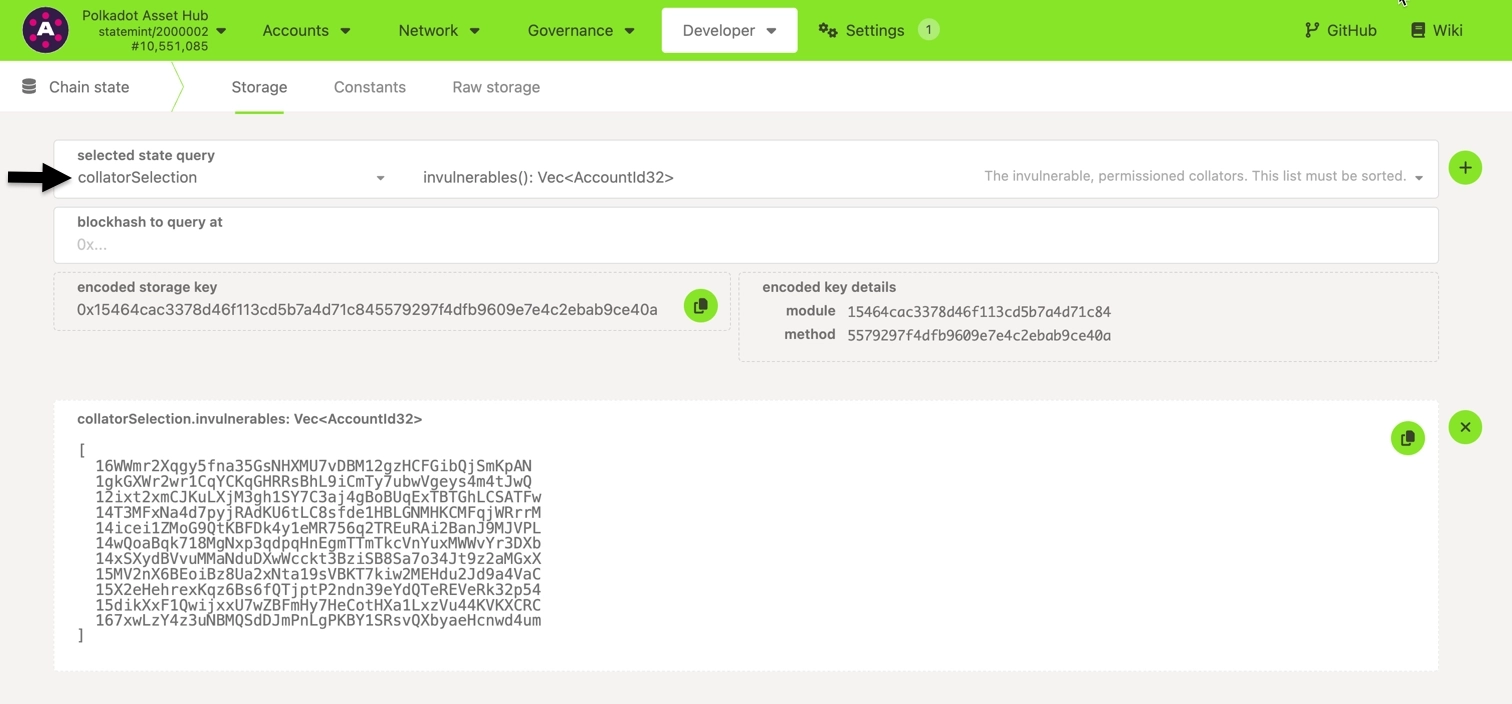
1. Check the existing collators for your target parachain:
1. Navigate to Polkadot.js Apps and connect to your system parachain.
2. Locate **Developer > Chain State**.
3. Query **`collatorSelection.invulnerables()`**.
2. Prepare a governance proposal for invulnerables-based selection, including the following information:
- **Draft proposal**: Explain why you should be added as a collator.
- **Technical details**: Provide your session keys and account ID.
- **Infrastructure**: Describe your hardware and monitoring setup.
- **Experience**: Detail your relevant experience.
Submit the proposal to the relevant governance channels.
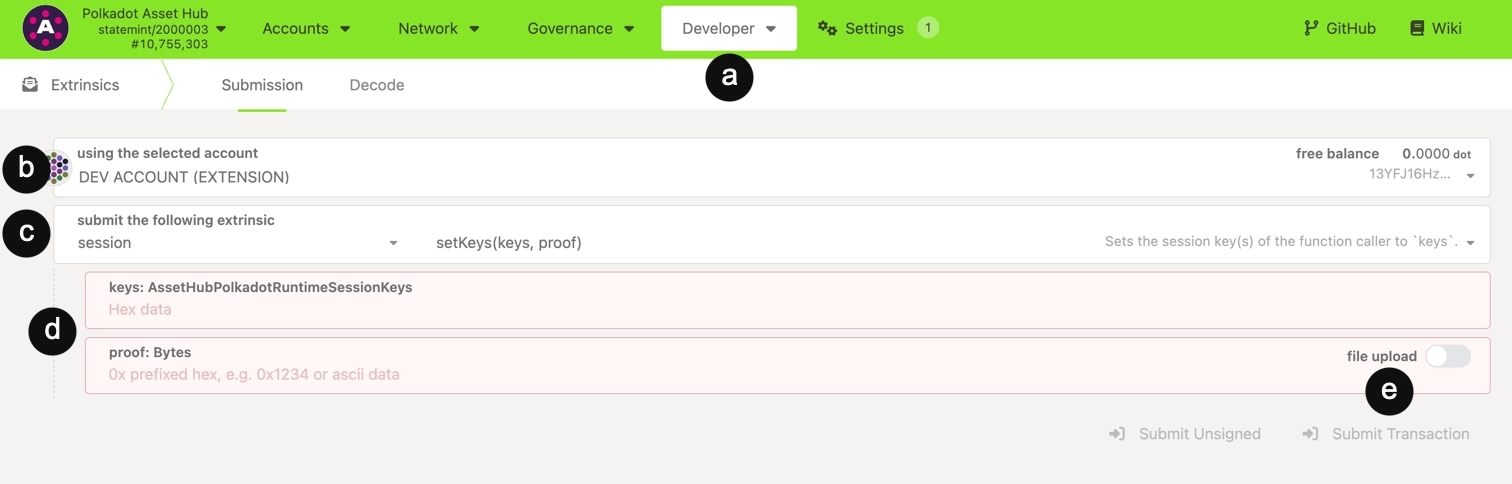
3. Once approved (or if using on-chain selection), follow these steps to register session keys using Polkadot.js Apps:
1. Locate **Developer > Extrinsics**.
2. Select your account.
3. Choose the **`session.setKeys`** extrinsic.
4. Enter the following information:
- **`keys`**: Your session keys (from `author_rotateKeys`)
- **`proof`**: 0x00 (typically)
5. Click **Submit Transaction** and sign the transaction.
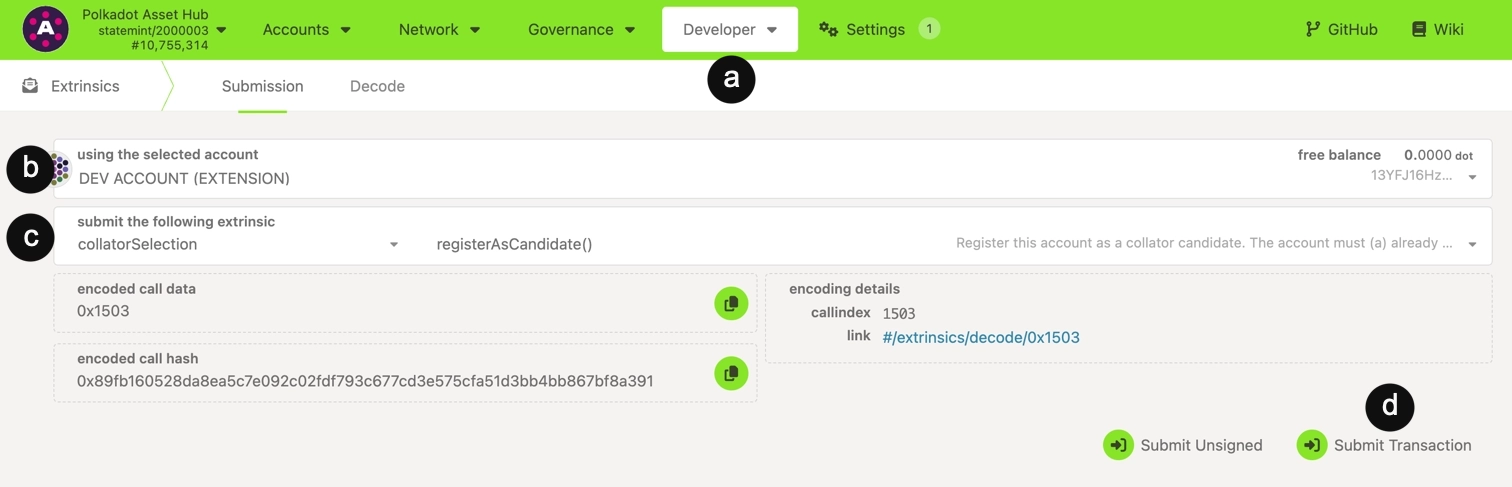
4. (Optional - primarily for non-system parachains) If the parachain uses on-chain bonding for collator selection, register as a candidate using Polkadot.js Apps:
!!! note
Most system parachains use invulnerables lists exclusively and do not require this step. Skip to step 5 if you're running a collator for a system parachain.
1. Locate **Developer > Extrinsics**.
2. Select your account.
3. Select `collatorSelection.registerAsCandidate`.
4. Click **Submit Transaction** and sign the transaction. The required bond amount will be automatically reserved from your account based on the pallet's configured `CandidacyBond`.
5. For system parachains using invulnerables lists, await governance approval for your proposal. Once approved, your collator is added to the invulnerables list and will begin producing blocks in the next session or era.
6. Verify your collator is active by monitoring logs for block production messages like "Prepared block for proposing" and "Imported #123". See the [Log Management](#commands-for-log-management) section for commands for log viewing.
## Commands for Node Management
Use the following commands to manage your node:
=== "Docker"
- **Stop container**:
```bash
docker stop polkadot-collator
```
- **Start container**:
```bash
docker start polkadot-collator
```
- **Remove container**:
```bash
docker rm polkadot-collator
```
=== "systemd"
- **Check status**:
```bash
sudo systemctl status polkadot-collator
```
- **Stop service**:
```bash
sudo systemctl stop polkadot-collator
```
- **Enable service**:
```bash
sudo systemctl enable polkadot-collator
```
- **Start service**:
```bash
sudo systemctl start polkadot-collator
```
## Commands for Log Management
Efficient log management is essential to ensure collator performance and uptime. Use the following commands to help you manage logs to monitor and maintain your collator:
=== "Docker"
- **View logs**:
```bash
docker logs -f polkadot-collator
```
- **View recent logs (last 100 lines)**:
```bash
docker logs --tail 100 polkadot-collator
```
- **Filter for errors**:
```bash
docker logs polkadot-collator 2>&1 | grep -i error
```
- **Filter for block production**:
```bash
docker logs polkadot-collator 2>&1 | grep -i "imported"
```
=== "systemd"
- **View recent logs**:
```bash
sudo journalctl -u polkadot-collator -n 100
```
- **Follow logs in real-time**:
```bash
sudo journalctl -u polkadot-collator -f
```
- **Filter for errors**:
```bash
sudo journalctl -u polkadot-collator | grep -i error
```
- **Filter for block production**:
```bash
sudo journalctl -u polkadot-collator | grep -i "imported"
```
## Database Maintenance
Check database size periodically using the commands for your selected setup:
=== "Docker"
```bash
# Replace with your mounted data directory path
du -sh ./collator-data
```
=== "systemd"
```bash
du -sh /var/lib/polkadot-collator
```
The collator node automatically prunes based on configuration.
## Updates and Upgrades
Updates or upgrades can happen on either the runtime or client. Runtime upgrades are automatically applied via on-chain governance and do not require any manual action on your part. Client upgrades do require a manual binary update process performed via terminal commands as follows:
=== "Docker"
1. Stop the service:
```bash
sudo systemctl stop polkadot-collator
```
2. Backup data (recommended):
```bash
sudo cp -r /var/lib/polkadot-collator /var/lib/polkadot-collator.backup
```
3. Pull the new Docker image:
```bash
docker pull parity/polkadot-parachain: