---
title: Build a Shared Todo App
description: Build a complete Polkadot Product end to end with a shared todo board that combines signing, local persistence, real-time pub/sub, and on-chain storage.
categories:
- Apps
url: https://docs.polkadot.com/apps/tutorials/shared-todo-app/
word_count: 3808
token_estimate: 7156
version_hash: sha256:5cdbfa5345aeb58569f7a7ce8c42597c5370df2ad18835b80a96da42762e04f4
last_updated: '2026-06-16T14:17:44+00:00'
---

# Build a Shared Todo App

## Introduction

Each [Build guide](/apps/build/) takes one `product-sdk` capability from zero to working code. This tutorial is the capstone: it combines four of them into one product, a Shared Todo Board where every participant sees changes live and the board survives durably on chain.

What you will build, and which package carries each part:

|      Capability      |                  Package                   |                                                     Role in the app                                                     |
| :------------------: | :----------------------------------------: | :---------------------------------------------------------------------------------------------------------------------: |
| Identity and signing | `signer` (via the umbrella's `wallet` API) | Connect to the Host and get the account that authors and signs everything                                               |
| Local persistence    | `local-storage`                            | The board renders instantly from the device's last known state                                                          |
| Real-time sharing    | `statement-store`                          | Every mutation gossips to other participants as a signed statement                                                      |
| Durable storage      | `cloud-storage`                            | Snapshots of the board live on the [Bulletin Chain](/reference/apps/infrastructure/bulletin-chain/), addressable by CID |
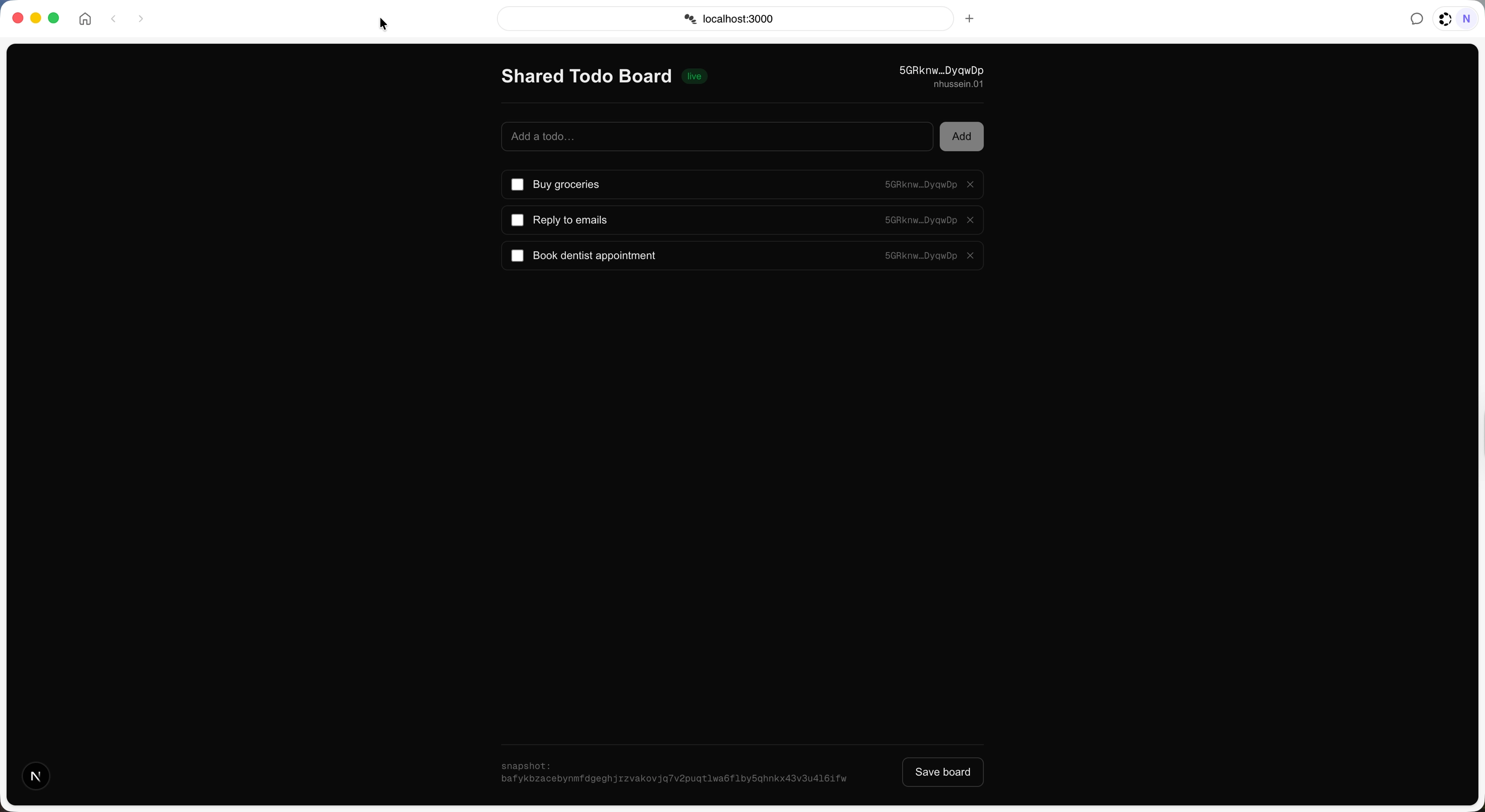
![The Shared Todo Board running inside Polkadot Desktop, with the connected account in the header, a synced todo list, and the latest snapshot CID in the footer](/images/apps/tutorials/shared-todo-app/shared-todo-app-01.webp)

The guides cover the individual calls. This tutorial focuses on how the layers compose. Statements are capped at 512 bytes and expire after 30 seconds, so they carry individual mutations, not the whole board. The Bulletin Chain holds full snapshots, and a last-write-wins channel announces the latest snapshot's CID. This is the same split Polkadot App's Chat uses: gossip for signaling, Bulletin for content.

The code in this tutorial is confirmed working with Polkadot Desktop, `@parity/product-sdk` v0.11.0, and `@parity/product-sdk-statement-store` v0.4.4.

## Prerequisites

Before starting, ensure you have:

- Node.js 20 or later.
- Polkadot Desktop installed and paired. See [Install Desktop and Pair](/apps/get-started/).
- A statement allowance and a Bulletin Chain storage authorization for your wallet account. See [Get TestNet Tokens](/apps/get-started/get-testnet-tokens/) and the [Bulletin Chain authorizations](https://paritytech.github.io/polkadot-bulletin-chain/authorizations) reference. Without the storage authorization, snapshot uploads are rejected.
- The individual [Build guides](/apps/build/) are optional but helpful because they cover each capability in more depth.

## Scaffold the Project

Create a Next.js app and install the SDK:

```bash
npx create-next-app@latest shared-todo-board --typescript --tailwind --eslint --app --no-src-dir
cd shared-todo-board
npm install @parity/product-sdk @parity/product-sdk-statement-store @parity/product-sdk-cloud-storage @polkadot-api/json-rpc-provider
```

Four dependencies, for four reasons:

- **`@parity/product-sdk`**: The umbrella package. It re-exports the wallet, local-storage, and cloud-storage capabilities this app uses, plus the React provider. See [Umbrella or Individual Packages](/apps/build/#umbrella-or-individual-packages) if you would rather install per-capability packages.
- **`@parity/product-sdk-statement-store`**: The pub/sub client. It is not re-exported by the umbrella, so it is always its own dependency.
- **`@parity/product-sdk-cloud-storage`**: Installed explicitly because the app imports `CloudStorageClient` directly for its authorization pre-flight; relying on the umbrella's transitive copy would depend on npm hoisting.
- **`@polkadot-api/json-rpc-provider`**: A one-line workaround, explained below.

!!! note "Why the explicit `@polkadot-api/json-rpc-provider` dependency?"
    Older transitive dependencies of the SDK pin `@polkadot-api/json-rpc-provider@0.0.1`, and npm hoists that version to the top of `node_modules`, which breaks the build. Declaring `^0.2.0` as a direct dependency forces the correct resolution. No `overrides` or patching is needed.

Wrap the app in `ProductSDKProvider` so every component can reach the SDK through `useProductSDK()`:

```tsx title="app/providers.tsx"
'use client';

import { ProductSDKProvider } from '@parity/product-sdk/react';
import type { ReactNode } from 'react';

export function Providers({ children }: { children: ReactNode })
    >
      {children}
    </ProductSDKProvider>
  );
}
```

Then mount it in the root layout. The inline script is a Polkadot Desktop workaround: it sets the host webview mark synchronously, so the SDK's container detection returns true before its bundle evaluates. It forces host mode unconditionally. That is acceptable here because every capability in this app needs the Host anyway; remove the line if your Product must also run standalone in a plain browser tab:

```tsx title="app/layout.tsx"
import type { Metadata } from 'next';
import { Geist, Geist_Mono } from 'next/font/google';
import { Providers } from './providers';
import './globals.css';

const geistSans = Geist({
  variable: '--font-geist-sans',
  subsets: ['latin'],
});

const geistMono = Geist_Mono({
  variable: '--font-geist-mono',
  subsets: ['latin'],
});

export const metadata: Metadata = {
  title: 'Shared Todo Board',
  description: 'Build a Full Product tutorial companion app',
};

export default function RootLayout({
  children,
}: Readonly<{
  children: React.ReactNode;
}>) ${geistMono.variable} h-full antialiased`}
    >
      <body className="min-h-full flex flex-col">
        {/* Sets the mark synchronously so isWebview() returns true before the SDK bundle evaluates */}
        <script
          dangerouslySetInnerHTML={{
            __html: 'window.__HOST_WEBVIEW_MARK__=true;',
          }}
        />
        <Providers>{children}</Providers>
      </body>
    </html>
  );
}
```

All SDK logic in this tutorial lives in a `lib/` directory, one file per capability, so each section that follows is one focused module. Start with the shared types: a `Todo` carries its author and an `updatedAt` timestamp, and the timestamps are what every later layer uses to resolve conflicts.

```typescript title="lib/types.ts"
import type { useProductSDK } from '@parity/product-sdk/react';

/** The SDK App instance, as returned by useProductSDK(). */
export type App = ReturnType<typeof useProductSDK>;

/** A single todo on the shared board. */
export interface Todo {
  id: string;
  text: string;
  done: boolean;
  /** SS58 address of the participant who created the todo. */
  author: string;
  /** Milliseconds since epoch of the last mutation. */
  updatedAt: number;
}

/** The full board state — synced per todo (last write wins), never broadcast whole. */
export interface Board {
  todos: Todo[];
  /** Timestamp of the latest mutation; receivers keep the newest board. */
  updatedAt: number;
  /** CID of the latest Bulletin Chain snapshot, if one has been saved. */
  snapshotCid?: string;
}
```

## Connect and Get an Identity

The app publishes todos, statements, and snapshots, and each item is attributed to an account, so identity comes first. `connectIdentity` connects to the Host, selects the first available account, and prefers the product-scoped account when the Host provides one:

```typescript title="lib/signer.ts"
import type { App } from './types';

/** Identity for the current participant on the board. */
export interface BoardIdentity {
  /** SS58 address used as the todo author and signing identity. */
  address: string;
  /** Display name reported by the provider, if any. */
  name?: string;
  /** True when the address is a product-scoped account from the host. */
  isProductAccount: boolean;
}

/**
 * Connect to the host, select the first available account, and resolve the
 * identity used for the board. Prefers the product-scoped account when the
 * app runs inside a host container; falls back to the selected account.
 */
export async function connectIdentity(app: App): Promise<BoardIdentity> {
  const { accounts } = await app.wallet.connect();
  if (accounts.length === 0)

  if (!app.wallet.getSelectedAccount())

  const productAccount = app.wallet.getProductAccount();
  if (productAccount);
  }

  const selected = app.wallet.getSelectedAccount() ?? accounts[0];
  return {
    address: selected.address,
    name: selected.name,
    isProductAccount: false,
  };
}
```

The product account is a per-Product, privacy-preserving identity derived by the Host. See [Sign and Submit Transactions](/apps/build/sign-and-submit/) for how derivation and approval routing work. Outside a host container, `connect()` fails, which the page surfaces as an error banner; there is deliberately no fallback path here because every later capability needs the Host anyway.

## Keep State on the Device

The board should render instantly on launch before the Host connection and before any network. `local-storage` gives each Product an isolated key-value store on the device, so the whole persistence layer is one key:

```typescript title="lib/board.ts"
import type { App, Board, Todo } from './types';

const BOARD_KEY = 'board';

export function emptyBoard(): Board {
  return { todos: [], updatedAt: 0 };
}

/** Load the board from per-product local storage (null if never saved). */
export async function loadBoard(app: App): Promise<Board | null> {
  return app.localStorage.getJSON<Board>(BOARD_KEY);
}

/** Persist the board to per-product local storage. */
export async function saveBoard(app: App, board: Board): Promise<void> {
  await app.localStorage.setJSON(BOARD_KEY, board);
}

/** Create a new todo authored by the given account address. */
export function createTodo(text: string, author: string): Todo {
  return {
    id: crypto.randomUUID(),
    text,
    done: false,
    author,
    updatedAt: Date.now(),
  };
}
```

The `getJSON` and `setJSON` helpers handle serialization, and the SDK namespaces keys per Product automatically, so no prefixing is needed. The store backend is auto-detected (Host or plain browser), a detail covered in [Persist Data Locally](/apps/build/persist-data-locally/).

Note what this file _does not_ contain: mutation logic. Adding, toggling, and deleting todos are defined in the next section as events, so that a change made locally and a change arriving from the network flow through identical code.

## Share the Board in Real Time

The [Statement Store](/reference/apps/infrastructure/statement-store/) gossips small signed payloads between instances of your Product. See [Publish and Subscribe to Off-Chain Data](/apps/build/pub-sub-off-chain-data/) for the full model. Two of its limits shape this app's protocol:

- The whole board does not fit inside the 512-byte statement cap, so each statement carries one mutation: an upsert of a single todo, or a deletion.
- Statements have a 30-second TTL. They are signaling, not storage. A participant who joins late sees nothing until the next mutation; that gap is closed by the durable snapshots in the next section.

??? code "lib/sync.ts"
    ```typescript title="lib/sync.ts"
    import {
      StatementStoreClient,
      type Unsubscribable,
    } from '@parity/product-sdk-statement-store';
    import type { Board, Todo } from './types';

    /** Hashed with blake2b as the primary statement topic — scopes gossip to this app. */
    const APP_NAME = 'shared-todo-board';

    /**
     * One board mutation, published as a single statement.
     * Statements are capped at 512 bytes, so we broadcast per-todo events
     * rather than the whole board.
     */
    export type BoardEvent =
      | { kind: 'upsert'; todo: Todo }
      | { kind: 'delete'; id: string; updatedAt: number };

    /** Event for a toggled todo. */
    export function toggleEvent(todo: Todo): BoardEvent {
      return {
        kind: 'upsert',
        todo: { ...todo, done: !todo.done, updatedAt: Date.now() },
      };
    }

    /** Event removing a todo. */
    export function deleteEvent(todo: Todo): BoardEvent {
      return { kind: 'delete', id: todo.id, updatedAt: Date.now() };
    }

    /** Connect a statement store client signing as the given account. */
    export async function createSyncClient(
      address: string,
    ): Promise<StatementStoreClient> {
      const client = new StatementStoreClient({ appName: APP_NAME });
      await client.connect({ mode: 'host', accountId: [address, 42] }); // 42 = generic SS58 prefix
      return client;
    }

    /** Broadcast a mutation to every other participant. Returns false if the node rejected it. */
    export function publishEvent(
      client: StatementStoreClient,
      event: BoardEvent,
    ): Promise<boolean> {
      return client.publish<BoardEvent>(event);
    }

    /** Receive mutations from other participants (and replays of our own). */
    export function subscribeToBoard(
      client: StatementStoreClient,
      onEvent: (event: BoardEvent) => void,
    ): Unsubscribable {
      return client.subscribe<BoardEvent>((statement) => {
        if (statement.data && 'kind' in statement.data)
      });
    }

    /**
     * Merge an incoming event into the board — last write wins per todo,
     * compared by `updatedAt`. Idempotent, so replayed statements are harmless.
     */
    export function applyEvent(board: Board, event: BoardEvent): Board {
      if (event.kind === 'delete');
      }

      const incoming: Todo = event.todo;
      const existing = board.todos.find((t) => t.id === incoming.id);
      if (existing && existing.updatedAt >= incoming.updatedAt) return board;

      const todos = existing
        ? board.todos.map((t) => (t.id === incoming.id ? incoming : t))
        : [...board.todos, incoming];
      return {
        ...board,
        todos,
        updatedAt: Math.max(board.updatedAt, incoming.updatedAt),
      };
    }
    ```

The pieces:

- **`createSyncClient`**: Connects a `StatementStoreClient` in host mode. The `appName` is hashed into the statement topic, so instances of this Product only see each other's traffic. Signing each statement routes through the Host to the user's Polkadot App.
- **`publishEvent` / `subscribeToBoard`**: Thin typed wrappers over `publish` and `subscribe`.
- **`applyEvent`**: The merge rule: per-todo last write wins, compared by `updatedAt`. It is idempotent, so replayed statements (including your own, which the node echoes back) are harmless no-ops.

## Make the Board Durable

Statements vanish after 30 seconds; the board should not. The [Bulletin Chain](/reference/apps/infrastructure/bulletin-chain/) stores content-addressed data on chain: upload bytes, get back a CID, and fetch by CID from anywhere. The app uploads the whole board as a JSON snapshot, then announces the CID on a last-write-wins channel so every participant knows where the freshest snapshot lives. Announcements are published with a one-hour TTL because the default 30 seconds would make the board undiscoverable almost immediately. A participant who joins within that window receives the latest live announcement on subscribe and loads the board from the Bulletin Chain; beyond it, the board appears once any participant saves again:

??? code "lib/snapshot.ts"
    ```typescript title="lib/snapshot.ts"
    import {
      ChannelStore,
      type StatementStoreClient,
      type Unsubscribable,
    } from '@parity/product-sdk-statement-store';
    import type { App, Board } from './types';

    const SNAPSHOT_CHANNEL = 'board-snapshot';

    /**
     * Statements default to a 30-second TTL — far too short for late joiners to
     * discover the board. Announcements request a one-hour retention instead
     * (the pallet caps the maximum); beyond that window a new participant sees
     * an empty board until the next save.
     */
    const SNAPSHOT_TTL_SECONDS = 3600;

    let authorizationVerified = false;

    /**
     * Pre-flight: verify the signing account holds a Bulletin Chain storage
     * authorization. Without one the chain rejects uploads with a bare
     * `Invalid: Payment` — this turns that into an actionable error.
     */
    async function ensureAuthorized(app: App): Promise<void> {
      if (authorizationVerified) return;
      const address = app.wallet.getSelectedAccount()?.address;
      if (!address) throw new Error('No account selected');

      const { CloudStorageClient, createLazySigner } =
        await import('@parity/product-sdk-cloud-storage');
      const readOnly = await CloudStorageClient.create({
        environment: 'paseo',
        signer: createLazySigner(() => null, 'read-only client'),
      });
      const status = await readOnly.checkAuthorization(address);
      if (!status.authorized) has no Bulletin Chain storage authorization — request an allowance from the faucet, then retry`,
        );
      }
      authorizationVerified = true;
    }

    /**
     * Announcement of the latest durable snapshot, written to a last-write-wins
     * channel. The board itself lives on the Bulletin Chain; only its CID travels
     * through the statement store, which keeps the payload well under 512 bytes.
     */
    export interface SnapshotAnnouncement {
      cid: string;
      /** Board.updatedAt at the time of the snapshot. */
      updatedAt: number;
      /** Stamped by ChannelStore when omitted. */
      timestamp?: number;
    }

    /** Upload the board as JSON to the Bulletin Chain. Returns the CID. */
    export async function uploadSnapshot(app: App, board: Board): Promise<string> {
      if (!app.cloudStorage)
      await ensureAuthorized(app);
      return app.cloudStorage.upload(JSON.stringify(board));
    }

    /** Fetch and decode a board snapshot by CID. */
    export async function fetchSnapshot(app: App, cid: string): Promise<Board> {
      if (!app.cloudStorage)
      const bytes = await app.cloudStorage.fetch(cid);
      return JSON.parse(new TextDecoder().decode(bytes)) as Board;
    }

    /** Create the snapshot-announcement channel on top of the sync client. */
    export function createSnapshotChannel(
      client: StatementStoreClient,
    ): ChannelStore<SnapshotAnnouncement> {
      return new ChannelStore<SnapshotAnnouncement>(client);
    }

    /**
     * Announce a new snapshot CID to every participant. Published directly
     * through the client (not ChannelStore.write) so the statement can carry a
     * long TTL — late joiners receive the latest live announcement on subscribe.
     */
    export function announceSnapshot(
      client: StatementStoreClient,
      cid: string,
      updatedAt: number,
    ): Promise<boolean> {
      return client.publish<SnapshotAnnouncement>(
        { cid, updatedAt, timestamp: Date.now() },
        { channel: SNAPSHOT_CHANNEL, ttlSeconds: SNAPSHOT_TTL_SECONDS },
      );
    }

    /**
     * React to snapshot announcements — including the replay a late joiner
     * receives on subscribe. The app only uses one channel, so no name filtering
     * is needed.
     */
    export function onSnapshotAnnounced(
      channels: ChannelStore<SnapshotAnnouncement>,
      callback: (announcement: SnapshotAnnouncement) => void,
    ): Unsubscribable {
      return channels.onChange((_name, value) => callback(value));
    }

    /**
     * Merge a snapshot into the local board — per-todo last write wins, same rule
     * as live sync. Union by id, so todos deleted after the snapshot was taken
     * can reappear; the next snapshot clears them again.
     */
    export function mergeBoards(local: Board, remote: Board): Board {
      const byId = new Map(local.todos.map((t) => [t.id, t]));
      for (const todo of remote.todos)
      }
      return {
        todos: [...byId.values()],
        updatedAt: Math.max(local.updatedAt, remote.updatedAt),
        snapshotCid:
          remote.updatedAt > local.updatedAt
            ? (remote.snapshotCid ?? local.snapshotCid)
            : local.snapshotCid,
      };
    }
    ```

The pieces:

- **`uploadSnapshot` / `fetchSnapshot`**: Use `app.cloudStorage` from the umbrella. `upload` signs and submits the storage transaction through the Host and resolves with the CID; `fetch` is permissionless. [Store Data on Chain](/apps/build/store-data-on-chain/) covers chunking, renewal, and the lower-level client.
- **`ensureAuthorized`**: A pre-flight that reads your account's storage quota with `checkAuthorization` before uploading, turning a missing [storage authorization](https://paritytech.github.io/polkadot-bulletin-chain/authorizations) into an actionable error instead of a bare on-chain rejection.
- **`announceSnapshot` / `onSnapshotAnnounced`**: Use the statement store's channel mechanism. Each channel keeps only its latest value per signer (one live announcement per account; `receiveSnapshot` reconciles announcements from different participants by `updatedAt`). Publishing goes through `client.publish` directly rather than `ChannelStore.write` so the statement can carry the long TTL; receiving still uses `ChannelStore`, which replays the latest live value to new subscribers. The announcement is `{ cid, updatedAt }`, comfortably inside the 512-byte cap. This is the composition the platform recommends: the channel is the index, the Bulletin Chain is the data.
- **`mergeBoards`**: Folds a fetched snapshot into local state with the same per-todo last-write-wins rule as live sync.

## Wire Up the Page

The UI is a single client component. All the SDK behavior you have built lives in `lib/`; the page wires it to React state. The two functions worth reading closely are `dispatch` (apply a local mutation, persist it, broadcast it) and `receiveEvent` (apply a remote mutation through the _same_ merge), plus `handleSaveBoard` and `receiveSnapshot` doing the equivalent pair for snapshots:

??? code "app/page.tsx"
    ```tsx title="app/page.tsx"
    'use client';

    import { useEffect, useRef, useState } from 'react';
    import { useProductSDK } from '@parity/product-sdk/react';
    import type {
      ChannelStore,
      StatementStoreClient,
    } from '@parity/product-sdk-statement-store';
    import { connectIdentity, type BoardIdentity } from '@/lib/signer';
    import { createTodo, emptyBoard, loadBoard, saveBoard } from '@/lib/board';
    import {
      applyEvent,
      createSyncClient,
      deleteEvent,
      publishEvent,
      subscribeToBoard,
      toggleEvent,
      type BoardEvent,
    } from '@/lib/sync';
    import {
      announceSnapshot,
      createSnapshotChannel,
      fetchSnapshot,
      mergeBoards,
      onSnapshotAnnounced,
      uploadSnapshot,
      type SnapshotAnnouncement,
    } from '@/lib/snapshot';
    import type { Board, Todo } from '@/lib/types';

    function shortAddress(address: string): string {
      return `${address.slice(0, 6)}…${address.slice(-6)}`;
    }

    export default function Home(), [app]);

      useEffect(() => {
        boardRef.current = board;
      }, [board]);

      useEffect(() => {
        return () => syncRef.current?.destroy();
      }, []);

      /** Merge an event into local state and persist the result. */
      function receiveEvent(event: BoardEvent));
      }

      /** Apply a local mutation and broadcast it to other participants. */
      function dispatch(event: BoardEvent));
        }
      }

      /** Pull a newer snapshot from the Bulletin Chain and merge it in. */
      async function receiveSnapshot(announcement: SnapshotAnnouncement));
        } catch (e)
      }

      async function handleConnect() catch (e) finally {
          setConnecting(false);
        }
      }

      async function handleSaveBoard();
            void saveBoard(app, next);
            return next;
          });
        } catch (e) finally {
          setSaving(false);
        }
      }

      function handleAdd(e: React.FormEvent));
        setDraft('');
      }

      function handleToggle(todo: Todo)

      function handleRemove(todo: Todo)

      return (
        <main className="flex flex-1 flex-col mx-auto w-full max-w-2xl p-6 gap-6">
          <header className="flex items-center justify-between border-b border-foreground/10 pb-4">
            <div className="flex items-center gap-3">
              <h1 className="text-2xl font-semibold">Shared Todo Board</h1>
              {live && (
                <span className="rounded-full bg-green-500/15 px-2 py-0.5 text-xs text-green-600">
                  live
                </span>
              )}
            </div>
            {identity ? (
              <div className="text-right text-sm">
                <p className="font-mono">{shortAddress(identity.address)}</p>
                <p className="text-xs opacity-60">
                  {identity.isProductAccount
                    ? 'product account'
                    : (identity.name ?? 'account')}
                </p>
              </div>
            ) : (
              <button
                onClick={handleConnect}
                disabled={connecting}
                className="rounded-lg bg-foreground px-4 py-2 text-sm font-medium text-background disabled:opacity-50"
              >
                {connecting ? 'Connecting…' : 'Connect'}
              </button>
            )}
          </header>

          {error && (
            <p className="rounded-lg bg-red-500/10 p-3 text-sm text-red-500">
              {error}
            </p>
          )}

          <form onSubmit={handleAdd} className="flex gap-2">
            <input
              value={draft}
              onChange={(e) => setDraft(e.target.value)}
              placeholder={identity ? 'Add a todo…' : 'Connect to add todos'}
              disabled={!identity || !board}
              className="flex-1 rounded-lg border border-foreground/15 bg-transparent px-3 py-2 text-sm outline-none focus:border-foreground/40 disabled:opacity-50"
            />
            <button
              type="submit"
              disabled={!identity || !board || !draft.trim()}
              className="rounded-lg bg-foreground px-4 py-2 text-sm font-medium text-background disabled:opacity-50"
            >
              Add
            </button>
          </form>

          {board && board.todos.length === 0 && (
            <p className="text-sm opacity-60">No todos yet. Add the first one.</p>
          )}

          <ul className="flex flex-col gap-2">
            {board?.todos.map((todo) => (
              <li
                key={todo.id}
                className="flex items-center gap-3 rounded-lg border border-foreground/10 px-3 py-2"
              >
                <input
                  type="checkbox"
                  checked={todo.done}
                  onChange={() => handleToggle(todo)}
                  className="size-4 accent-foreground"
                />
                <span
                  className={`flex-1 text-sm ${todo.done ? 'line-through opacity-50' : ''}`}
                >
                  {todo.text}
                </span>
                <span className="font-mono text-xs opacity-40">
                  {shortAddress(todo.author)}
                </span>
                <button
                  onClick={() => handleRemove(todo)}
                  className="text-xs opacity-40 hover:opacity-100"
                  aria-label={`Delete ${todo.text}`}
                >
                  ✕
                </button>
              </li>
            ))}
          </ul>

          <footer className="mt-auto flex items-center justify-between border-t border-foreground/10 pt-4">
            <p className="font-mono text-xs opacity-40">
              {board?.snapshotCid
                ? `snapshot: ${board.snapshotCid}`
                : 'no snapshot yet'}
            </p>
            <button
              onClick={handleSaveBoard}
              disabled={!live || !board || saving}
              className="rounded-lg border border-foreground/20 px-4 py-2 text-sm font-medium disabled:opacity-50"
            >
              {saving ? 'Saving…' : 'Save board'}
            </button>
          </footer>
        </main>
      );
    }
    ```

## Run It

Start the dev server and load the Product in Polkadot Desktop (per [Set Up Your Project](/apps/build/#set-up-your-project)):

```bash
npm run dev
```

Then walk the same checks this tutorial's reference app was verified with:

1. **Identity**: Click **Connect**; your account address appears in the header and a green live badge confirms the statement subscription.
2. **Local persistence**: Add todos, reload the page, and the board comes back instantly from device storage.
3. **Real-time sync**: Open the Product in a second host client and connect; a todo added in one appears in the other within a couple of seconds.
4. **Durability**: Click **Save board**; after the signing approval, the snapshot CID appears in the footer. Connect a third client with no local state within the announcement's one-hour TTL: it receives the announced CID and loads the board from the Bulletin Chain.

## Ship It

The board runs from `localhost` inside your host container. The remaining step is making it a real, discoverable Product. [Deploy Your App](/apps/deploy-your-app/) walks through bundling, publishing, and registering a `.dot` name for it. Once it is live, the same bundle opens in Polkadot Desktop and on Polkadot Web at `https://<name>.dot.li` in any browser.

## Where to Go Next

Each capability this tutorial composed has a guide that owns the depth:

<div class="grid cards" markdown>

-   <span class="badge guide">Guide</span> **Sign and Submit Transactions**

    ---

    Product accounts, raw-byte signing, full transaction submission, and error handling.

    [:octicons-arrow-right-24: Get Started](/apps/build/sign-and-submit/)

-   <span class="badge guide">Guide</span> **Persist Data Locally**

    ---

    The local key-value store in depth: JSON helpers, React hooks, prefixes.

    [:octicons-arrow-right-24: Get Started](/apps/build/persist-data-locally/)

-   <span class="badge guide">Guide</span> **Publish and Subscribe to Off-Chain Data**

    ---

    Statement Store internals: topics, channels, TTLs, and allowances.

    [:octicons-arrow-right-24: Get Started](/apps/build/pub-sub-off-chain-data/)

-   <span class="badge guide">Guide</span> **Store Data on Chain**

    ---

    Bulletin Chain in depth: chunking, authorization, renewal, and preimages.

    [:octicons-arrow-right-24: Get Started](/apps/build/store-data-on-chain/)

-   <span class="badge guide">Guide</span> **Read On-Chain Data**

    ---

    The one capability this app did not need: typed, host-routed chain reads.

    [:octicons-arrow-right-24: Get Started](/apps/build/read-chain-state/)

</div>
