---
category: Reference
includes_base_categories: false
base_categories: []
word_count: 47546
token_estimate: 76455
page_count: 67
build_timestamp: '2026-06-25T12:38:13.291384+00:00'
version_hash: sha256:59f73bf32b974380944424e04212f1465bd50273079c9f9dbe94f747d85f0fae
---
# Begin New Bundle: Reference
---
Page Title: Account Management Method Group
- Resolved Markdown: https://docs.polkadot.com/reference/apps/protocol/truapi/account-management.md
- Canonical (HTML): https://docs.polkadot.com/reference/apps/protocol/truapi/account-management/
- Summary: TrUAPI Account Management method group for resolving sub-accounts, reading account state, and using @parity/product-sdk-signer to get Product accounts.
- Word Count: 360; Token Estimate: 564
- Last Updated: 2026-06-16T14:17:44+00:00
- Version Hash: sha256:237a7a86a50040a0f87b01e59deb1c8d6fee164c600d43bf5f6b9c94d332c6b2
# Account Management
## Introduction
The Account Management method group lets a Product discover which account it should operate against. A Polkadot Product never sees the user's root identity; it sees a per-Product sub-account derived from the user's identity and the Product's `.dot` domain. See [Sandbox and Sub-Accounts](/reference/apps/protocol/truapi/sandbox/) for the derivation model. This method group is the surface that resolves that sub-account, exposes its address, and returns related state.
The Product SDK wraps this surface as `SignerManager.getProductAccount(dotNsIdentifier, derivationIndex)` in [`@parity/product-sdk-signer`](https://www.npmjs.com/package/@parity/product-sdk-signer).
## Conceptual Contract
The group covers:
- **Resolving a Product-scoped account**: Given the Product's dotNS identifier and a derivation index (`0` is the conventional default), the Host returns a `SignerAccount` with the SS58-formatted address, the raw public key, and an optional display name.
- **Listing accounts available to the Product**: The Host enumerates the sub-accounts the user has approved for this Product to see.
- **Selecting an active account**: Before the Product invokes any signing operation, it tells the Host which account it intends to use for the rest of the session or until it switches accounts.
Account resolution is local and instantaneous. The Host computes the derived address without needing to round-trip to the paired App. The private key never leaves the App; the address derivation uses public information only.
!!! warning "Provisional"
Multi-account scenarios (a Product asking for several sub-accounts at non-default indexes for distinct flows), cross-domain account requests (alias-scoped accounts spanning multiple `.dot` domains), and the precise list-accounts surface are still being finalized.
## Where to Go Next
- Learn **Sandbox and Sub-Accounts**
---
The conceptual model for why a Product gets a derived sub-account in the first place, and how isolation works.
[:octicons-arrow-right-24: Reference](/reference/apps/protocol/truapi/sandbox/)
- Guide **Accounts and Signing**
---
The Product-side how-to: getting an account, building a transaction, and submitting it.
[:octicons-arrow-right-24: Get Started](/apps/build/sign-and-submit/)
---
Page Title: App Development Reference
- Resolved Markdown: https://docs.polkadot.com/reference/apps.md
- Canonical (HTML): https://docs.polkadot.com/reference/apps/
- Summary: Technical reference for building Polkadot Products, including Hosts, TrUAPI between Host and Product, and the on-chain infrastructure they consume.
- Word Count: 686; Token Estimate: 1106
- Last Updated: 2026-06-23T11:32:12+00:00
- Version Hash: sha256:cb7ec11adde7e59027d969792a674fca4173c0845f7a0370aa8a64c38a22e215
# App Development Reference
## Introduction
This is the technical-depth companion to the [App Development](/apps/) how-to guides. Where the guides walk you through tasks step by step, this section explains _what each component is, how it works, and where its limits are_ — the level of detail you need when integrating against the surface.
A Polkadot Product is a sandboxed application you build that runs inside one of the Polkadot Apps. The Host it runs in mediates everything sensitive, including signing, chain access, storage, and outbound requests, through a protocol called TrUAPI, and the Product talks to Polkadot's on-chain infrastructure through the SDK and the Host. This reference is organized along those axes: Hosts, the TrUAPI protocol between Host and Product, and the infrastructure components Products consume.
!!! info "Depth target"
Each page in this section follows the same shape: a short conceptual frame up top, then the developer-facing surface (Host API method tables for Hosts, pallet surface tables for infrastructure) at the bottom. The [TrUAPI](/reference/apps/protocol/truapi/) subsection, with one page per method group, is the depth model for protocol reference pages.
## Architecture
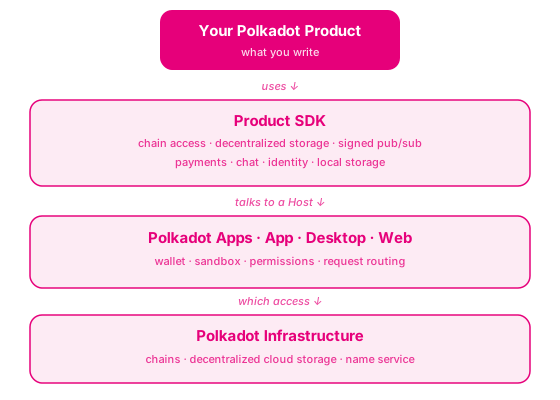
Your Product sits at the top of a layered stack. You write the Product itself; everything below — the [Product SDK](/reference/glossary/#polkadot-sdk) that exposes typed methods, the Polkadot Apps that load and sandbox your Product, and the underlying chains, decentralized storage, and name service — is provided by the platform. The [Host](/reference/glossary/#host) (whichever Polkadot App is loading your Product) mediates every interaction through [TrUAPI](/reference/apps/protocol/truapi/) and prompts the user for anything sensitive.
## Hosts
Hosts are the runtime containers that load and run Polkadot Products:
- **[Polkadot App](/reference/apps/hosts/polkadot-app/)**: The mobile Host. Holds the user's signing key, runs Proof of Personhood, and is the canonical signer for every transaction a Product submits anywhere in the Triangle.
- **[Polkadot Desktop](/reference/apps/hosts/polkadot-desktop/)**: The desktop Host. Loads Products by `.dot` name, mediates signing requests to the paired mobile App, and exposes the Host API surface to the Product running inside it.
- **[Polkadot Web](/reference/apps/hosts/polkadot-web/)**: The web Host (`dot.li`). Loads Products in a browser sandbox and documents the visiting flow, shield states, and on-chain `polkadot.com` integration.
## Protocol
The [TrUAPI](/reference/apps/protocol/truapi/) reference documents the protocol between Hosts and Products: the conceptual sandbox model, the 11 method groups (TrUAPI Calls, Permissions, Local Storage, Account Management, Signing, Chat, Statement Store, Preimage, Chain Interaction, Payment, Entropy), the versioning model, and the package reference table.
## Infrastructure
Per-component reference for the on-chain infrastructure Products consume:
- **[Bulletin Chain](/reference/apps/infrastructure/bulletin-chain/)**: Content-addressed storage with explicit authorization, chunked uploads, time-bound retention, and renewal.
- **[Statement Store](/reference/apps/infrastructure/statement-store/)**: Gossip-distributed, signed statements on the People Chain for real-time signaling between users.
- **[dotNS](/reference/apps/infrastructure/dotns/)**: The `.dot` name system, including PopRules pricing, the contract architecture, and the registration flow.
- **[Proof of Personhood](/reference/apps/infrastructure/pop/)**: The Ring-VRF mechanism and the per-pallet surface (people, game, score, identity, universal basic capacity, coinage).
- **[HOP](/reference/apps/infrastructure/hop/)**: The cross-chain hop protocol.
## Skills
The [product-sdk](/reference/apps/skills/) skills reference documents what skills exist, what each one does, and how to use them inside your Product workflow.
## Where to Go Next
- Learn **Hosts**
---
Start with the Polkadot App, the mobile Host that holds the signing key and runs Proof of Personhood for every Product in the Triangle.
[:octicons-arrow-right-24: Reference](/reference/apps/hosts/polkadot-app/)
- Guide **App Development How-To**
---
If you are new here, start with the how-to guides: set up Polkadot Desktop, then build your first Product against the SDK surface this reference documents.
[:octicons-arrow-right-24: Get Started](/apps/get-started/)
---
Page Title: Bulletin Chain Authorization
- Resolved Markdown: https://docs.polkadot.com/reference/apps/infrastructure/bulletin-chain/authorization.md
- Canonical (HTML): https://docs.polkadot.com/reference/apps/infrastructure/bulletin-chain/authorization/
- Summary: How writes to the Bulletin Chain are gated — the explicit per-account authorization model, the transaction-and-byte quota, and the expiration lifecycle.
- Word Count: 515; Token Estimate: 719
- Last Updated: 2026-06-16T14:17:44+00:00
- Version Hash: sha256:5c7d8a96345b775644f4ce1fcb837dc14e4878513404d980b4191d58e61319c6
# Authorization
## Introduction
The Bulletin Chain has no token balance for storage. You cannot "pay for storage" the way you pay a transaction fee on a typical chain. Instead, every account that wants to write to Bulletin needs an explicit authorization: an on-chain record that grants a quota of transactions and bytes, with an expiration block.
A write attempted without authorization is rejected at the boundary. This page is the reference for how authorizations are shaped, how they are checked, and what happens when they expire.
## What an Authorization Records
An authorization is a per-account on-chain record stored in the `Authorizations` storage map of the `transaction-storage` pallet. It records, for the account it covers:
- **Remaining transactions**: How many storage extrinsics the account may still submit before the quota is exhausted.
- **Remaining bytes**: How many bytes total the account may still write across those transactions.
- **Expiration block**: The block at which the authorization expires. Unused capacity is _not_ refunded when this block passes.
A Product can verify an account's current authorization by reading the `Authorizations` storage map for that account through the standard chain client.
## What a Write Costs
Each storage submission decrements both counters:
- The transaction counter decrements by one per extrinsic.
- The byte counter decrements by the payload size.
The transaction counter is the one most Products will hit first. Even a small upload that uses chunking (because the payload exceeds the per-transaction byte limit) consumes one transaction per chunk; large files consume the corresponding count.
## Expiration
Authorizations are time-bounded for a reason: storage on the network is finite, and an unexpiring authorization would let an inactive account hold reserved capacity indefinitely. When the expiration block passes:
- Any remaining transaction and byte quota in that authorization is _forfeited_ (not credited to a new authorization, not refunded to the user).
- Subsequent storage attempts return an authorization error until a new authorization is provisioned.
A Product whose users store data over time needs to think about authorization renewal as a first-class concern, not a once-at-onboarding step.
## Provisioning on TestNet
!!! warning "Provisional"
The TestNet provisioning flow — the faucet endpoint, the request UX, governance- or sudo-routed grants where they apply — is being firmed up. The current flow lives in the [Get TestNet Tokens](/apps/get-started/get-testnet-tokens/) guide; that guide is the source of truth as the surface stabilizes.
On TestNet today, authorizations are provisioned through a faucet built into the Bulletin Chain Console. The [Get TestNet Tokens](/apps/get-started/get-testnet-tokens/) guide walks through requesting an authorization for a paired account.
## Where to Go Next
- Learn **Renewal**
---
What happens when an authorization or a stored item approaches expiration, and the mechanics of keeping data alive.
[:octicons-arrow-right-24: Reference](/reference/apps/infrastructure/bulletin-chain/renewal/)
- Guide **Get TestNet Funds**
---
The setup step that provisions an authorization on TestNet alongside PAS tokens for transaction fees.
[:octicons-arrow-right-24: Get Started](/apps/get-started/get-testnet-tokens/)
---
Page Title: Bulletin Chain Reference
- Resolved Markdown: https://docs.polkadot.com/reference/apps/infrastructure/bulletin-chain.md
- Canonical (HTML): https://docs.polkadot.com/reference/apps/infrastructure/bulletin-chain/
- Summary: Reference for the Bulletin Chain — Polkadot's decentralized, content-addressed storage layer for Products, with authorization, chunked uploads, and renewal.
- Word Count: 732; Token Estimate: 1119
- Last Updated: 2026-06-16T14:17:44+00:00
- Version Hash: sha256:619a76b452e4551fd2d02c4274d039f536a3c02cb74a560eba6df253533fa5ad
# Bulletin Chain
## Introduction
The Bulletin Chain is Polkadot's decentralized cloud storage layer for Products. Your Product's files and content live there, addressed by their hash so anyone can verify what they fetched. A Product writes data; the chain returns a [Content Identifier (CID)](/reference/glossary/#content-identifier-cid), which is a Blake2b-256 hash of the bytes, and anyone with that CID can fetch the data back peer-to-peer from the network.
If you have used IPFS, the mental model is the same: content addressed by hash, retrieved without a central host. The difference is that storage records and authorizations live natively on Polkadot.
Four properties define how a Product interacts with Bulletin:
- **Content-addressed by design**: The CID is the hash of the bytes; two users uploading identical bytes produce the same CID. Readers verify they got the bytes they expected without trusting the host that served them.
- **Permissionless reads**: Anyone with the CID can fetch from the network — no URL signing, no read auth, no CDN to configure. Privacy through encryption is the Product's responsibility (encrypt before storing if the payload is sensitive).
- **Explicit authorization for writes**: Bulletin Chain has no token balance for storage. Every account needs an [authorization](/reference/apps/infrastructure/bulletin-chain/authorization/) — a quota of transactions and bytes — before it can store anything.
- **Time-bound retention with renewal**: Data is retained for a default window (about two weeks); [renewal](/reference/apps/infrastructure/bulletin-chain/renewal/) keeps it alive past expiration; without renewal it falls off.
## Architecture
!!! warning "Provisional"
The full architecture diagram — the relationship between the on-chain storage records, the collator network that serves CIDs to readers, and the cross-chain delivery path from People Chain — is still being finalized. Per-layer specifics will be added once they are confirmed.
At a high level, two layers cooperate:
- The on-chain Bulletin Chain holds the _records_ — the CIDs, who is authorized to store, when each item expires. This is where writes are gated and where the authorization model is enforced. See [Authorization](/reference/apps/infrastructure/bulletin-chain/authorization/).
- The collator-served content network holds the _bytes_. Readers fetch by CID over the peer-to-peer layer; the chain holds the commitment that the bytes existed and the CID was valid at write time, the collator network actually delivers them.
This split is what makes Bulletin practical at content sizes that would not fit on a typical blockchain's storage: the chain's job is to bound _what counts as authorized storage_, not to physically hold every byte.
## When to Use Bulletin
Bulletin is the right layer for content that needs to outlive a session and be fetched later by hash. Profile photos, published articles, app bundles, encrypted message content for chat — anything where the readers are not all present at the same moment and the bytes have to be there later, by hash.
For the storage-layer comparison (Bulletin vs Statement Store vs local `KvStore`) see [Storage options for your Product](/apps/build/store-data-on-chain/), and for the Product-side how-to use [Store Data on Chain](/apps/build/store-data-on-chain/).
## Where to Go Next
- Learn **Authorization**
---
The model that gates writes: no token balance, an explicit per-account authorization with a transaction-and-byte quota and an expiration block.
[:octicons-arrow-right-24: Reference](/reference/apps/infrastructure/bulletin-chain/authorization/)
- Learn **Chunked Uploads**
---
How a payload larger than the per-transaction limit is uploaded as chunks under a DAG-PB manifest, transparently to the Product.
[:octicons-arrow-right-24: Reference](/reference/apps/infrastructure/bulletin-chain/chunked-upload/)
- Learn **Renewal**
---
The retention lifecycle and the mechanics of renewing data before it falls off the network.
[:octicons-arrow-right-24: Reference](/reference/apps/infrastructure/bulletin-chain/renewal/)
- Learn **Cross-Chain**
---
How a write initiated from the People Chain (where a Product's PoP identity lives) reaches the Bulletin Chain via XCM.
[:octicons-arrow-right-24: Reference](/reference/apps/infrastructure/bulletin-chain/cross-chain/)
- Guide **Store Data on Chain**
---
The Product-side how-to: setting up the storage client, the Hello World write, retrieval, larger files, renewal.
[:octicons-arrow-right-24: Get Started](/apps/build/store-data-on-chain/)
---
Page Title: Bulletin Chain Renewal
- Resolved Markdown: https://docs.polkadot.com/reference/apps/infrastructure/bulletin-chain/renewal.md
- Canonical (HTML): https://docs.polkadot.com/reference/apps/infrastructure/bulletin-chain/renewal/
- Summary: The retention lifecycle for data on the Bulletin Chain — default window, what happens at expiration, and the mechanics of renewing data before it falls off.
- Word Count: 624; Token Estimate: 848
- Last Updated: 2026-06-16T14:17:44+00:00
- Version Hash: sha256:68d2496727ebc154f3339a8f8e9c54b15700e69b932fbf2396f340b5572ef6c7
# Renewal
## Introduction
Data on the Bulletin Chain has a bounded retention window. The chain doesn't promise to keep bytes forever; it promises to keep them for a default period (about two weeks), after which the storage record expires and the bytes can be evicted from the collator network unless the record is renewed.
This page documents the renewal lifecycle: what counts as "alive," what happens at expiration, what a Product has to do to keep data alive, and what costs renewal incurs.
## The Default Retention Window
When a Product writes to Bulletin, the resulting storage record carries an expiration block — by default, approximately two weeks of blocks from the write. Between the write and the expiration block:
- **The data is _alive_**: Any reader with the CID can fetch the bytes from the collator network.
- **The chain enforces availability**: The on-chain record exists, and collators serving the network are expected to hold the bytes.
After the expiration block:
- The on-chain record is no longer "active." Fetches against the CID may continue to succeed for a window depending on collator caching, but the chain no longer guarantees the bytes are reachable.
- Eventually, collators evict the bytes. The CID still exists as a content reference, but the network can no longer serve it.
## What Renewal Does
A _renewal_ is a separate transaction (signed and submitted like any other) that extends the expiration block of an existing storage record. The data itself doesn't move — what changes is the record's expiration. After renewal:
- The on-chain record's expiration is pushed forward by another default window.
- Collators continue to hold and serve the bytes.
Renewal does not change the CID — readers continue to use the same hash they had before. A Product that has published a CID externally (in another statement, embedded in a `.dot` site, referenced by another pallet) does not have to update those references when it renews.
## What Renewal Costs
Renewal consumes a transaction from the renewing account's [authorization](/reference/apps/infrastructure/bulletin-chain/authorization/) quota — same as the original upload would. Bytes are _not_ counted again (you are not re-uploading content), so the byte counter doesn't decrement, but each renewal call consumes one transaction.
For long-lived content (a profile photo, a published article, an app bundle), a Product should:
- Budget for periodic renewals as part of the account's quota planning.
- Schedule renewals before the expiration block, not at it — submission, inclusion, and finalization take time, and an authorization that itself expires on the same block prevents the renewal from going through.
## What Happens to Forgotten Data
If a Product (or its operator) forgets to renew, the data eventually becomes unreachable. There is no manual recovery: once collators have evicted the bytes, only re-uploading the same payload from outside the chain restores availability. The CID will be the same (because the bytes are the same), but a new upload is a fresh transaction against a fresh authorization slot.
!!! warning "Provisional"
The exact default retention window, the renewal grace period (if any) between expiration and eviction, and any batch-renewal primitives for renewing many CIDs in a single transaction are still being finalized. The conceptual lifecycle above is stable.
## Where to Go Next
- Learn **Authorization**
---
The quota model that renewals consume — why a renewal needs a live authorization the same way a fresh upload does.
[:octicons-arrow-right-24: Reference](/reference/apps/infrastructure/bulletin-chain/authorization/)
- Guide **Store Data on Chain**
---
The Product-side how-to that covers the renewal call alongside the basic store and retrieve flow.
[:octicons-arrow-right-24: Get Started](/apps/build/store-data-on-chain/)
---
Page Title: Chain Interaction Method Group
- Resolved Markdown: https://docs.polkadot.com/reference/apps/protocol/truapi/chain-interaction.md
- Canonical (HTML): https://docs.polkadot.com/reference/apps/protocol/truapi/chain-interaction/
- Summary: TrUAPI method group for reading chain state and subscribing to changes, behind @parity/product-sdk-chain-client and the typed PAPI API exposed per chain.
- Word Count: 419; Token Estimate: 648
- Last Updated: 2026-06-16T14:17:44+00:00
- Version Hash: sha256:e6f10e0e5ef719cccadde1b640a77ce429816cf132bac6762ddc896e30606703
# Chain Interaction
## Introduction
The Chain Interaction method group lets a Product read on-chain state, including account balances, storage items, and runtime constants, and subscribe to changes on those values. It is the foundation most Products build on. Reading state is usually the first thing a Product does after lifecycle setup.
The Product SDK wraps this surface as [`@parity/product-sdk-chain-client`](https://www.npmjs.com/package/@parity/product-sdk-chain-client), which gives the Product a typed PAPI client per connected chain. The same code works whether the Product runs inside a Host, where calls route through the Host's chain client, or outside one in development, where the client falls back to a direct WebSocket connection.
## Conceptual Contract
The group exposes the chain-client surface a Product expects, with the Host handling the routing:
- **Connecting to one or more chains**: A preset path (`getChainAPI(env)`) returns a ready-to-use client for a known environment. A Bring Your Own Descriptors path (`createChainClient`) lets the Product compose any set of chains. Both paths produce the same client shape.
- **Reading storage**: Every connected chain exposes a typed `.query` surface for storage items and a `.constants` surface for runtime constants via PAPI's typed descriptors.
- **Subscribing to changes**: The underlying PAPI client exposes `watchValue(address)` and similar primitives for live subscriptions. The Host mediates the connection but the subscription surface is the standard PAPI one.
- **Reading multiple chains in parallel**: Independent connections per chain let reads compose with `Promise.all`.
- **Dropping to the raw PAPI client**: `.raw` exposes the underlying `PolkadotClient` for advanced flows the typed surface does not cover, such as custom remote procedure call methods, low-level submissions, and raw storage subscriptions.
For the conceptual model and the Product-side how-to, see [Read Chain State](/apps/build/read-chain-state/).
!!! warning "Provisional"
Subscription error semantics (reconnection, missed-events recovery), per-Host differences in how the underlying connection is routed, and the precise set of presets shipped with the SDK are still being finalized.
## Where to Go Next
- Guide **Read Chain State**
---
The Product-side how-to: preset and BYOD connection paths, reading storage / constants / account state, multi-chain reads.
[:octicons-arrow-right-24: Get Started](/apps/build/read-chain-state/)
- Learn **Signing**
---
The signing method group that complements chain reads and lets a Product react to state changes on-chain.
[:octicons-arrow-right-24: Reference](/reference/apps/protocol/truapi/signing/)
---
Page Title: Chat in the Polkadot App
- Resolved Markdown: https://docs.polkadot.com/reference/apps/hosts/polkadot-app/chat.md
- Canonical (HTML): https://docs.polkadot.com/reference/apps/hosts/polkadot-app/chat/
- Summary: Reference for Polkadot App Chat, room and bot registration, typed messages, custom rendering, and how it composes Statement Store with Bulletin Chain.
- Word Count: 672; Token Estimate: 970
- Last Updated: 2026-06-16T14:17:44+00:00
- Version Hash: sha256:dff82f33e884adb91d46c6819c77d9ace50dd5e8df77ece632e37cf8efc01ebd
# Chat
## Introduction
Chat is the Polkadot App's in-App messaging surface — and the canonical example of a feature that composes two Polkadot infrastructure layers. The [Statement Store](/reference/apps/infrastructure/statement-store/) carries the real-time signaling (who is online, who said what, when); the [Bulletin Chain](/reference/apps/infrastructure/bulletin-chain/) stores the encrypted message content that has to outlive the gossip TTL.
A Product can participate in Chat in two ways:
- **Bot**: Your Product registers as a bot in a chat room and publishes and receives typed messages on behalf of the user.
- **Custom message renderer**: Your Product responds to a _reverse subscription_ the App opens against it, providing custom UI for message types you define. The App calls `product_chat_custom_message_render_subscribe` and your Product returns rendered output for each message it owns.
!!! warning "Provisional"
The internal architecture of Chat in the App (the local message queue, the bot registry, the proof-routing for outgoing statements) is still being finalized. Architecture diagrams and lifecycle specifics will be added once they are confirmed. The narrative below covers the developer-observable surface only.
## Room and Bot Registration
Two registration concepts gate participation:
- **Room registration**: Identifies a logical conversation. Rooms can be DM-style (two users), simple group chats, or feature-specific (a Product registers a room to deliver messages to its users).
- **Bot registration**: Identifies a Product participating in a room. A Product that wants to publish messages on the user's behalf registers as a bot inside the room.
A `host_chat_create_simple_group` host call (introduced in TrUAPI v0.2) creates a simple group chat from a Product. Full lifecycle specifics — invitation flow, membership semantics, leave behavior — are documented in the TrUAPI Chat method group once that reference lands.
## Message Types
Chat uses a typed message system. The canonical types are:
- **`Text`**: Plain-text messages
- **`RichText`**: Formatted messages, such as links, mentions, and basic formatting
- **`Actions`**: Actionable messages users can interact with directly in-App
- **`File`**: File attachments backed by Bulletin Chain content addresses
- **`Reaction`**: Reactions attached to an existing message
- **`Custom`**: Product-defined message types rendered by the originating Product via custom rendering
## Custom Message Rendering
Custom rendering inverts the usual Host→Product call direction. When the App needs to display a custom message type your Product defined, it opens a subscription against your Product and asks it to render. The host call is `product_chat_custom_message_render_subscribe`. Your Product receives the message payload, produces UI output, and returns it for the App to display in the chat thread.
This is how Chat stays extensible without baking every possible message type into the App itself.
## Message Queueing
Messages a Product sends before it has registered as a bot in a room are queued automatically. The Product does not need to track registration state to avoid losing messages. Submit the outgoing chat message on the user's behalf, and the queue resolves once registration completes.
## Composition: Statement Store + Bulletin Chain
Chat is the model composition for Product developers building real-time-with-durable-content features. It pairs two infrastructure layers documented separately in this reference:
- **Statement Store**: Carries signaling, such as presence, typing indicators, message-arrival notifications, and room-membership events. Statements are gossiped, allowance-gated, and short-lived. For mechanics, see [Publish and Subscribe to Off-Chain Data](/apps/build/pub-sub-off-chain-data/).
- **Bulletin Chain**: Stores the encrypted message content readers fetch by CID after they see the statement that points to it. See [Store Data on Chain](/apps/build/store-data-on-chain/).
The composition is general. Many Products with chat-like or activity-feed semantics will use the same split: Statement Store for the live signal, Bulletin Chain for content that needs to survive longer than a session.
## Where to Go Next
- Guide **Exchange Ephemeral Messages**
---
The underlying Statement Store layer that Chat is built on — useful when you need pub/sub semantics without the full Chat surface.
[:octicons-arrow-right-24: Get Started](/apps/build/pub-sub-off-chain-data/)
---
Page Title: Chat Method Group
- Resolved Markdown: https://docs.polkadot.com/reference/apps/protocol/truapi/chat.md
- Canonical (HTML): https://docs.polkadot.com/reference/apps/protocol/truapi/chat/
- Summary: TrUAPI method group for in-App chat, including room and bot registration, typed message publishing, and custom message rendering by subscription.
- Word Count: 338; Token Estimate: 484
- Last Updated: 2026-06-16T14:17:44+00:00
- Version Hash: sha256:55f46e1f1657f51da13ec60f14ca428f21b24083a35693ff9e69aae60e9b6569
# Chat
## Introduction
The Chat method group lets a Product participate in the Polkadot App's chat surface by registering as a bot in a room, publishing typed messages, and rendering custom message types that the App displays inline. The underlying transport composes the Statement Store for signaling with the Bulletin Chain for content that has to outlive the gossip time to live (TTL). The Chat group exposes a higher-level surface on top of that pattern.
For the conceptual model of how Chat composes the two layers, see the [Chat in the Polkadot App](/reference/apps/hosts/polkadot-app/chat/) reference. This page documents the TrUAPI surface that powers it.
## Conceptual Contract
Methods in this group fall into three families:
- **Room and bot registration**: A Product registers as a bot inside a room and creates simple group chats via `host_chat_create_simple_group`, introduced in `v0.2`. The registration call is gated by the standard Permissions surface.
- **Publishing typed messages**: The Host accepts `Text`, `RichText`, `Actions`, `File`, `Reaction`, and `Custom` message types. It handles encoding, attaches the per-Product account context, and dispatches to the Statement Store and Bulletin Chain underneath.
- **Custom-message rendering (reverse subscription)**: `product_chat_custom_message_render_subscribe` lets the App ask the Product to render its own `Custom` message types in place. The Host opens a subscription against the Product, and the Product responds with rendered output for each message it owns.
Messages a Product submits before bot registration completes are queued automatically. The Product does not need to track registration state.
!!! warning "Provisional"
Lifecycle semantics around room membership, the precise shape of typed-message payloads, and the rendering-subscription contract are still being finalized. The capabilities above are stable; per-method signatures will be added as the surface confirms.
## Where to Go Next
- Learn **Chat in the Polkadot App**
---
The conceptual reference for how Chat composes Statement Store and Bulletin Chain, and what each message type is for.
[:octicons-arrow-right-24: Reference](/reference/apps/hosts/polkadot-app/chat/)
---
Page Title: Chunked Uploads on the Bulletin Chain
- Resolved Markdown: https://docs.polkadot.com/reference/apps/infrastructure/bulletin-chain/chunked-upload.md
- Canonical (HTML): https://docs.polkadot.com/reference/apps/infrastructure/bulletin-chain/chunked-upload/
- Summary: How payloads larger than the per-transaction byte limit are uploaded as chunks under a DAG-PB manifest, transparently to the Product.
- Word Count: 602; Token Estimate: 828
- Last Updated: 2026-06-16T14:17:44+00:00
- Version Hash: sha256:8d6dcbf5b779522e1d302897f42fa734222bec7019d344bf3ce9ca77b1de1689
# Chunked Uploads
## Introduction
Every Bulletin Chain storage extrinsic carries a hard per-transaction byte limit. A payload smaller than the limit goes in a single transaction. A payload larger than the limit is chunked: the SDK splits the bytes into chunks, uploads each chunk in its own transaction, and writes a small DAG-PB manifest describing how the chunks reassemble. The CID returned for a chunked upload is the CID of the manifest, not of any individual chunk; readers fetching that CID get the manifest, follow it to the chunk CIDs, and reassemble the original payload.
For most Products, this is transparent — `app.bulletin.upload(bytes)` accepts a payload of any size up to the SDK's supported maximum, and the chunking pipeline runs underneath. This page documents what the pipeline does and what trade-offs it surfaces.
## What Happens Internally
The SDK's chunking pipeline runs roughly this sequence:
1. Split the payload into fixed-size chunks (the chunk size is the SDK default, sized to fit comfortably under the per-transaction byte limit).
2. Upload each chunk in its own extrinsic, accumulating CIDs as the chain returns them.
3. Build a DAG-PB manifest a small object that lists the chunk CIDs in order, encoded in the DAG-PB format that IPFS-style readers recognize.
4. Upload the manifest itself as a final small transaction.
5. Return the manifest CID to the Product.
Readers retrieving the manifest CID get back the manifest first, then issue parallel fetches for each chunk CID and reassemble. Because both the chunks and the manifest are content-addressed, readers can verify each piece independently.
## What This Costs
Chunked uploads cost more than single-transaction uploads because each chunk consumes one transaction from the [authorization](/reference/apps/infrastructure/bulletin-chain/authorization/) quota. A Product uploading large payloads on behalf of many users should budget transaction quota accordingly — running out of transactions even with plenty of bytes remaining is a realistic failure mode.
The manifest itself counts as one additional transaction on top of the chunk count.
!!! warning "Provisional"
The exact chunk size used by the SDK, the maximum supported payload size, the per-transaction byte limit on the current chain build, and any tunables exposed for advanced flows are still being finalized. The conceptual pipeline above is stable; per-value specifics will be added once confirmed.
## What a Product Sees
A Product calling `app.bulletin.upload(bytes)` sees the same shape regardless of whether chunking ran underneath:
- The call returns a CID.
- The call decremented the account's authorization quota by the appropriate amount (1 + chunk count for a chunked upload, 1 for a single-transaction upload).
- A subsequent `app.bulletin.fetch(cid)` retrieves the original payload.
The chunking is an implementation detail of the upload pipeline, not part of the surface a Product needs to manage. For Products that want explicit control (custom chunk size, parallelism limits, progress reporting on large uploads), the [Store Data on Chain](/apps/build/store-data-on-chain/) guide covers the lower-level `BulletinClient` and the chunk-level controls it exposes.
## Where to Go Next
- Learn **Authorization**
---
The quota model that chunked uploads consume — why transaction count, not only byte count, matters when uploading large files.
[:octicons-arrow-right-24: Reference](/reference/apps/infrastructure/bulletin-chain/authorization/)
- Guide **Store Data on Chain**
---
The Product-side how-to: small writes, larger files with chunking, and the lower-level `BulletinClient` surface for advanced control.
[:octicons-arrow-right-24: Get Started](/apps/build/store-data-on-chain/)
---
Page Title: Coinage in the Polkadot App
- Resolved Markdown: https://docs.polkadot.com/reference/apps/hosts/polkadot-app/coinage.md
- Canonical (HTML): https://docs.polkadot.com/reference/apps/hosts/polkadot-app/coinage/
- Summary: Reference for Coinage, the Polkadot App's peer-to-peer payment flow with the privacy and personhood-gating properties of the pallet-coinage primitive.
- Word Count: 372; Token Estimate: 545
- Last Updated: 2026-06-16T14:17:44+00:00
- Version Hash: sha256:2729d544753481f5f976a7a803d369d7ff0334efda22b41b4972aa53f595cba1
# Coinage
## Introduction
Coinage is the Polkadot App's peer-to-peer payment feature. From a user perspective, it is a way to send and receive funds App-to-App with the privacy and personhood properties of the underlying `pallet-coinage` primitive. From a Product developer perspective, Coinage is one of two payment surfaces a Product can route through:
- **Coinage**: Personhood-gated, peer-to-peer payments where the App is the originating UI on both sides.
- **Standard `Balances` transfer surface**: General transfers and merchant-style flows.
!!! info "Underlying asset: HOLLAR before pUSD"
Coinage is backed by a stablecoin on Asset Hub (configured via `UnderlyingAssetId`). The configured asset is HOLLAR, and the system is designed to migrate to pUSD when pUSD lands. The asset is an implementation detail of the recycler, onboard, and offboard layer, not a gate on the developer-facing surface. The narrative below is stable across the HOLLAR-to-pUSD transition.
!!! warning "Provisional"
The App's send/receive UX details and the recommended Product-side integration pattern are still being finalized by Parity. This page documents the conceptual model; per-flow specifics will be added once the surface is confirmed.
## Conceptual Model
Three properties differentiate Coinage from a plain `Balances.transfer_keep_alive`:
- **Personhood-aware**: Coinage payments can be gated on PoP, sending to "any real person on the network" rather than to a specific account address. The recipient's address need not be known to the sender.
- **Privacy-preserving by default**: Coinage routes through the alias and Ring-VRF surface where appropriate, so the on-chain trail does not link the sender's account to the recipient's account in the same way a public transfer does.
- **App-native UX**: The send and receive flows are rendered in the Polkadot App on both sides, with the user approving the transaction on their phone.
For the pallet-level storage model, privacy primitives, and dispatch surface, see the [pallet-coinage reference](/reference/apps/infrastructure/pop/pallet-coinage/).
## Where to Go Next
- Learn **Proof of Personhood**
---
The personhood surface Coinage gates on, including Ring-VRF aliases and the Full and Lite tier model.
[:octicons-arrow-right-24: Reference](/reference/apps/hosts/polkadot-app/pop/)
---
Page Title: Cross-Chain Bulletin Storage via People Chain
- Resolved Markdown: https://docs.polkadot.com/reference/apps/infrastructure/bulletin-chain/cross-chain.md
- Canonical (HTML): https://docs.polkadot.com/reference/apps/infrastructure/bulletin-chain/cross-chain/
- Summary: How a Bulletin Chain storage call initiated from the People Chain — where a Product's Proof of Personhood identity lives — reaches the Bulletin Chain via XCM.
- Word Count: 561; Token Estimate: 743
- Last Updated: 2026-06-16T14:17:44+00:00
- Version Hash: sha256:0d7eacfabdbcfdc085795c62eec9c3e2daf3a21e64271d6e03c2ca8addc8f0b0
# Cross-Chain Storage via People Chain
## Introduction
A Polkadot Product's identity, accounts, and PoP state all live on the People Chain. Storage capabilities live on the Bulletin Chain. When a Product needs to store something that should be attached to the user's identity — proof material tied to PoP, content the People Chain itself references, anything the People Chain side of a flow needs to commit to before the Bulletin Chain side completes — the natural origin for the storage call is the People Chain, not Bulletin directly.
The cross-chain path makes this work: a storage call dispatched on the People Chain crosses to the Bulletin Chain via XCM (Cross-Consensus Messaging) and lands the storage record there, with the People Chain identity carried through as the originating context.
## The Flow
!!! warning "Provisional"
The exact XCM payload, the receiving pallet on Bulletin, and the response routing for cross-chain storage operations are still being finalized. This page documents the conceptual flow; the protocol-level message format and per-step diagram will be added once they are confirmed.
Conceptually, a cross-chain Bulletin write goes through these steps:
1. The Product dispatches a storage call on the People Chain rather than directly on Bulletin. The call carries the payload (or CID, for large payloads pre-uploaded) and any People-Chain-side context the Bulletin record should be associated with.
2. The People Chain wraps the call in an XCM message addressed to the Bulletin Chain. The message carries the originating account context so the Bulletin side can attribute the storage to the right authorization.
3. The Bulletin Chain receives the XCM message and enacts the storage extrinsic on behalf of the originating account, subject to that account's Bulletin authorization quota.
4. The result returns to the People Chain side of the flow, where the Product can observe the outcome through the standard PAPI subscription on the People Chain.
The CID the Bulletin Chain returns is the same CID a direct write would have produced — content addressing is content addressing, regardless of origin.
## When to Use the Cross-Chain Path
Most Products will not need this path. For a typical "store a profile photo, get a CID, embed in a `.dot` site" flow, writing directly to the Bulletin Chain is simpler. The cross-chain path becomes useful when:
- The storage is tied to a People Chain operation — for example, a governance proposal whose body is referenced from the People Chain side of a flow.
- The storage must be authorized against the People Chain identity in a way that a direct Bulletin write cannot easily attribute.
- The Product is already orchestrating a multi-chain operation and adding a Bulletin write to that operation keeps the flow on a single dispatch path.
For everyday Bulletin writes, see [Store Data on Chain](/apps/build/store-data-on-chain/).
## Where to Go Next
- Learn **Authorization**
---
Cross-chain writes still consume the originating account's Bulletin authorization quota — the same model as direct writes.
[:octicons-arrow-right-24: Reference](/reference/apps/infrastructure/bulletin-chain/authorization/)
- Guide **Store Data on Chain**
---
The Product-side how-to for direct Bulletin writes, which is the right path for most use cases.
[:octicons-arrow-right-24: Get Started](/apps/build/store-data-on-chain/)
---
Page Title: dotNS Architecture
- Resolved Markdown: https://docs.polkadot.com/reference/apps/infrastructure/dotns/architecture.md
- Canonical (HTML): https://docs.polkadot.com/reference/apps/infrastructure/dotns/architecture/
- Summary: The cooperating contracts on Asset Hub that back the dotNS registry — name records, ownership, content references, and PopRules enforcement.
- Word Count: 468; Token Estimate: 705
- Last Updated: 2026-06-16T14:17:44+00:00
- Version Hash: sha256:291779c6de17299721fb06577d6877aad7c831e39a2e8e8092e33b522d2f29f2
# Architecture
## Introduction
dotNS is implemented as a set of cooperating contracts on Asset Hub, not as a single monolithic registrar. The split exists because the responsibilities are genuinely different — managing name records, enforcing PopRules pricing, and handling transfers are separate jobs — and contract boundaries map cleanly onto those slices.
This page documents what each contract is responsible for at a conceptual level, so a Product developer building against the dotNS surface knows which contract handles which interaction.
!!! warning "Provisional"
The complete contract map (every contract's name, address, ABI, and the precise responsibilities split between them) is still being finalized. This page documents the conceptual responsibilities; the per-contract reference will be added once the deployment is confirmed. The [TestNet Contracts](/reference/apps/infrastructure/dotns/testnet-contracts/) page tracks the current addresses as they stabilize.
## Conceptual Responsibilities
The contract set covers nine slices of the registry's job, grouped into three families:
- **Registry core**: The contracts that hold the name records themselves:
- A registry contract holding the `(namehash → record)` mapping and gating who can write to each record.
- A resolver contract responding to queries — read-side surface for "what record does this `namehash` currently have?"
- A records contract or substructure storing the `contenthash`, owner, and other per-name fields a resolver returns.
- **Registration and pricing**: The contracts that gate who can register what:
- A PopRules contract that evaluates a proposed registration against the pricing ladder (name length × PoP tier × suffix → free or deposit).
- A registrar contract that orchestrates the full registration flow: PopRules check, fee collection if applicable, write to the registry.
- A deposit/treasury contract managing the deposits paid by open-tier registrations.
- **Lifecycle**: The contracts that handle changes after registration:
- A transfer contract handling owner-changes for an existing name. See [Name Transfers](/reference/apps/infrastructure/dotns/transfer/).
- A renewal contract (or sub-mechanism) handling annual or per-period renewals where applicable.
- An admin/governance contract for operations that need to be governance-routed (reserved-name allocations, dispute resolution, contract upgrades).
A Product developer rarely interacts with the contracts directly — the [CLI](/reference/apps/infrastructure/dotns/cli/) and the higher-level [Register and Publish](/apps/deploy-your-app/) flow wrap the registration interactions. A Product reading name resolution data does so through the standard chain-client surface, calling into the resolver contract via the typed PAPI descriptor for Asset Hub.
## Where to Go Next
- Learn **PopRules and Pricing**
---
The ladder the registrar contract evaluates against — name length, PoP tier, deposit amounts.
[:octicons-arrow-right-24: Reference](/reference/apps/infrastructure/dotns/poprules-pricing/)
- Learn **TestNet Contracts**
---
The current TestNet addresses for the dotNS contract set, tracked as the surface stabilizes.
[:octicons-arrow-right-24: Reference](/reference/apps/infrastructure/dotns/testnet-contracts/)
---
Page Title: dotNS CLI Reference
- Resolved Markdown: https://docs.polkadot.com/reference/apps/infrastructure/dotns/cli.md
- Canonical (HTML): https://docs.polkadot.com/reference/apps/infrastructure/dotns/cli/
- Summary: Reference for @parity/dotns-cli — the command-line tool for managing .dot name registrations, contenthash updates, transfers, and renewals.
- Word Count: 575; Token Estimate: 1015
- Last Updated: 2026-06-16T14:17:44+00:00
- Version Hash: sha256:d5fc04d96cd87d148712e5d3ab1ec171f4093da2fe98d9815d4805d8e70d6b37
# CLI
## Introduction
[`@parity/dotns-cli`](https://www.npmjs.com/package/@parity/dotns-cli) is the command-line tool for interacting with the dotNS registry — registering a `.dot` name, updating its `contenthash`, transferring ownership, and renewing where applicable. It is the canonical way to perform these operations outside of the higher-level [Register and Publish](/apps/deploy-your-app/) flow that the Polkadot Product setup track wraps.
A Product developer building a typical publishing pipeline rarely calls the CLI directly — the setup track handles the common path. The CLI is the right tool when you need a fine-grained, scriptable interaction (CI publishing, batch operations across multiple names, debugging a registration failure).
!!! info "CLI version"
This page targets `@parity/dotns-cli` `0.6.2`. The CLI is in active development and breaking changes between versions are expected. To follow this reference, install this version (or check the page's last update against the latest release on npm).
## Command Families
The CLI exposes commands across three families that map onto the dotNS contract responsibilities:
- **Registration**: Commands that create a name record:
- Register a new name with a starting `contenthash`.
- Check PopRules eligibility for a proposed name and account (preview the deposit / free-tier outcome before submitting).
- **Records management**: Commands that mutate an existing name's fields:
- Update the `contenthash` to a new CID — this is what a Product owner runs when they publish a new bundle and want the `.dot` name to point at the new version.
- Set or unset administrative fields on the record.
- **Lifecycle**: Commands that change ownership or extend the registration:
- Transfer the name to another account.
- Renew the registration where renewals apply.
## Installing and Authenticating
The CLI is distributed as an npm package. Install it globally or run via `npx`. Operations that mutate state (registration, update, transfer) require an account that can sign the resulting Asset Hub transaction — the CLI accepts a key file, a connected hardware signer, or a Polkadot App session via a pairing flow, depending on the operation and the security posture the operator chooses.
For day-to-day Product publishing, the recommended account is the same paired account a developer uses with Polkadot Desktop, so PopRules tier and any reserved-name claims continue to apply consistently across the CLI and Desktop paths.
## Command Surface
Each command — subcommand path, required flags, optional flags, and exit codes — is enumerated here.
!!! warning "Provisional"
Per-flag details for each command are still being audited against the published surface. The table below lists the known top-level commands at `0.6.2`; the per-flag reference will be filled in once it is confirmed against the live package.
| Command | Family | Required flags | Optional flags | Notes |
|:-----------------------------------------|:------------------|:---------------|:---------------|:-----------|
| `register domain` | Registration | _Pending_ | _Pending_ | _Pending_ |
| `register subname` | Registration | _Pending_ | _Pending_ | _Pending_ |
| `lookup` | Records | _Pending_ | _Pending_ | _Pending_ |
| `content view` / `content set` | Records | _Pending_ | _Pending_ | _Pending_ |
| `text view` / `text set` | Records | _Pending_ | _Pending_ | _Pending_ |
| `pop set` / `pop info` | Records | _Pending_ | _Pending_ | _Pending_ |
| `store` | Records | _Pending_ | _Pending_ | _Pending_ |
| `account` | Lifecycle | _Pending_ | _Pending_ | _Pending_ |
| `bulletin` | Lifecycle | _Pending_ | _Pending_ | _Pending_ |
## Where to Go Next
- Guide **Register and Publish**
---
The higher-level publishing flow that wraps the most common CLI operations.
[:octicons-arrow-right-24: Get Started](/apps/deploy-your-app/)
- Learn **TestNet Contracts**
---
The current TestNet contract addresses the CLI targets when operating in TestNet mode.
[:octicons-arrow-right-24: Reference](/reference/apps/infrastructure/dotns/testnet-contracts/)
---
Page Title: dotNS Reference
- Resolved Markdown: https://docs.polkadot.com/reference/apps/infrastructure/dotns.md
- Canonical (HTML): https://docs.polkadot.com/reference/apps/infrastructure/dotns/
- Summary: Reference for dotNS — the .dot name system on Asset Hub that resolves Product names to published bundles, with PopRules pricing and contract architecture.
- Word Count: 528; Token Estimate: 879
- Last Updated: 2026-06-16T14:17:44+00:00
- Version Hash: sha256:e704c571bc642d5f733595adb9cf6b8c0471ef7116ce802b53936a7b706dd5a3
# dotNS
## Introduction
dotNS is Polkadot's decentralized name service for Products — the registry that turns a human-readable `.dot` name like `awesome.dot` into the published Polkadot Product it points at. It's the lookup every Host runs whenever a user navigates to a `.dot` address.
If you have used a DNS provider, the role is similar: human-readable names map to content. The differences: dotNS is on-chain (no DNS provider in the middle), name resolution returns a [Content Identifier (CID)](/reference/glossary/#content-identifier-cid) for a Product bundle (not an IP address), and pricing is tied to [Proof of Personhood](/reference/apps/infrastructure/pop/) so spam farming short names is bounded.
Four properties shape how a Product developer interacts with dotNS:
- **The registry lives on Asset Hub**: Names, owners, and the content references they point at are stored as contract state on Asset Hub, not on the People Chain or Bulletin Chain.
- **Name resolution is content-addressed at the end**: A `.dot` name resolves to a CID, and the CID points at bytes on the [Bulletin Chain](/reference/apps/infrastructure/bulletin-chain/) (or via an IPFS gateway). See [Name Mechanism](/reference/apps/infrastructure/dotns/name-mechanism/).
- **Pricing is personhood-gated by PopRules**: Short names are free for personhood holders; longer or numerically-suffixed names are open to anyone but require a deposit. See [PopRules and Pricing](/reference/apps/infrastructure/dotns/poprules-pricing/).
- **The architecture is a small set of cooperating contracts**: Not a single registrar — a set of contracts each handling a slice of the model. See [Architecture](/reference/apps/infrastructure/dotns/architecture/).
For the Product-side how-to (registering a name, publishing your bundle), see [Register and Publish](/apps/deploy-your-app/).
!!! warning "Known gaps"
Two operational caveats apply to the current dotNS surface:
- **Self-declared PoP tier**: dotNS reads PoP tier from a status the user sets themselves. On-chain verification of PoP tier against the People Chain is a forthcoming integration; until then, treat the tier check as cooperative, not adversarial.
- **Operational runbook gaps**: Some operator-side procedures (migration, batch updates, contract upgrade paths) are not yet documented for this build. The reference here covers the developer-facing surface.
## Where to Go Next
- Learn **Name Mechanism**
---
How a `.dot` name resolves to a Product bundle — `namehash` derivation, the `contenthash` → CID mapping, and the IPFS/Bulletin delivery path.
[:octicons-arrow-right-24: Reference](/reference/apps/infrastructure/dotns/name-mechanism/)
- Learn **Architecture**
---
The contract architecture on Asset Hub that backs the registry — what each contract is responsible for and how they cooperate.
[:octicons-arrow-right-24: Reference](/reference/apps/infrastructure/dotns/architecture/)
- Learn **PopRules and Pricing**
---
The pricing ladder for name registration: who can register what at what cost, organized by name length and PoP tier.
[:octicons-arrow-right-24: Reference](/reference/apps/infrastructure/dotns/poprules-pricing/)
- Guide **Register and Publish**
---
The Product-side how-to: registering a `.dot` name, attaching your published Product bundle, and going live.
[:octicons-arrow-right-24: Get Started](/apps/deploy-your-app/)
---
Page Title: dotNS TestNet Contracts
- Resolved Markdown: https://docs.polkadot.com/reference/apps/infrastructure/dotns/testnet-contracts.md
- Canonical (HTML): https://docs.polkadot.com/reference/apps/infrastructure/dotns/testnet-contracts/
- Summary: Current Paseo TestNet contract addresses for the dotNS registry — registry core, registration and pricing, and lifecycle contract families.
- Word Count: 431; Token Estimate: 779
- Last Updated: 2026-06-16T14:17:44+00:00
- Version Hash: sha256:c85182ff6e12ef0c2b45f481ca9ffe4b7804cc5c136099f89896b4f13128accd
# TestNet Contracts
## Introduction
This page tracks the current TestNet contract addresses for the dotNS deployment on Paseo. A Product or tool that wants to interact with the registry directly on TestNet needs these addresses; the higher-level CLI and Polkadot Product SDK surfaces resolve them internally, but anyone integrating below those layers can look up what to call here.
!!! warning "Provisional"
The current TestNet contract addresses are still being finalized as the dotNS deployment stabilizes. Addresses can change across redeployments during this window. The table below will be populated and kept in sync as the deployment is confirmed; until then, the [CLI](/reference/apps/infrastructure/dotns/cli/) and the [Register and Publish](/apps/deploy-your-app/) flow target the current deployment automatically, and most developers should rely on those rather than calling contracts directly.
## Contract Address Table
| Contract | Responsibility | Paseo TestNet Address |
|:------------|:------------------------------------------------------------------|:----------------------|
| `Registry` | Holds `(namehash → record)` mappings; gates writes per-record. | _TBD_ |
| `Resolver` | Read-side query surface for name records. | _TBD_ |
| `Records` | Stores `contenthash`, owner, and per-name administrative fields. | _TBD_ |
| `Registrar` | Orchestrates registration: PopRules check, fee collection, write. | _TBD_ |
| `PopRules` | Evaluates a proposed registration against the pricing ladder. | _TBD_ |
| `Deposit` | Manages deposits paid by open-tier registrations. | _TBD_ |
| `Transfer` | Handles owner-changes for an existing name. | _TBD_ |
| `Renewal` | Handles renewals where they apply. | _TBD_ |
| `Admin` | Governance-routed operations (reserved names, contract upgrades). | _TBD_ |
Addresses will appear in this table as the deployment is confirmed. In the meantime, the SDK and CLI resolve the right targets automatically.
## How to Use These Addresses
For Products that need to read name resolution data directly (most don't — the chain client surface and the resolution code in each Host handle this), point your typed chain client at the resolver contract address using the standard PAPI descriptor for Asset Hub. The query is a standard contract call; the resolver returns the record fields you read against.
For tools or batch jobs that need to mutate state (a CI pipeline registering a name on every release, for example), use the [`@parity/dotns-cli`](/reference/apps/infrastructure/dotns/cli/) instead of building contract calls by hand. The CLI handles the encoding, the PopRules pre-check, and the signing path consistently.
## Where to Go Next
- Learn **CLI**
---
The command-line surface that targets these contracts automatically.
[:octicons-arrow-right-24: Reference](/reference/apps/infrastructure/dotns/cli/)
- Learn **Architecture**
---
What each contract in the table above is responsible for and how they cooperate.
[:octicons-arrow-right-24: Reference](/reference/apps/infrastructure/dotns/architecture/)
---
Page Title: Entropy Method Group
- Resolved Markdown: https://docs.polkadot.com/reference/apps/protocol/truapi/entropy.md
- Canonical (HTML): https://docs.polkadot.com/reference/apps/protocol/truapi/entropy/
- Summary: TrUAPI method group for deriving deterministic per-Product entropy from the user's root key, suitable for seeding Product-local key material.
- Word Count: 462; Token Estimate: 626
- Last Updated: 2026-06-16T14:17:44+00:00
- Version Hash: sha256:96e55623b9965cb74ad6b1ed9d59944c7ebb3db5356fd55c2a0b1529175bfda2
# Entropy
## Introduction
The Entropy method group lets a Product obtain a stable secret derived from the user's root key, scoped to that Product. A Product uses it to seed key material it needs to hold itself — an encryption key for local data, a deterministic identifier, a seed for a Product-side keypair — without ever touching the user's root entropy or asking the user to manage a separate secret.
The value is deterministic: it is derived from the user's root [BIP-39](https://github.com/bitcoin/bips/blob/master/bip-0039.mediawiki) entropy through a three-layer BLAKE2b-256 keyed-hashing scheme, so the same input always produces the same output. A Product that asks for the same derivation context tomorrow, or on another device the user has restored, gets the same 32 bytes back. This is what makes it useful for seeding: the Product can re-derive its key material instead of storing it.
!!! danger "Not a randomness source"
Host-derived entropy is deterministic and pre-computable — it is key-derivation, not randomness. Do **not** use it for lottery draws, fair-shuffle games, randomized selection, or any flow where a value must be unpredictable to the parties involved. Anyone who can reproduce the derivation can predict the output. For unpredictable values, use the browser's `crypto.getRandomValues`; for randomness that an external party must be able to verify against the chain, use an on-chain VRF or beacon directly, not this group.
This is the same `entropy = randomness` confusion behind the RFC-7 bug, where a Host minted a random `rootAccountSecret` instead of deriving it. The point of this group is the opposite of randomness: reproducible derivation.
## Conceptual Contract
The group exposes a single derivation primitive:
- **Deriving entropy for a context**: The Product requests 32 bytes of entropy derived from the user's root entropy and bound to a derivation context. The same context always yields the same bytes; two different contexts yield independent values, so a Product cannot accidentally reuse one secret where it meant to use another.
There is no subscription, no per-block or per-epoch update, and no randomness beacon. The group is one `host_derive_entropy` request and its deterministic response.
!!! warning "Provisional"
The exact derivation-context surface (how a Product names and scopes a derivation) and the SDK wrapper around `host_derive_entropy` are still being finalized. The deterministic-derivation contract described here matches the TrUAPI v0.2 spec and is stable.
## Where to Go Next
- Learn **Sandbox and Sub-Accounts**
---
Why a Product is scoped to derived material rather than the user's root identity — the same derivation principle this group exposes for arbitrary secrets.
[:octicons-arrow-right-24: Reference](/reference/apps/protocol/truapi/sandbox/)
---
Page Title: Glossary
- Resolved Markdown: https://docs.polkadot.com/reference/glossary.md
- Canonical (HTML): https://docs.polkadot.com/reference/glossary/
- Summary: Glossary of terms used within the Polkadot ecosystem, Polkadot SDK, its subsequent libraries, and other relevant Web3 terminology.
- Word Count: 6223; Token Estimate: 9568
- Last Updated: 2026-06-16T14:17:44+00:00
- Version Hash: sha256:8b6299f142f29ff35acbb912c706d0e6c915510255af4a55c5ca63ec175fb63f
# Glossary
Key definitions, concepts, and terminology specific to the Polkadot ecosystem are included here.
Additional glossaries from around the ecosystem you might find helpful:
- [Polkadot Wiki Glossary](https://wiki.polkadot.com/general/glossary)
- [Polkadot SDK Glossary](https://paritytech.github.io/polkadot-sdk/master/polkadot_sdk_docs/reference_docs/glossary/index.html)
## Alias
A context-specific pseudonym derived from a user's [PoP](#proof-of-personhood-pop) identity via [Ring-VRF](#ring-vrf). Unlinkable across `.dot` domains by default. The same user produces a consistent alias every time they return to the same [Product](#product), but a different alias for any other Product.
## Allowance
An on-chain access-control grant. The chain-level permission that gates publishing or storing data. `pallet-statement-store` records per-account `StatementAllowance` entries (a `max_count` cap on live statements and a `max_size` cap on total bytes). [Bulletin Chain](#bulletin-chain) consumes per-account quotas of transactions and bytes for storage. [Coinage](#coinage) issues periodic free-token allowances to persons. Spam resistance comes from the allowance ceiling rather than from per-transaction fees.
## Asset Hub
[Polkadot](#polkadot)'s system chain for assets, swaps, smart contracts, and EVM-compatible contracts. Hosts the [dotNS](#dotns) contracts, where [`.dot`](#dot-address) names actually live.
## Authority
The role in a blockchain that can participate in consensus mechanisms.
- **[GRANDPA](#ghost-based-recursive-ancestor-deriving-prefix-agreement-grandpa)**: The authorities vote on chains they consider final.
- **[Blind Assignment of Blockchain Extension](#blind-assignment-of-blockchain-extension-babe) (BABE)**: The authorities are also [block authors](#block-author).
Authority sets can be used as a basis for consensus mechanisms such as the [Nominated Proof of Stake (NPoS)](#nominated-proof-of-stake-npos) protocol.
## Authority Round (Aura)
A deterministic [consensus](#consensus) protocol where block production is limited to a rotating list of [authorities](#authority) that take turns creating blocks. In authority round (Aura) consensus, most online authorities are assumed to be honest. It is often used in combination with [GRANDPA](#ghost-based-recursive-ancestor-deriving-prefix-agreement-grandpa) as a [hybrid consensus](#hybrid-consensus) protocol.
Learn more by reading the official [Aura consensus algorithm](https://openethereum.github.io/Aura) wiki article.
## Blake2b-256
The cryptographic hash function used pervasively in [Polkadot](#polkadot), for [CIDs](#content-identifier-cid), [statement](#statement)-topic derivation, and content addressing.
## Blind Assignment of Blockchain Extension (BABE)
A [block authoring](#block-author) protocol similar to [Aura](#authority-round-aura), except [authorities](#authority) win [slots](#slot) based on a Verifiable Random Function (VRF) instead of the round-robin selection method. The winning authority can select a chain and submit a new block.
Learn more by reading the Polkadot Wiki page on [BABE](https://wiki.polkadot.com/learn/learn-consensus/#block-production-babe).
## Block Author
The node responsible for the creation of a block, also called _block producers_. In a Proof of Work (PoW) blockchain, these nodes are called _miners_.
## Browse
The Polkadot-native channel through which users find published [Products](#product). A curated catalogue surfaced inside the [Hosts](#host) (App and Desktop dashboards), and the destination a developer publishes a Product to once it's ready for end users.
## Bulletin Chain
[Polkadot](#polkadot)'s content-addressed storage [parachain](#parachain). Writes are gated by an explicit on-chain authorization (no token balance for storage). Content is retained ~2 weeks by default and renewable. Powers [Product](#product) bundles, encrypted [chat](#chat) content, profile media, and app assets.
## Byzantine Fault Tolerance (BFT)
The ability of a distributed computer network to remain operational if a certain proportion of its nodes or [authorities](#authority) are defective or behaving maliciously. A distributed network is typically considered Byzantine fault tolerant if it can remain functional, with up to one-third of nodes assumed to be defective, offline, actively malicious, and part of a coordinated attack.
### Byzantine Failure
The loss of a network service due to node failures that exceed the proportion of nodes required to reach consensus.
### Practical Byzantine Fault Tolerance (pBFT)
An early approach to Byzantine fault tolerance (BFT), practical Byzantine fault tolerance (pBFT) systems tolerate Byzantine behavior from up to one-third of participants.
The communication overhead for such systems is `O(n²)`, where `n` is the number of nodes (participants) in the system.
## Call
In the context of pallets containing functions to be dispatched to the runtime, `Call` is an enumeration data type that describes the functions that can be dispatched with one variant per pallet. A `Call` represents a [dispatch](#dispatchable) data structure object.
## Chain Specification
A chain specification file defines the properties required to run a node in an active or new Polkadot SDK-built network. It often contains the initial genesis runtime code, network properties (such as the network's name), the initial state for some pallets, and the boot node list. The chain specification file makes it easy to use a single Polkadot SDK codebase as the foundation for multiple independently configured chains.
## Chain State
Chain state (also referred to as on-chain state) is the complete set of data stored in a Polkadot SDK-based blockchain's key-value database at any given point in time. It represents everything the runtime currently knows and manages about the network.
## Chat
The [Polkadot App](#polkadot-app)'s in-App messaging surface. Composes the [Statement Store](#statement-store) (signaling, who's online, message arrival) with the [Bulletin Chain](#bulletin-chain) (encrypted message content). Supports DMs, group chats, file attachments, voice calls, and video calls.
## Coin (in Coinage)
A discrete bearer token object with a power-of-two USD value (denominations from $0.01 to $163.84) and an age counter that increments on every transfer or split. Not a balance. One public key holds at most one coin. Backed 1:1 by an underlying stablecoin.
## Coinage
[Polkadot](#polkadot)'s privacy-preserving payment layer (`pallet-coinage`). Replaces public balances with an anonymous coin system denominated in USD. When Alice sends funds to Bob, the only information revealed is that Alice had enough to cover the transfer. [Products](#product) interact with Coinage only through the abstract Payment API.
## Collator
An [author](#block-author) of a [parachain](#parachain) network.
They aren't [authorities](#authority) in themselves, as they require a [relay chain](#relay-chain) to coordinate [consensus](#consensus).
More details are found on the [Polkadot Collator Wiki](https://wiki.polkadot.com/learn/learn-collator/).
## Collective
Most often used to refer to an instance of the Collective pallet on Polkadot SDK-based networks such as [Kusama](#kusama) or [Polkadot](#polkadot) if the Collective pallet is part of the FRAME-based runtime for the network.
## Consensus
Consensus is the process blockchain nodes use to agree on a chain's canonical fork. It is composed of [authorship](#block-author), finality, and [fork-choice rule](#fork-choice-rulestrategy). In the Polkadot ecosystem, these three components are usually separate and the term consensus often refers specifically to authorship.
See also [hybrid consensus](#hybrid-consensus).
## Consensus Algorithm
Ensures a set of [actors](#authority), who don't necessarily trust each other, can reach an agreement about the state as the result of some computation. Most consensus algorithms assume that up to one-third of the actors or nodes can be [Byzantine fault tolerant](#byzantine-fault-tolerance-bft).
Consensus algorithms are generally concerned with ensuring two properties:
- **Safety**: Indicating that all honest nodes eventually agreed on the state of the chain.
- **Liveness**: Indicating the ability of the chain to keep progressing.
## Consensus Engine
The node subsystem responsible for consensus tasks.
For detailed information about the consensus strategies of the [Polkadot](#polkadot) network, see the [Polkadot Consensus](/reference/polkadot-hub/consensus-and-security/pos-consensus/) blog series.
See also [hybrid consensus](#hybrid-consensus).
## Content Identifier (CID)
An IPFS-compatible identifier derived from the content (multihash + codec). [Bulletin Chain](#bulletin-chain) defaults to Blake2b-256 with the Raw codec. Two identical payloads produce the same CID.
## Coretime
The time allocated for utilizing a core, measured in relay chain blocks. There are two types of coretime: *on-demand* and *bulk*.
On-demand coretime refers to coretime acquired through bidding in near real-time for the validation of a single parachain block on one of the cores reserved specifically for on-demand orders. They are available as an on-demand coretime pool. Set of cores that are available on-demand. Cores reserved through bulk coretime could also be made available in the on-demand coretime pool, in parts or in entirety.
Bulk coretime is a fixed duration of continuous coretime represented by an NFT that can be split, shared, or resold. It is managed by the [Broker pallet](https://paritytech.github.io/polkadot-sdk/master/pallet_broker/index.html).
## Cross-Consensus Messaging (XCM)
[Polkadot](#polkadot)'s standard for moving messages and assets between chains. Used for cross-chain [Bulletin Chain](#bulletin-chain) writes initiated from [People Chain](#people-chain), and by the members ring system to distribute ring roots to subscribing [parachains](#parachain).
## DAG-PB
A manifest format used to stitch together the chunks of a large file uploaded to the [Bulletin Chain](#bulletin-chain). When a file is bigger than Bulletin's single-transaction size limit, the SDK splits it into chunks and uploads each one separately, then publishes a DAG-PB manifest that records the order and [CIDs](#content-identifier-cid) of every chunk. Readers fetch the manifest first, then pull the chunks in parallel and reassemble the file locally.
## Derived Sub-Account
A per-[Product](#product) account deterministically derived from the user's identity and the Product's [`.dot`](#dot-address) domain. Each Product sees its own sub-account for the same user, so activity in `app-a.dot` is unlinkable to activity in `app-b.dot` without an explicit cross-domain permission grant. Derivation is computed locally by the [Host](#host), so no round trip to the paired [App](#polkadot-app) is needed to obtain the account.
## Development Phrase
A [mnemonic phrase](https://en.wikipedia.org/wiki/Mnemonic#For_numerical_sequences_and_mathematical_operations) that is intentionally made public.
Well-known development accounts, such as Alice, Bob, Charlie, Dave, Eve, and Ferdie, are generated from the same secret phrase:
```
bottom drive obey lake curtain smoke basket hold race lonely fit walk
```
Many tools in the Polkadot SDK ecosystem, such as [`subkey`](https://github.com/paritytech/polkadot-sdk/tree/polkadot-stable2603/substrate/bin/utils/subkey), allow you to implicitly specify an account using a derivation path such as `//Alice`.
## Digest
An extensible field of the [block header](#header) that encodes information needed by several actors in a blockchain network, including:
- [Light clients](#light-client) for chain synchronization.
- Consensus engines for block verification.
- The runtime itself, in the case of pre-runtime digests.
## Dimension of Individuality Measurement (DIM)
A way of demonstrating that you're a real, unique person. Each DIM is a separate mechanism a user can complete to build up their personhood score. The PoP Game is the primary DIM in use today. Tattoo verification and in-person meetups have been discussed as future additions.
## Dispatchable
Function objects that act as the entry points in FRAME [pallets](#pallet). Internal or external entities can call them to interact with the blockchain’s state. They are a core aspect of the runtime logic, handling [transactions](#transaction) and other state-changing operations.
## DOT
[Polkadot](#polkadot)'s native mainnet token. Used for [transaction](#transaction) fees, staking, and governance deposits.
## dot Address
A human-readable name in the [dotNS](#dotns) registry on [Asset Hub](#asset-hub), of the form `something.dot`. Resolves to a content reference ([CID](#content-identifier-cid)) pointing at a published [Product](#product) bundle on [Bulletin Chain](#bulletin-chain) (or via an [IPFS](#interplanetary-file-system-ipfs) gateway), plus a wallet address for users.
## DotNS
[Polkadot](#polkadot)'s name service. A suite of smart contracts on [Asset Hub](#asset-hub) that map `.dot` names to on-chain resources, including wallet addresses for users and [CIDs](#content-identifier-cid) for [Products](#product). Architecturally derived from ENS (Ethereum Name Service) and uses the same name-hashing scheme.
## Entropy
Verifiable randomness sourced from chain state, such as block hashes, VRF outputs, or randomness beacons. Useful when fairness has to be checkable by an external party after the fact (lotteries, fair-shuffle games, randomized airdrops), and stronger than a [Product](#product)'s local CSPRNG for that purpose.
## Ephemeral
Short-lived data that exists outside chain blocks and decays after a defined window. [Statements](#statement) ([Statement Store](#statement-store)), [HOP](#handoff-protocol-hop) entries, and [chat](#chat) messages are all ephemeral. They propagate peer-to-peer, expire after a TTL, and never durably commit to the chain itself.
## Events
A means of recording that some particular [chain state](#chain-state) transition happened.
In the context of [FRAME](#framework-for-runtime-aggregation-of-modularized-entities-frame), events are composable data types that each [pallet](#pallet) can individually define. Events in FRAME are implemented as a set of transient storage items inspected immediately after a block has been executed and reset during block initialization.
## Executor
A means of executing a function call in a given [runtime](#runtime) with a set of dependencies.
There are two orchestration engines in Polkadot SDK, _WebAssembly_ and _native_.
- The _native executor_ uses a natively compiled runtime embedded in the node to execute calls. This is a performance optimization available to up-to-date nodes.
- The _WebAssembly executor_ uses a [Wasm](#webassembly-wasm) binary and a Wasm interpreter to execute calls. The binary is guaranteed to be up-to-date regardless of the version of the blockchain node because it is persisted in the [chain state](#chain-state) of the Polkadot SDK-based chain.
## Existential Deposit
The minimum balance an account is allowed to have in the [Balances pallet](https://paritytech.github.io/polkadot-sdk/master/pallet_balances/index.html). Accounts cannot be created with a balance less than the existential deposit amount.
If an account balance drops below this amount, the Balances pallet uses [a FRAME System API](https://paritytech.github.io/substrate/master/frame_system/pallet/struct.Pallet.html#method.dec_ref) to drop its references to that account.
If the Balances pallet reference to an account is dropped, the account can be [reaped](https://paritytech.github.io/substrate/master/frame_system/pallet/struct.Pallet.html#method.allow_death).
## Extrinsic
A general term for data that originates outside the runtime, is included in a block, and leads to some action. This includes user-initiated transactions and inherent transactions placed into the block by the block builder.
It is a SCALE-encoded array typically consisting of a version number, signature, and varying data types indicating the resulting runtime function to be called. Extrinsics can take two forms: [inherents](#inherent-transactions) and [transactions](#transaction).
## Fork Choice Rule/Strategy
A fork choice rule or strategy helps determine which chain is valid when reconciling several network forks. A common fork choice rule is the [longest chain](https://paritytech.github.io/polkadot-sdk/master/sc_consensus/struct.LongestChain.html), in which the chain with the most blocks is selected.
## Framework for Runtime Aggregation of Modularized Entities (FRAME)
Enables developers to create blockchain [runtime](#runtime) environments from a modular set of components called [pallets](#pallet). It utilizes a set of procedural macros to construct runtimes.
[Visit the Polkadot SDK docs for more details on FRAME.](https://paritytech.github.io/polkadot-sdk/master/polkadot_sdk_docs/polkadot_sdk/frame_runtime/index.html)
## Full Node
A node that prunes historical states, keeping only recently finalized block states to reduce storage needs. Full nodes provide current chain state access and allow direct submission and validation of [extrinsics](#extrinsic), maintaining network decentralization.
## Genesis Configuration
A mechanism for specifying the initial state of a blockchain. By convention, this initial state or first block is commonly referred to as the genesis state or genesis block. The genesis configuration for Polkadot SDK-based chains is accomplished by way of a [chain specification](#chain-specification) file.
## GHOST-based Recursive Ancestor Deriving Prefix Agreement (GRANDPA)
A deterministic finality mechanism for blockchains that is implemented in the [Rust](https://rust-lang.org/) programming language.
The [formal specification](https://github.com/w3f/consensus/blob/master/pdf/grandpa-old.pdf) is maintained by the [Web3 Foundation](https://web3.foundation/).
## Handoff Protocol (HOP)
A [Substrate](#substrate) node service for [ephemeral](#ephemeral), addressed, peer-to-peer data delivery between users. Like a dead-drop with an expiry timer. A sender deposits data for named recipients, recipients collect, and the data self-destructs after collection or ~24 hours.
## Header
A structure that aggregates the information used to summarize a block. Primarily, it consists of cryptographic information used by [light clients](#light-client) to get minimally secure but very efficient chain synchronization.
## HOLLAR
The placeholder stablecoin currently backing [Coinage](#coinage). Will be replaced by [pUSD](#pusd) once pUSD is available.
## Host
One of the three Polkadot applications ([App](#polkadot-app), [Desktop](#polkadot-desktop), [Web](#polkadot-web)) that load Polkadot [Products](#product) in a [sandboxed](#sandbox) container and mediate every capability the Product uses, including chain calls, storage, signing, and outbound requests.
## Host API
The set of methods a [Host](#host) exposes to the [Products](#product) running inside it. Often used interchangeably with [TrUAPI](#triangle-user-agent-programming-interface-truapi). "Host API" emphasizes the consumer side, "TrUAPI" emphasizes the protocol specification.
## Hybrid Consensus
A blockchain consensus protocol that consists of independent or loosely coupled mechanisms for [block production](#block-author) and finality.
Hybrid consensus allows the chain to grow as fast as probabilistic consensus protocols, such as [Aura](#authority-round-aura), while maintaining the same level of security as deterministic finality consensus protocols, such as [GRANDPA](#ghost-based-recursive-ancestor-deriving-prefix-agreement-grandpa).
## Inherent Transactions
A special type of unsigned transaction, referred to as _inherents_, that enables a block authoring node to insert information that doesn't require validation directly into a block.
Only the block-authoring node that calls the inherent transaction function can insert data into its block. In general, validators assume the data inserted using an inherent transaction is valid and reasonable even if it can't be deterministically verified.
## InterPlanetary File System (IPFS)
The content-addressed delivery layer [Polkadot Web](#polkadot-web)'s host shell can use to fetch a [Product](#product) bundle by [CID](#content-identifier-cid), as an alternative to direct [Bulletin Chain](#bulletin-chain) peer-to-peer fetch.
## JSON-RPC
A stateless, lightweight remote procedure call protocol encoded in JavaScript Object Notation (JSON). JSON-RPC provides a standard way to call functions on a remote system by using JSON.
For Polkadot SDK, this protocol is implemented through the [Parity JSON-RPC](https://github.com/paritytech/jsonrpc) crate.
## Keystore
A subsystem for managing keys for the purpose of producing new blocks.
## Kusama
[Kusama](https://kusama.network/) is a Polkadot SDK-based blockchain that implements a design similar to the [Polkadot](#polkadot) network.
Kusama is a [canary](https://en.wiktionary.org/wiki/canary_in_a_coal_mine) network and is referred to as [Polkadot's "wild cousin."](https://wiki.polkadot.com/learn/learn-comparisons-kusama/).
As a canary network, Kusama is expected to be more stable than a test network like [Westend](#westend) but less stable than a production network like [Polkadot](#polkadot). Kusama is controlled by its network participants and is intended to be stable enough to encourage meaningful experimentation.
## libp2p
A peer-to-peer networking stack that allows the use of many transport mechanisms, including WebSockets (usable in a web browser).
Polkadot SDK uses the [Rust implementation](https://github.com/libp2p/rust-libp2p) of the `libp2p` networking stack.
## Light Client
A type of blockchain node that doesn't store the [chain state](#chain-state) or produce blocks.
A light client can verify cryptographic primitives and provides a [remote procedure call (RPC)](https://en.wikipedia.org/wiki/Remote_procedure_call) server, enabling blockchain users to interact with the network.
## Manifest
A JSON file packaged with a [Product](#product)'s bundle that declares the permissions it needs and (for [Polkadot Web](#polkadot-web) Products) the routes and [CIDs](#content-identifier-cid) the [Host](#host) loads. Permissions are declared in the manifest, not requested ad-hoc at runtime.
## Metadata
Data that provides information about one or more aspects of a system.
The metadata that exposes information about a Polkadot SDK blockchain enables you to interact with that system.
## Nominated Proof of Stake (NPoS)
A method for determining [validators](#validator) or _[authorities](#authority)_ based on a willingness to commit their stake to the proper functioning of one or more block-producing nodes.
## Oracle
An entity that connects a blockchain to a non-blockchain data source. Oracles enable the blockchain to access and act upon information from existing data sources and incorporate data from non-blockchain systems and services.
## Origin
A [FRAME](#framework-for-runtime-aggregation-of-modularized-entities-frame) primitive that identifies the source of a [dispatched](#dispatchable) function call into the [runtime](#runtime). The FRAME System pallet defines three built-in [origins](#origin). As a [pallet](#pallet) developer, you can also define custom origins, such as those defined by the [Collective pallet](https://paritytech.github.io/substrate/master/pallet_collective/enum.RawOrigin.html).
## Pairing
The one-time cryptographic handshake between [Polkadot Desktop](#polkadot-desktop) and the user's mobile [App](#polkadot-app). Desktop displays a QR code, the App scans it and returns a derived [session public key](#session-public-key) that Desktop stores. The private key never leaves the phone.
## Pallet
A module that can be used to extend the capabilities of a [FRAME](#framework-for-runtime-aggregation-of-modularized-entities-frame)-based [runtime](#runtime).
Pallets bundle domain-specific logic with runtime primitives like [events](#events) and [storage items](#storage-item).
## PAPI
`polkadot-api`. The standard typed TypeScript library for interacting with [Polkadot](#polkadot) chains. The [Product](#product) SDK's chain-client wraps PAPI, so Products use familiar PAPI patterns under the hood.
## Parachain
A parachain is a blockchain that derives shared infrastructure and security from a _[relay chain](#relay-chain)_.
You can learn more about parachains on the [Polkadot Wiki](https://wiki.polkadot.com/learn/learn-parachains/).
## PAS
The native token of the [Paseo TestNet](#paseo-testnet). The test-network counterpart to [DOT](#dot). Distributed via the Polkadot Faucet for development.
## Paseo TestNet
The [Polkadot](#polkadot) ecosystem test network. Provisions testing on Polkadot's "production" runtime, which means less chance of feature or code mismatch when developing [parachain](#parachain) apps. After the [Polkadot Technical fellowship](https://wiki.polkadot.com/learn/learn-polkadot-technical-fellowship/) proposes a runtime upgrade for Polkadot, this TestNet is updated, giving a period where the TestNet is ahead of Polkadot to allow for testing. The network that lives behind the [Polkadot Desktop](#polkadot-desktop) environment called `paseo-next`. Accounts, balances, and identities on Paseo TestNet are isolated from mainnet.
## People Chain
[Polkadot](#polkadot)'s system [parachain](#parachain) for identity, usernames, and [Proof of Personhood](#proof-of-personhood-pop). Hosts the PoP pallet set (`pallet-people`, `pallet-game`, `pallet-score`, `pallet-identity`, `pallet-ubc`, `pallet-airdrop`, `pallet-members`), the [Statement Store](#statement-store) [allowance](#allowance) records, and [Coinage](#coinage).
## Pocket
[Polkadot Desktop](#polkadot-desktop)'s peer-to-peer send flow. Two distinguishing properties. First, [personhood](#proof-of-personhood-pop)-aware addressing (the sender can address a recipient by their personhood, not just an account address). Second, two-sided confirmation (the recipient explicitly accepts or declines on their [App](#polkadot-app)).
## Polkadot
The [Polkadot network](https://polkadot.com/) is a blockchain that serves as the central hub of a heterogeneous blockchain network. It serves the role of the [relay chain](#relay-chain) and provides shared infrastructure and security to support [parachains](#parachain).
## Polkadot App
The mobile [Host](#host) in the [Triangle](#triangle). Runs on the user's phone, holds the user's private key, performs [Proof of Personhood](#proof-of-personhood-pop) verification, and signs every [transaction](#transaction) a [Product](#product) submits anywhere in the Triangle.
## Polkadot Cloud
Polkadot Cloud is a platform for deploying resilient, customizable and scalable Web3 applications through Polkadot's functionality. It encompasses the wider Polkadot network infrastructure and security layer where parachains operate. The platform enables users to launch Ethereum-compatible chains, build specialized blockchains, and flexibly manage computing resources through on-demand or bulk coretime purchases. Initially launched with basic parachain functionality, Polkadot Cloud has evolved to offer enhanced flexibility with features like coretime, elastic scaling, and async backing for improved performance.
## Polkadot Desktop
The desktop [Host](#host) in the [Triangle](#triangle). A specialized browser that loads Polkadot [Products](#product) by their `.dot` names inside a [sandbox](#sandbox). Never holds private keys. Routes every signing request to the paired mobile [App](#polkadot-app).
## Polkadot Hub
Polkadot Hub is a Layer 1 platform that serves as the primary entry point to the Polkadot ecosystem, providing essential functionality without requiring parachain deployment. It offers core services including smart contracts, identity management, staking, governance, and interoperability with other ecosystems, making it simple and fast for both builders and users to get started in Web3.
## Polkadot SDK
The umbrella project that contains [Substrate](#substrate) (the blockchain framework), Cumulus (the [parachain](#parachain) integration layer that lets a Substrate chain plug into [Polkadot](#polkadot)'s [relay chain](#relay-chain) as a parachain), and the Polkadot node implementation itself, all in one monorepo. Most teams building on Polkadot depend on the Polkadot SDK rather than on Substrate alone, because Cumulus is what makes a Substrate chain a parachain of Polkadot.
## Polkadot Virtual Machine (PVM)
A custom virtual machine optimized for performance, leveraging a RISC-V-based architecture to support Solidity and any language that compiles to RISC-V. Specifically designed for the Polkadot ecosystem, enabling smart contract deployment and execution.
## Polkadot Web
The browser-based [Host](#host) in the [Triangle](#triangle), served at `dot.li`. Loads Polkadot [Products](#product) by their `.dot` names inside a [sandboxed](#sandbox) iframe. Pairs with the user's mobile [App](#polkadot-app) for signing. No installation required.
## PoP Full
The destination [personhood](#proof-of-personhood-pop) tier. Cryptographically proven via the biometric verification flow in the official [Polkadot App](#polkadot-app). PoP Full holders join the active membership ring on the [People Chain](#people-chain) and can generate full [Ring-VRF](#ring-vrf) proofs.
## PoP Lite
The on-ramp [personhood](#proof-of-personhood-pop) tier. Third-party attestation registered in a separate lite-people ring. Supply is governance-bounded for spam resistance. Lite holders can produce lite-ring [Ring-VRF](#ring-vrf) proofs but do not yet hold membership in the full personhood ring.
## PoP Tier
A user's level of [Proof of Personhood](#proof-of-personhood-pop). Currently one of three options: Full (cryptographically proven via biometric verification), Lite (third-party attested, governance-bounded supply), or none. The tier determines which features unlock, including short `.dot` names, UBI eligibility, and free unload tokens. Checked through [Ring-VRF](#ring-vrf) proofs against the corresponding members ring.
## Preimage
A preimage is the data that is input into a hash function to calculate a hash. Since a hash function is a [one-way function](https://en.wikipedia.org/wiki/One-way_function), the output (the hash) cannot be used to reveal the input (the preimage). Another way to define it is as off-chain content addressed by hash that an on-chain operation will dereference, for example the bytes of a governance proposal that a referendum points at. This differs from a [Statement](#statement). A preimage is durable (it lives until the referencing operation completes), where a Statement is short-lived gossip.
## Product
A third-party single-page application that runs inside a [Host](#host), addressed by a `.dot` domain, reachable from the outside world only through the [Host API](#host-api). Products cannot hold keys, make arbitrary network requests, or talk to chains directly.
## Proof of Personhood (PoP)
[Polkadot](#polkadot)'s privacy-preserving "real human" check on the [People Chain](#people-chain). Verified once via an in-App video interaction (the PoP Game). The result is registered in `pallet-people`'s membership ring and unlocks personhood-gated features such as TestNet funds, short `.dot` names, and [alias](#alias)-gated checks.
## pUSD
[Polkadot](#polkadot)'s planned native stablecoin on [Asset Hub](#asset-hub). Will eventually back [Coinage](#coinage). Until pUSD is live on TestNet, [HOLLAR](#hollar) is the placeholder backing.
## Recycler
A mixing pool built on [Ring-VRF](#ring-vrf) that breaks the on-chain link between a [coin](#coin-in-coinage)'s deposit and withdrawal. Users load a coin into the recycler, wait for other users to load too (a larger set makes deposits harder to link to withdrawals), then unload anonymously into a fresh coin.
## Relay Chain
Relay chains are blockchains that provide shared infrastructure and security to the [parachains](#parachain) in the network. In addition to providing [consensus](#consensus) capabilities, relay chains allow parachains to communicate and exchange digital assets without needing to trust one another.
## Ring-VRF
The cryptographic primitive at the heart of [PoP](#proof-of-personhood-pop). Lets a verified person prove "I'm one of the recognized persons in this set" without revealing which one. The privacy foundation under [aliases](#alias), [Coinage](#coinage), and airdrops.
## Rococo
A [parachain](#parachain) test network for the Polkadot network. The [Rococo](#rococo) network is a Polkadot SDK-based blockchain with an October 14, 2024 deprecation date. Development teams are encouraged to use the Paseo TestNet instead.
## Runtime
The runtime represents the [state transition function](#state-transition-function-stf) for a blockchain. In Polkadot SDK, the runtime is stored as a [Wasm](#webassembly-wasm) binary in the chain state. The Runtime is stored under a unique state key and can be modified during the execution of the state transition function.
## Sandbox
The [Host](#host)-governed environment a [Product](#product) runs in. Products see [derived sub-accounts](#derived-sub-account) (not the user's root identity), reach the outside world only through the [Host API](#host-api), and are isolated from one another by default. Declared permissions selectively relax this isolation.
## Session Public Key
The derived public key [Desktop](#polkadot-desktop) receives from the mobile [App](#polkadot-app) during [pairing](#pairing). Lets Desktop identify the user and construct per-[Product](#product) sub-accounts, but is never enough to sign on its own. A dev-pairing artifact, unrelated to [validator](#validator) session keys used for block production.
## Shield States
The security-indicator UI in [Polkadot Web](#polkadot-web). Yellow while verifying. Green when confirmed. Orange when content was served via a gateway fallback rather than peer-to-peer. Red when the on-chain record has changed since the cached version was loaded.
## Sign In with Polkadot
The [Host](#host)-level authentication handshake between [Polkadot Desktop](#polkadot-desktop) (or [Web](#polkadot-web)) and the paired [Polkadot App](#polkadot-app). Establishes session identity so the Host can construct per-[Product](#product) sub-accounts. Distinct from per-[transaction](#transaction) signing. Sign In runs once at the start of a session, and signing runs per-transaction.
## Signing Model
Mobile is the signer. [Desktop](#polkadot-desktop) is the mediator. Every [transaction](#transaction) routes from the [Product](#product) through Desktop's signing modal to the paired [App](#polkadot-app), where the user explicitly approves on their phone. The Chain Submit permission gates the ability to request a signing prompt. It never authorizes auto-signing.
## Simple Concatenated Aggregate Little-Endian (SCALE)
The compact binary codec used by [Polkadot SDK](#polkadot-sdk) for on-chain data, RPC messages, and inter-chain payloads. [TrUAPI](#triangle-user-agent-programming-interface-truapi) messages are SCALE-encoded.
## Slot
A fixed, equal interval of time used by consensus engines such as [Aura](#authority-round-aura) and [BABE](#blind-assignment-of-blockchain-extension-babe). In each slot, a subset of [authorities](#authority) is permitted, or obliged, to [author](#block-author) a block.
## Smoldot
The [Polkadot](#polkadot) [light client](#light-client). Used by [Polkadot Web](#polkadot-web)'s host shell to verify chain state in-browser without running a [full node](#full-node). Planned for direct [Statement Store](#statement-store) participation by end-user apps.
## Sovereign Account
The unique account identifier for each chain in the relay chain ecosystem. It is often used in cross-consensus (XCM) interactions to sign XCM messages sent to the relay chain or other chains in the ecosystem.
The sovereign account for each chain is a root-level account that can only be accessed using the Sudo pallet or through governance. The account identifier is calculated by concatenating the Blake2 hash of a specific text string and the registered parachain identifier.
## Sr25519
The default cryptographic signature scheme used across [Polkadot](#polkadot). Schnorr signatures over Ristretto. Used for [transactions](#transaction), [statements](#statement), and [PoP](#proof-of-personhood-pop) proofs.
## SS58 Address Format
A public key address based on the Bitcoin [`Base-58-check`](https://en.bitcoin.it/wiki/Base58Check_encoding) encoding. Each Polkadot SDK SS58 address uses a `base-58` encoded value to identify a specific account on a specific Polkadot SDK-based chain
The [canonical `ss58-registry`](https://github.com/paritytech/ss58-registry) provides additional details about the address format used by different Polkadot SDK-based chains, including the network prefix and website used for different networks
## State Transition Function (STF)
The logic of a blockchain that determines how the state changes when a block is processed. In Polkadot SDK, the state transition function is effectively equivalent to the [runtime](#runtime).
## Statement
An [ephemeral](#ephemeral), signed data blob in the [Statement Store](#statement-store). Lives in the node's local pool, not in chain blocks. Carries a payload (up to ~1 MB), one or more topics, an optional channel for last-write-wins replacement, and an authentication proof.
## Statement Store
A network-layer pub/sub primitive on the [People Chain](#people-chain), not a chain in its own right. [Statements](#statement) are signed, [allowance](#allowance)-gated, propagated peer-to-peer through gossip, and decay after a short TTL.
## Storage Item
[FRAME](#framework-for-runtime-aggregation-of-modularized-entities-frame) primitives that provide type-safe data persistence capabilities to the [runtime](#runtime).
Learn more in the [storage items](https://paritytech.github.io/polkadot-sdk/master/frame_support/storage/types/index.html) reference document in the Polkadot SDK.
## Substrate
The modular [Rust](https://rust-lang.org/) blockchain framework Polkadot is built on, and now one component of the Polkadot SDK. A Substrate runtime is composed of pallets (reusable modules implementing chain logic — balances, staking, governance, etc.) and uses the SCALE codec for encoding. Substrate is the framework; Polkadot is one chain built with it. Substrate is maintained by [Parity Technologies](https://www.parity.io/).
## Transaction
An [extrinsic](#extrinsic) that includes a signature that can be used to verify the account authorizing it inherently or via [signed extensions](https://paritytech.github.io/polkadot-sdk/master/polkadot_sdk_docs/reference_docs/signed_extensions/index.html).
## Transaction Era
A definable period expressed as a range of block numbers during which a transaction can be included in a block.
Transaction eras are used to protect against transaction replay attacks if an account is reaped and its replay-protecting nonce is reset to zero.
## Triangle
Three Polkadot [Hosts](#host) (the [Polkadot App](#polkadot-app) on mobile, [Polkadot Desktop](#polkadot-desktop), and [Polkadot Web](#polkadot-web)) together with the [Products](#product) that run inside them and the [TrUAPI](#triangle-user-agent-programming-interface-truapi) protocol that connects them. The mobile App is always the key custodian. Desktop and Web never hold private keys.
## Triangle User-Agent Programming Interface (TrUAPI)
The protocol that mediates all communication between [Hosts](#host) and [Products](#product). Always capitalized this way. Eleven method groups cover signing, chain interaction, storage, [chat](#chat), payments, and more.
## Trie (Patricia Merkle Tree)
A data structure used to represent sets of key-value pairs and enables the items in the data set to be stored and retrieved using a cryptographic hash. Because incremental changes to the data set result in a new hash, retrieving data is efficient even if the data set is very large. With this data structure, you can also prove whether the data set includes any particular key-value pair without access to the entire data set.
In Polkadot SDK-based blockchains, state is stored in a trie data structure that supports the efficient creation of incremental digests. This trie is exposed to the [runtime](#runtime) as [a simple key/value map](#storage-item) where both keys and values can be arbitrary byte arrays.
## Validator
A validator is a node that participates in the consensus mechanism of the network. Its roles include block production, transaction validation, network integrity, and security maintenance.
## WebAssembly (Wasm)
An execution architecture that allows for the efficient, platform-neutral expression of
deterministic, machine-executable logic.
[Wasm](https://webassembly.org/) can be compiled from many languages, including
the [Rust](https://rust-lang.org/) programming language. Polkadot SDK-based chains use a Wasm binary to provide portable [runtimes](#runtime) that can be included as part of the chain's state.
## Weight
A convention used in Polkadot SDK-based blockchains to measure and manage the time it takes to validate a block.
Polkadot SDK defines one unit of weight as one picosecond of execution time on reference hardware.
The maximum block weight should be equivalent to one-third of the target block time with an allocation of one-third each for:
- Block construction
- Network propagation
- Import and verification
By defining weights, you can trade-off the number of transactions per second and the hardware required to maintain the target block time appropriate for your use case. Weights are defined in the runtime, meaning you can tune them using runtime updates to keep up with hardware and software improvements.
## Westend
Westend is a Parity-maintained, Polkadot SDK-based blockchain that serves as a test network for the [Polkadot](#polkadot) network.
---
Page Title: HOP Recipient Journey
- Resolved Markdown: https://docs.polkadot.com/reference/apps/infrastructure/hop/recipient.md
- Canonical (HTML): https://docs.polkadot.com/reference/apps/infrastructure/hop/recipient/
- Summary: The receiving side of a HOP transfer — observing the incoming hop on the destination chain, validating the proof, and settling the resulting state.
- Word Count: 466; Token Estimate: 689
- Last Updated: 2026-06-16T14:17:44+00:00
- Version Hash: sha256:b1a36fb6043574910d50d196b76a31d4a8d6a19513bf963f2537ad6607592a7a
# Recipient Journey
## Introduction
This page documents the recipient side of a HOP transfer: what a participant or chain receiving the final hop sees, how the destination chain validates the incoming proof, and what settles when the validation passes.
For the protocol mechanics underneath, see [How It Works](/reference/apps/infrastructure/hop/how-it-works/). For the sender's view, see [Sender Journey](/reference/apps/infrastructure/hop/sender/).
!!! warning "Provisional"
The exact recipient-side event surface (what events the destination emits when a HOP transfer lands, the subscription primitive for those events, the state-change semantics), and any accept-or-decline mechanics on the recipient's side are still being finalized. This page documents the conceptual flow; the per-event reference will be added once the surface stabilizes.
## The Flow at a Glance
From the recipient's perspective:
1. **An incoming hop lands**: The destination chain receives the final hop with its payload and proof.
2. **The verifier validates**: The chain's HOP integration calls the configured verifier; only an accepted proof proceeds to settlement.
3. **State settles**: The destination chain applies the payload's effect — crediting the recipient's account for an asset transfer, recording the message for a message-passing flow, or whatever the payload prescribed.
4. **The destination emits a finalization event**: The event is what tells the sender (and the recipient's UI, if any) that the transfer completed.
Importantly, the recipient does _not_ typically have to explicitly accept the transfer — settlement happens automatically when the verifier accepts. Where two-sided acceptance is needed (a Coinage-style flow where the recipient can decline), that semantics is layered on top of HOP by the higher-level pallet, not built into HOP itself.
## What the Recipient's Product Sees
If the recipient is a user of a Polkadot Product, the Product subscribes to the relevant chain state on the destination chain. When the HOP transfer settles:
- The user's balance (or other state) updates as the destination chain's storage changes.
- The Product UI surfaces the change to the user — typically as an arrived transfer or an updated state value.
For asynchronous receive flows, the Product builds against the destination chain's chain-client surface — see [Read Chain State](/apps/build/read-chain-state/) for the pattern.
## Where to Go Next
- Learn **How It Works**
---
The protocol mechanics — single hops, multi-hop routing, the verifier model that gates settlement.
[:octicons-arrow-right-24: Reference](/reference/apps/infrastructure/hop/how-it-works/)
- Guide **Read Chain State**
---
The Product-side how-to for subscribing to chain state — the surface a recipient's Product uses to observe HOP-driven state changes.
[:octicons-arrow-right-24: Get Started](/apps/build/read-chain-state/)
---
Page Title: HOP Reference
- Resolved Markdown: https://docs.polkadot.com/reference/apps/infrastructure/hop.md
- Canonical (HTML): https://docs.polkadot.com/reference/apps/infrastructure/hop/
- Summary: Reference for HOP — Polkadot's cross-chain hop protocol that moves assets and messages between chains, with current maturity-state caveats clearly flagged.
- Word Count: 464; Token Estimate: 709
- Last Updated: 2026-06-16T14:17:44+00:00
- Version Hash: sha256:1f29cafb6c5d0bcff91a979d20e95d018fcc563fc78cd4d4b05516bdc4f39c62
# HOP
## Introduction
HOP is Polkadot's cross-chain hop protocol — a mechanism for moving assets and messages between chains in the Polkadot ecosystem with more flexibility than a plain XCM transfer. The use case is *"hop a transfer through one or more intermediate chains to reach its destination,"* with HOP handling the per-hop routing, proofs, and cleanup of intermediate state.
For most Product developers, HOP is not something you will reach for in day-one flows. The standard payment patterns — `Balances.transfer_keep_alive` for merchant flows, [Coinage](/reference/apps/infrastructure/pop/pallet-coinage/) for personhood-aware payments — cover the common cases without needing HOP. HOP becomes relevant when a Product crosses chain boundaries in a way standard XCM does not cleanly handle.
!!! warning "Current state caveats"
HOP is being actively built and three caveats apply to integrations against the current code:
- **`NoopVerifier` is not production-ready**: The current verifier implementation is a development stand-in. Production-grade verification is forthcoming.
- **The repository README is out of date**: Where the README and this reference disagree, this reference reflects the intended direction; the README will be updated separately.
- **`pallet-hop-promotion` status is evolving**: The promotion pallet that pairs with HOP for certain flows is in flux; integrations should not depend on its current shape.
These notes will be removed from this page as each item resolves.
## Where HOP Fits
Three places HOP shows up in a Product context:
- **As a building block under cross-chain payments**: Coinage and other payment flows can route through HOP underneath when the sender and recipient are on different chains. The Product surface (Coinage, `Balances.transfer_keep_alive`) is what a Product calls; HOP is the layer beneath that makes the cross-chain part work.
- **As a primitive for cross-chain messaging beyond payments**: Moving non-asset payloads (state references, capability handles) across chain boundaries in flows that need more flexibility than plain XCM.
- **As a target for node-operator and runtime-developer work**: Running a HOP-enabled node, integrating HOP into a new Substrate chain. These node-operator and SDK-integration paths are forthcoming separately.
## Where to Go Next
- Learn **How It Works**
---
The conceptual protocol — what a "hop" is, how multi-hop routing is constructed, and the verifier model.
[:octicons-arrow-right-24: Reference](/reference/apps/infrastructure/hop/how-it-works/)
- Learn **Sender Journey**
---
The sender side of a HOP transfer: building, dispatching, and tracking a multi-hop send.
[:octicons-arrow-right-24: Reference](/reference/apps/infrastructure/hop/sender/)
- Learn **Recipient Journey**
---
The recipient side: receiving a HOP transfer that landed on a chain via one or more hops.
[:octicons-arrow-right-24: Reference](/reference/apps/infrastructure/hop/recipient/)
---
Page Title: HOP Sender Journey
- Resolved Markdown: https://docs.polkadot.com/reference/apps/infrastructure/hop/sender.md
- Canonical (HTML): https://docs.polkadot.com/reference/apps/infrastructure/hop/sender/
- Summary: The sender side of a HOP transfer — dispatching a multi-hop send, tracking it as it routes through intermediate chains, and observing the final outcome.
- Word Count: 448; Token Estimate: 662
- Last Updated: 2026-06-16T14:17:44+00:00
- Version Hash: sha256:55b40eeea4a2d23ffb7feb58d4e0e0d5083c089b6b851040ce1f12c6d30e4ea8
# Sender Journey
## Introduction
This page documents the sender side of a HOP transfer: what a participant who initiates the send does, what they see as it routes, and how they observe whether it landed.
For the protocol mechanics underneath, see [How It Works](/reference/apps/infrastructure/hop/how-it-works/). For the recipient's view, see [Recipient Journey](/reference/apps/infrastructure/hop/recipient/).
!!! warning "Provisional"
The exact sender-side dispatch extrinsics, the tracking surface (events emitted at each hop, subscribable status), and the finalization signal a sender observes are still being finalized. This page documents the conceptual flow; the per-call reference will be added once the surface stabilizes.
## The Flow at a Glance
From the sender's perspective:
1. **Build the hop sequence**: Either specify the full route (sender-specified routing) or specify only the destination and let routing chains determine the intermediate hops dynamically.
2. **Sign and dispatch**: A single signed transaction on the sender's chain initiates the send. The signing uses the standard mediated-signing flow — the user approves on the paired App per the usual model.
3. **Watch the hops progress**: Each hop emits an event on the chain it landed on; the sender's UI (or backend, if the sender is a service) can subscribe to those events to track progress.
4. **Observe finalization**: When the transfer lands on the destination chain, the destination emits a finalization event. The sender's flow can resolve at that point — typically by updating UI, posting a confirmation, or triggering the next step in a larger workflow.
## What Can Go Wrong
The two common failure modes a sender's UI should handle:
- **Mid-route rejection**: A hop fails verification on an intermediate or destination chain (the verifier rejects the proof, the receiving chain refuses for policy reasons, fees are insufficient). The funds typically remain reclaimable on the chain where the failure occurred; the sender's UI should make recovery visible.
- **Timeout / loss of tracking**: A hop succeeds but the sender's monitoring loses visibility (the sender's node was offline during the relevant events). The funds are still where the chain says they are; the sender's UI should recover by reading the destination's state directly rather than assuming the worst from missing events.
## Where to Go Next
- Learn **How It Works**
---
The protocol mechanics underneath the sender flow — single hops, multi-hop routing, the verifier model.
[:octicons-arrow-right-24: Reference](/reference/apps/infrastructure/hop/how-it-works/)
- Learn **Recipient Journey**
---
The receiving side of a HOP transfer.
[:octicons-arrow-right-24: Reference](/reference/apps/infrastructure/hop/recipient/)
---
Page Title: Host API on Polkadot Web
- Resolved Markdown: https://docs.polkadot.com/reference/apps/hosts/polkadot-web/host-api.md
- Canonical (HTML): https://docs.polkadot.com/reference/apps/hosts/polkadot-web/host-api/
- Summary: Reference for the TrUAPI Host API surface exposed by Polkadot Web, including shared Desktop behavior and where browser-context behavior differs.
- Word Count: 486; Token Estimate: 671
- Last Updated: 2026-06-16T14:17:44+00:00
- Version Hash: sha256:c19a0a16b340e4dc3091e64cac695d0e09e366694f5d91bf753883f65f7648f0
# Host API on Polkadot Web
## Introduction
The Host API surface a Product calls on Polkadot Web is the same TrUAPI surface as on Polkadot Desktop. The same method groups, the same signatures, and the same SDK packages apply. Code written for Desktop runs on Web. This page documents the _exceptions_ to that statement, focusing on the small number of capabilities whose underlying behavior is materially different because the runtime is a browser, not an installed application.
For the full TrUAPI reference (method groups, versioning, package table), see [Protocol: TrUAPI](/reference/apps/protocol/truapi/).
!!! warning "Provisional"
The per-method-group behavioral matrix between Polkadot Web and Polkadot Desktop is still being finalized. This page documents the categories where behavior is known to differ and the conceptual reason for each; the per-method specifics will be added once the surface is confirmed.
## What Is the Same
By default, assume the following behavior is the same on Web as on Desktop:
- Chain interaction, storage reads, transaction building, and `signAndSubmit` work identically.
- Per-Product sub-accounts derive the same way and resolve to the same addresses.
- Permissions are declared the same way in the manifest and gate the same capabilities at the Host API boundary.
- Signing routes to the paired Polkadot App with the same per-transaction approval model.
A Product that targets Web can use the same `@parity/product-sdk` packages and the same TrUAPI method group calls; the SDK abstracts away the Host difference at every point where it matters.
## Where Browser-Context Differs
Three categories are where browser-context behavior diverges and a Product developer may need Web-specific handling:
- **Local storage backing**: The Product SDK's [`KvStore`](/apps/build/persist-data-locally/) routes through the Host on Web exactly as on Desktop, but the underlying backend the Host uses is different: browser-managed storage rather than the installed app's on-device storage. Capacity, eviction behavior, and clear-history semantics follow the browser's rules.
- **Outbound requests under the `ExternalRequest` permission**: Pattern-scoped outbound requests still work, but the request itself is dispatched from a browser context. CORS, cookies, and the browser's network policies all apply on top of the Host's pattern enforcement. A request the Host would allow may still be blocked by the browser if the target server's CORS policy rejects it.
- **Media capabilities**: Media-access permissions such as `Microphone` are gated by both the Host's permission system and the browser's media-permission prompt. The user has to grant both. Build UI that handles the two-prompt path gracefully.
A Product that uses none of those three categories needs no Web-specific code.
## Where to Go Next
- Guide **Persist Data Locally**
---
The Product-side how-to for `KvStore`, including the cross-environment behavior the Web Host inherits.
[:octicons-arrow-right-24: Get Started](/apps/build/persist-data-locally/)
---
Page Title: How HOP Works
- Resolved Markdown: https://docs.polkadot.com/reference/apps/infrastructure/hop/how-it-works.md
- Canonical (HTML): https://docs.polkadot.com/reference/apps/infrastructure/hop/how-it-works/
- Summary: The HOP protocol's conceptual model — what a hop is, how multi-hop routing is constructed, and how the verifier model proves cross-chain correctness.
- Word Count: 629; Token Estimate: 852
- Last Updated: 2026-06-16T14:17:44+00:00
- Version Hash: sha256:af4e8730ec41f19f841ebbf49f40661eda1b3b9abaa03537b2fdabad07f61b90
# How It Works
## Introduction
A HOP transfer is built from a sequence of single-chain hops, each one taking the transfer one step closer to its destination. The protocol's job is to make a sequence of single-chain hops behave like a single coherent operation — atomic enough for the sender to reason about, with proofs that the intermediate state was correctly cleared as the transfer moved through.
This page documents the conceptual model: what a hop is, how multi-hop routing is constructed, and how the verifier model works at a high level.
!!! warning "Provisional"
The exact wire format of a HOP message, the runtime extrinsics that initiate and consume hops, the verifier interface, and the per-chain integration surface are still being finalized. This page covers the conceptual model only; the protocol-level reference will be added once the surface stabilizes.
## What a Single Hop Is
A single hop moves a transfer from one chain to one adjacent chain. The hop carries:
- **The payload**: The asset and amount, or the message being moved.
- **A proof**: Evidence that the source chain has authorized the hop (typically a signed XCM-style message from the source chain's account holding the funds).
- **Routing information**: Where the hop should land next, plus any constraints or fees the next hop should respect.
The receiving chain on the other side of a hop validates the proof, accepts the payload, and either holds the funds locally (if it is the destination) or constructs the next hop forward.
## How Multi-Hop Routing Is Constructed
A multi-hop transfer is a chain of single hops — chain A → chain B → chain C, for example, where A is the sender's chain, C is the destination, and B is an intermediate routing chain.
The routing can be:
- **Sender-specified**: The sender constructs the full hop sequence at dispatch time and signs the whole thing.
- **Router-determined**: The sender specifies only the destination, and intermediate chains determine the next-hop routing dynamically.
In both modes, each hop carries enough proof for the receiving chain to validate the previous hop independently, so the chain doesn't need to trust the routing chain's word about what happened upstream.
## The Verifier Model
The verifier is the component that checks the cryptographic correctness of each incoming hop. It receives the payload, the proof, and the routing context, and produces either an "accept" or "reject" outcome. The chain's HOP integration calls into the verifier for every incoming hop; only accepted hops modify chain state.
The verifier abstracts the cryptography from the chain's HOP integration, so different verifier implementations can plug in without rewriting the per-chain integration code. The current `NoopVerifier` is a development stand-in that always accepts — useful for testing the protocol flow without the cryptographic overhead, but not suitable for production. A production verifier is forthcoming.
## What a Product Sees
A Product dispatching a HOP transfer through a higher-level surface (Coinage, or a future payment-routing primitive that uses HOP underneath) sees a single `signAndSubmit`-style call that resolves when the transfer completes — or fails — at the destination. The multi-hop machinery underneath is not directly exposed to the Product code; it is the chain's HOP integration that orchestrates the hops, and the Product's UI shows the result the destination reports back.
## Where to Go Next
- Learn **Sender Journey**
---
What a participant sending a HOP transfer sees — dispatch, tracking, and finalization on the destination.
[:octicons-arrow-right-24: Reference](/reference/apps/infrastructure/hop/sender/)
- Learn **Recipient Journey**
---
What a participant receiving a HOP transfer sees on the destination chain.
[:octicons-arrow-right-24: Reference](/reference/apps/infrastructure/hop/recipient/)
---
Page Title: JSON-RPC APIs
- Resolved Markdown: https://docs.polkadot.com/smart-contracts/for-eth-devs/json-rpc-apis.md
- Canonical (HTML): https://docs.polkadot.com/smart-contracts/for-eth-devs/json-rpc-apis/
- Summary: JSON-RPC APIs guide for Polkadot Hub, covering supported methods, parameters, and examples for interacting with the chain.
- Word Count: 4012; Token Estimate: 9712
- Last Updated: 2026-06-04T16:08:37+00:00
- Version Hash: sha256:f07175cbe34280c5145ffeabf00bff70df102d7435c9d0c07700f8eb19cd69bc
# JSON-RPC APIs
## Introduction
Polkadot Hub provides Ethereum compatibility through its JSON-RPC interface, allowing developers to interact with the chain using familiar Ethereum tooling and methods. This document outlines the supported [Ethereum JSON-RPC methods](https://ethereum.org/developers/docs/apis/json-rpc/#json-rpc-methods) and provides examples of how to use them.
This guide uses the Polkadot Hub TestNet endpoint:
```text
https://services.polkadothub-rpc.com/testnet
```
## Available Methods
### eth_accounts
Returns a list of addresses owned by the client. [Reference](https://ethereum.org/developers/docs/apis/json-rpc/#eth_accounts).
**Parameters**:
None.
**Example**:
```bash title="eth_accounts"
curl -X POST https://services.polkadothub-rpc.com/testnet \
-H "Content-Type: application/json" \
--data '{
"jsonrpc":"2.0",
"method":"eth_accounts",
"params":[],
"id":1
}'
```
---
### eth_blockNumber
Returns the number of the most recent block. [Reference](https://ethereum.org/developers/docs/apis/json-rpc/#eth_blocknumber).
**Parameters**:
None.
**Example**:
```bash title="eth_blockNumber"
curl -X POST https://services.polkadothub-rpc.com/testnet \
-H "Content-Type: application/json" \
--data '{
"jsonrpc":"2.0",
"method":"eth_blockNumber",
"params":[],
"id":1
}'
```
---
### eth_call
Executes a new message call immediately without creating a transaction. [Reference](https://ethereum.org/developers/docs/apis/json-rpc/#eth_call).
**Parameters**:
- **`transaction` ++"object"++**: The transaction call object.
- **`to` ++"string"++**: Recipient address of the call. Must be a [20-byte data](https://ethereum.org/developers/docs/apis/json-rpc/#unformatted-data-encoding) string.
- **`data` ++"string"++**: Hash of the method signature and encoded parameters. Must be a [data](https://ethereum.org/developers/docs/apis/json-rpc/#unformatted-data-encoding) string.
- **`from` ++"string"++**: (Optional) Sender's address for the call. Must be a [20-byte data](https://ethereum.org/developers/docs/apis/json-rpc/#unformatted-data-encoding) string.
- **`gas` ++"string"++**: (Optional) Gas limit to execute the call. Must be a [quantity](https://ethereum.org/developers/docs/apis/json-rpc/#quantities-encoding) string.
- **`gasPrice` ++"string"++**: (Optional) Gas price per unit of gas. Must be a [quantity](https://ethereum.org/developers/docs/apis/json-rpc/#quantities-encoding) string.
- **`value` ++"string"++**: (Optional) Value in wei to send with the call. Must be a [quantity](https://ethereum.org/developers/docs/apis/json-rpc/#quantities-encoding) string.
- **`blockValue` ++"string"++**: (Optional) Block tag or block number to execute the call at. Must be a [quantity](https://ethereum.org/developers/docs/apis/json-rpc/#quantities-encoding) string or a [default block parameter](https://ethereum.org/developers/docs/apis/json-rpc/#default-block).
- **`stateOverrides` ++"object"++**: (Optional) A mapping of addresses to state overrides. Allows temporary modification of account state for the duration of the call without persisting changes on-chain. Conforms to the [Geth state override specification](https://geth.ethereum.org/docs/interacting-with-geth/rpc/ns-eth#state-override-set).
- **Key**: Account address as a hex string (e.g., `"0x1234..."`)
- **Value**: An object with the following optional fields:
- **`balance` ++"string"++**: (Optional) Fake balance to set for the account. Must be a quantity string.
- **`nonce` ++"string"++**: (Optional) Fake nonce to set for the account. Must be a quantity string.
- **`code` ++"string"++**: (Optional) Fake bytecode to inject at the account address. On Polkadot Hub, this field accepts both EVM bytecode and PolkaVM (PVM) bytecode, which is detected automatically via magic bytes.
- **`state` ++"object"++**: (Optional) Completely replaces all storage slots for the account. A mapping of storage keys to storage values (both as 32-byte hex strings). Unspecified slots are zeroed. Mutually exclusive with `stateDiff`.
- **`stateDiff` ++"object"++**: (Optional) Patches only the specified storage slots, leaving all other slots unchanged. A mapping of storage keys to storage values (both as 32-byte hex strings). Mutually exclusive with `state`.
- **`movePrecompileToAddress` ++"string"++**: (Optional) Accepted for Geth compatibility but has no effect, as Polkadot Hub does not use relocatable precompile addresses.
**Example**:
=== "Basic"
```bash
curl -X POST https://services.polkadothub-rpc.com/testnet \
-H "Content-Type: application/json" \
--data '{
"jsonrpc":"2.0",
"method":"eth_call",
"params":[{
"to": "INSERT_RECIPIENT_ADDRESS",
"data": "INSERT_ENCODED_CALL"
}, "INSERT_BLOCK_VALUE"],
"id":1
}'
```
Ensure to replace `INSERT_RECIPIENT_ADDRESS`, `INSERT_ENCODED_CALL`, and `INSERT_BLOCK_VALUE` with the appropriate values.
=== "With state overrides"
```bash
curl -X POST https://services.polkadothub-rpc.com/testnet \
-H "Content-Type: application/json" \
--data '{
"jsonrpc":"2.0",
"method":"eth_call",
"params":[{
"to": "INSERT_RECIPIENT_ADDRESS",
"data": "INSERT_ENCODED_CALL"
}, "latest", {
"INSERT_ADDRESS": {
"balance": "0xDE0B6B3A7640000"
}
}],
"id":1
}'
```
In this example, the account at `INSERT_ADDRESS` is temporarily assigned a balance of 1 native token (10^18 in its smallest denomination) for the duration of the call. Ensure to replace `INSERT_RECIPIENT_ADDRESS`, `INSERT_ENCODED_CALL`, and `INSERT_ADDRESS` with the appropriate values.
!!! note "Differences from Ethereum"
Polkadot Hub's `eth_call` state overrides are fully compatible with the [Geth state override specification](https://geth.ethereum.org/docs/interacting-with-geth/rpc/ns-eth#state-override-set). One Polkadot-specific extension is that the `code` field accepts both EVM bytecode and PolkaVM (PVM) bytecode, detected automatically via magic bytes at the start of the blob.
---
### eth_chainId
Returns the chain ID used for signing transactions. [Reference](https://ethereum.org/developers/docs/apis/json-rpc/#eth_chainid).
**Parameters**:
None.
**Example**:
```bash title="eth_chainId"
curl -X POST https://services.polkadothub-rpc.com/testnet \
-H "Content-Type: application/json" \
--data '{
"jsonrpc":"2.0",
"method":"eth_chainId",
"params":[],
"id":1
}'
```
---
### eth_estimateGas
Estimates gas required for a transaction. [Reference](https://ethereum.org/developers/docs/apis/json-rpc/#eth_estimategas).
**Parameters**:
- **`transaction` ++"object"++**: The transaction call object.
- **`to` ++"string"++**: Recipient address of the call. Must be a [20-byte data](https://ethereum.org/developers/docs/apis/json-rpc/#unformatted-data-encoding) string.
- **`data` ++"string"++**: Hash of the method signature and encoded parameters. Must be a [data](https://ethereum.org/developers/docs/apis/json-rpc/#unformatted-data-encoding) string.
- **`from` ++"string"++**: (Optional) Sender's address for the call. Must be a [20-byte data](https://ethereum.org/developers/docs/apis/json-rpc/#unformatted-data-encoding) string.
- **`gas` ++"string"++**: (Optional) Gas limit to execute the call. Must be a [quantity](https://ethereum.org/developers/docs/apis/json-rpc/#quantities-encoding) string.
- **`gasPrice` ++"string"++**: (Optional) Gas price per unit of gas. Must be a [quantity](https://ethereum.org/developers/docs/apis/json-rpc/#quantities-encoding) string.
- **`value` ++"string"++**: (Optional) Value in wei to send with the call. Must be a [quantity](https://ethereum.org/developers/docs/apis/json-rpc/#quantities-encoding) string.
- **`blockValue` ++"string"++**: (Optional) Block tag or block number to execute the call at. Must be a [quantity](https://ethereum.org/developers/docs/apis/json-rpc/#quantities-encoding) string or a [default block parameter](https://ethereum.org/developers/docs/apis/json-rpc/#default-block).
**Example**:
```bash title="eth_estimateGas"
curl -X POST https://services.polkadothub-rpc.com/testnet \
-H "Content-Type: application/json" \
--data '{
"jsonrpc":"2.0",
"method":"eth_estimateGas",
"params":[{
"to": "INSERT_RECIPIENT_ADDRESS",
"data": "INSERT_ENCODED_FUNCTION_CALL"
}],
"id":1
}'
```
Ensure to replace the `INSERT_RECIPIENT_ADDRESS` and `INSERT_ENCODED_CALL` with the proper values.
---
### eth_gasPrice
Returns the current gas price in Wei. [Reference](https://ethereum.org/developers/docs/apis/json-rpc/#eth_gasprice).
**Parameters**:
None.
**Example**:
```bash title="eth_gasPrice"
curl -X POST https://services.polkadothub-rpc.com/testnet \
-H "Content-Type: application/json" \
--data '{
"jsonrpc":"2.0",
"method":"eth_gasPrice",
"params":[],
"id":1
}'
```
---
### eth_getBalance
Returns the balance of a given address. [Reference](https://ethereum.org/developers/docs/apis/json-rpc/#eth_getbalance).
**Parameters**:
- **`address` ++"string"++**: Address to query balance. Must be a [20-byte data](https://ethereum.org/developers/docs/apis/json-rpc/#unformatted-data-encoding) string.
- **`blockValue` ++"string"++**: (Optional) The block value to be fetched. Must be a [quantity](https://ethereum.org/developers/docs/apis/json-rpc/#quantities-encoding) string or a [default block parameter](https://ethereum.org/developers/docs/apis/json-rpc/#default-block).
**Example**:
```bash title="eth_getBalance"
curl -X POST https://services.polkadothub-rpc.com/testnet \
-H "Content-Type: application/json" \
--data '{
"jsonrpc":"2.0",
"method":"eth_getBalance",
"params":["INSERT_ADDRESS", "INSERT_BLOCK_VALUE"],
"id":1
}'
```
Ensure to replace the `INSERT_ADDRESS` and `INSERT_BLOCK_VALUE` with the proper values.
---
### eth_getBlockByHash
Returns information about a block by its hash. [Reference](https://ethereum.org/developers/docs/apis/json-rpc/#eth_getblockbyhash).
**Parameters**:
- **`blockHash` ++"string"++**: The hash of the block to retrieve. Must be a [32 byte data](https://ethereum.org/developers/docs/apis/json-rpc/#unformatted-data-encoding) string.
- **`fullTransactions` ++"boolean"++**: If `true`, returns full transaction details; if `false`, returns only transaction hashes.
**Example**:
```bash title="eth_getBlockByHash"
curl -X POST https://services.polkadothub-rpc.com/testnet \
-H "Content-Type: application/json" \
--data '{
"jsonrpc":"2.0",
"method":"eth_getBlockByHash",
"params":["INSERT_BLOCK_HASH", INSERT_BOOLEAN],
"id":1
}'
```
Ensure to replace the `INSERT_BLOCK_HASH` and `INSERT_BOOLEAN` with the proper values.
---
### eth_getBlockByNumber
Returns information about a block by its number. [Reference](https://ethereum.org/developers/docs/apis/json-rpc/#eth_getblockbynumber).
**Parameters**:
- **`blockValue` ++"string"++**: (Optional) The block value to be fetched. Must be a [quantity](https://ethereum.org/developers/docs/apis/json-rpc/#quantities-encoding) string or a [default block parameter](https://ethereum.org/developers/docs/apis/json-rpc/#default-block).
- **`fullTransactions` ++"boolean"++**: If `true`, returns full transaction details; if `false`, returns only transaction hashes.
**Example**:
```bash title="eth_getBlockByNumber"
curl -X POST https://services.polkadothub-rpc.com/testnet \
-H "Content-Type: application/json" \
--data '{
"jsonrpc":"2.0",
"method":"eth_getBlockByNumber",
"params":["INSERT_BLOCK_VALUE", INSERT_BOOLEAN],
"id":1
}'
```
Ensure to replace the `INSERT_BLOCK_VALUE` and `INSERT_BOOLEAN` with the proper values.
---
### eth_getBlockTransactionCountByNumber
Returns the number of transactions in a block from a block number. [Reference](https://ethereum.org/developers/docs/apis/json-rpc/#eth_getblocktransactioncountbynumber).
**Parameters**:
- **`blockValue` ++"string"++**: The block value to be fetched. Must be a [quantity](https://ethereum.org/developers/docs/apis/json-rpc/#quantities-encoding) string or a [default block parameter](https://ethereum.org/developers/docs/apis/json-rpc/#default-block).
**Example**:
```bash title="eth_getBlockTransactionCountByNumber"
curl -X POST https://services.polkadothub-rpc.com/testnet \
-H "Content-Type: application/json" \
--data '{
"jsonrpc":"2.0",
"method":"eth_getBlockTransactionCountByNumber",
"params":["INSERT_BLOCK_VALUE"],
"id":1
}'
```
Ensure to replace the `INSERT_BLOCK_VALUE` with the proper values.
---
### eth_getBlockTransactionCountByHash
Returns the number of transactions in a block from a block hash. [Reference](https://ethereum.org/developers/docs/apis/json-rpc/#eth_getblocktransactioncountbyhash).
**Parameters**:
- **`blockHash` ++"string"++**: The hash of the block to retrieve. Must be a [32 byte data](https://ethereum.org/developers/docs/apis/json-rpc/#unformatted-data-encoding) string.
**Example**:
```bash title="eth_getBlockTransactionCountByHash"
curl -X POST https://services.polkadothub-rpc.com/testnet \
-H "Content-Type: application/json" \
--data '{
"jsonrpc":"2.0",
"method":"eth_getBlockTransactionCountByHash",
"params":["INSERT_BLOCK_HASH"],
"id":1
}'
```
Ensure to replace the `INSERT_BLOCK_HASH` with the proper values.
---
### eth_getCode
Returns the code at a given address. [Reference](https://ethereum.org/developers/docs/apis/json-rpc/#eth_getcode).
**Parameters**:
- **`address` ++"string"++**: Contract or account address to query code. Must be a [20-byte data](https://ethereum.org/developers/docs/apis/json-rpc/#unformatted-data-encoding) string.
- **`blockValue` ++"string"++**: (Optional) The block value to be fetched. Must be a [quantity](https://ethereum.org/developers/docs/apis/json-rpc/#quantities-encoding) string or a [default block parameter](https://ethereum.org/developers/docs/apis/json-rpc/#default-block).
**Example**:
```bash title="eth_getCode"
curl -X POST https://services.polkadothub-rpc.com/testnet \
-H "Content-Type: application/json" \
--data '{
"jsonrpc":"2.0",
"method":"eth_getCode",
"params":["INSERT_ADDRESS", "INSERT_BLOCK_VALUE"],
"id":1
}'
```
Ensure to replace the `INSERT_ADDRESS` and `INSERT_BLOCK_VALUE` with the proper values.
---
### eth_getLogs
Returns an array of all logs matching a given filter object. [Reference](https://ethereum.org/developers/docs/apis/json-rpc/#eth_getlogs).
**Parameters**:
- **`filter` ++"object"++**: The filter object.
- **`fromBlock` ++"string"++**: (Optional) Block number or tag to start from. Must be a [quantity](https://ethereum.org/developers/docs/apis/json-rpc/#quantities-encoding) string or a [default block parameter](https://ethereum.org/developers/docs/apis/json-rpc/#default-block).
- **`toBlock` ++"string"++**: (Optional) Block number or tag to end at. Must be a [quantity](https://ethereum.org/developers/docs/apis/json-rpc/#quantities-encoding) string or a [default block parameter](https://ethereum.org/developers/docs/apis/json-rpc/#default-block).
- **`address` ++"string" or "array of strings"++**: (Optional) Contract address or a list of addresses from which to get logs. Must be a [20-byte data](https://ethereum.org/developers/docs/apis/json-rpc/#unformatted-data-encoding) string.
- **`topics` ++"array of strings"++**: (Optional) Array of topics for filtering logs. Each topic can be a single [32 byte data](https://ethereum.org/developers/docs/apis/json-rpc/#unformatted-data-encoding) string or an array of such strings (meaning OR).
- **`blockhash` ++"string"++**: (Optional) Hash of a specific block. Cannot be used with `fromBlock` or `toBlock`. Must be a [32 byte data](https://ethereum.org/developers/docs/apis/json-rpc/#unformatted-data-encoding) string.
**Example**:
```bash title="eth_getLogs"
curl -X POST https://services.polkadothub-rpc.com/testnet \
-H "Content-Type: application/json" \
--data '{
"jsonrpc":"2.0",
"method":"eth_getLogs",
"params":[{
"fromBlock": "latest",
"toBlock": "latest"
}],
"id":1
}'
```
---
### eth_getStorageAt
Returns the value from a storage position at a given address. [Reference](https://ethereum.org/developers/docs/apis/json-rpc/#eth_getstorageat).
**Parameters**:
- **`address` ++"string"++**: Contract or account address to query code. Must be a [20-byte data](https://ethereum.org/developers/docs/apis/json-rpc/#unformatted-data-encoding) string.
- **`storageKey` ++"string"++**: Position in storage to retrieve data from. Must be a [quantity](https://ethereum.org/developers/docs/apis/json-rpc/#quantities-encoding) string.
- **`blockValue` ++"string"++**: (Optional) The block value to be fetched. Must be a [quantity](https://ethereum.org/developers/docs/apis/json-rpc/#quantities-encoding) string or a [default block parameter](https://ethereum.org/developers/docs/apis/json-rpc/#default-block).
**Example**:
```bash title="eth_getStorageAt"
curl -X POST https://services.polkadothub-rpc.com/testnet \
-H "Content-Type: application/json" \
--data '{
"jsonrpc":"2.0",
"method":"eth_getStorageAt",
"params":["INSERT_ADDRESS", "INSERT_STORAGE_KEY", "INSERT_BLOCK_VALUE"],
"id":1
}'
```
Ensure to replace the `INSERT_ADDRESS`, `INSERT_STORAGE_KEY`, and `INSERT_BLOCK_VALUE` with the proper values.
---
### eth_getTransactionCount
Returns the number of transactions sent from an address (nonce). [Reference](https://ethereum.org/developers/docs/apis/json-rpc/#eth_gettransactioncount).
**Parameters**:
- **`address` ++"string"++**: Address to query balance. Must be a [20-byte data](https://ethereum.org/developers/docs/apis/json-rpc/#unformatted-data-encoding) string.
- **`blockValue` ++"string"++**: (Optional) The block value to be fetched. Must be a [quantity](https://ethereum.org/developers/docs/apis/json-rpc/#quantities-encoding) string or a [default block parameter](https://ethereum.org/developers/docs/apis/json-rpc/#default-block).
**Example**:
```bash title="eth_getTransactionCount"
curl -X POST https://services.polkadothub-rpc.com/testnet \
-H "Content-Type: application/json" \
--data '{
"jsonrpc":"2.0",
"method":"eth_getTransactionCount",
"params":["INSERT_ADDRESS", "INSERT_BLOCK_VALUE"],
"id":1
}'
```
Ensure to replace the `INSERT_ADDRESS` and `INSERT_BLOCK_VALUE` with the proper values.
---
### eth_getTransactionByHash
Returns information about a transaction by its hash. [Reference](https://ethereum.org/developers/docs/apis/json-rpc/#eth_gettransactionbyhash).
**Parameters**:
- **`transactionHash` ++"string"++**: The hash of the transaction. Must be a [32 byte data](https://ethereum.org/developers/docs/apis/json-rpc/#unformatted-data-encoding) string.
**Example**:
```bash title="eth_getTransactionByHash"
curl -X POST https://services.polkadothub-rpc.com/testnet \
-H "Content-Type: application/json" \
--data '{
"jsonrpc":"2.0",
"method":"eth_getTransactionByHash",
"params":["INSERT_TRANSACTION_HASH"],
"id":1
}'
```
Ensure to replace the `INSERT_TRANSACTION_HASH` with the proper values.
---
### eth_getTransactionByBlockNumberAndIndex
Returns information about a transaction by block number and transaction index. [Reference](https://ethereum.org/developers/docs/apis/json-rpc/#eth_gettransactionbyblocknumberandindex).
**Parameters**:
- **`blockValue` ++"string"++**: The block value to be fetched. Must be a [quantity](https://ethereum.org/developers/docs/apis/json-rpc/#quantities-encoding) string or a [default block parameter](https://ethereum.org/developers/docs/apis/json-rpc/#default-block).
- **`transactionIndex` ++"string"++**: The index of the transaction in the block. Must be a [quantity](https://ethereum.org/developers/docs/apis/json-rpc/#quantities-encoding) string.
**Example**:
```bash title="eth_getTransactionByBlockNumberAndIndex"
curl -X POST https://services.polkadothub-rpc.com/testnet \
-H "Content-Type: application/json" \
--data '{
"jsonrpc":"2.0",
"method":"eth_getTransactionByBlockNumberAndIndex",
"params":["INSERT_BLOCK_VALUE", "INSERT_TRANSACTION_INDEX"],
"id":1
}'
```
Ensure to replace the `INSERT_BLOCK_VALUE` and `INSERT_TRANSACTION_INDEX` with the proper values.
---
### eth_getTransactionByBlockHashAndIndex
Returns information about a transaction by block hash and transaction index. [Reference](https://ethereum.org/developers/docs/apis/json-rpc/#eth_gettransactionbyblockhashandindex).
**Parameters**:
- **`blockHash` ++"string"++**: The hash of the block. Must be a [32 byte data](https://ethereum.org/developers/docs/apis/json-rpc/#unformatted-data-encoding) string.
- **`transactionIndex` ++"string"++**: The index of the transaction in the block. Must be a [quantity](https://ethereum.org/developers/docs/apis/json-rpc/#quantities-encoding) string.
**Example**:
```bash title="eth_getTransactionByBlockHashAndIndex"
curl -X POST https://services.polkadothub-rpc.com/testnet \
-H "Content-Type: application/json" \
--data '{
"jsonrpc":"2.0",
"method":"eth_getTransactionByBlockHashAndIndex",
"params":["INSERT_BLOCK_HASH", "INSERT_TRANSACTION_INDEX"],
"id":1
}'
```
Ensure to replace the `INSERT_BLOCK_HASH` and `INSERT_TRANSACTION_INDEX` with the proper values.
---
### eth_getTransactionReceipt
Returns the receipt of a transaction by transaction hash. [Reference](https://ethereum.org/developers/docs/apis/json-rpc/#eth_gettransactionreceipt).
**Parameters**:
- **`transactionHash` ++"string"++**: The hash of the transaction. Must be a [32 byte data](https://ethereum.org/developers/docs/apis/json-rpc/#unformatted-data-encoding) string.
**Example**:
```bash title="eth_getTransactionReceipt"
curl -X POST https://services.polkadothub-rpc.com/testnet \
-H "Content-Type: application/json" \
--data '{
"jsonrpc":"2.0",
"method":"eth_getTransactionReceipt",
"params":["INSERT_TRANSACTION_HASH"],
"id":1
}'
```
Ensure to replace the `INSERT_TRANSACTION_HASH` with the proper values.
---
### eth_maxPriorityFeePerGas
Returns an estimate of the current priority fee per gas, in Wei, to be included in a block.
**Parameters**:
None.
**Example**:
```bash title="eth_maxPriorityFeePerGas"
curl -X POST https://services.polkadothub-rpc.com/testnet \
-H "Content-Type: application/json" \
--data '{
"jsonrpc":"2.0",
"method":"eth_maxPriorityFeePerGas",
"params":[],
"id":1
}'
```
---
### eth_sendRawTransaction
Submits a raw transaction. [Reference](https://ethereum.org/developers/docs/apis/json-rpc/#eth_sendrawtransaction).
**Parameters**:
- **`callData` ++"string"++**: Signed transaction data. Must be a [data](https://ethereum.org/developers/docs/apis/json-rpc/#unformatted-data-encoding) string.
**Example**:
```bash title="eth_sendRawTransaction"
curl -X POST https://services.polkadothub-rpc.com/testnet \
-H "Content-Type: application/json" \
--data '{
"jsonrpc":"2.0",
"method":"eth_sendRawTransaction",
"params":["INSERT_CALL_DATA"],
"id":1
}'
```
Ensure to replace the `INSERT_CALL_DATA` with the proper values.
---
### eth_sendTransaction
Creates and sends a new transaction. [Reference](https://ethereum.org/developers/docs/apis/json-rpc/#eth_sendtransaction).
**Parameters**:
- **`transaction` ++"object"++**: The transaction object.
- **`from` ++"string"++**: Address sending the transaction. Must be a [20-byte data](https://ethereum.org/developers/docs/apis/json-rpc/#unformatted-data-encoding) string.
- **`to` ++"string"++**: (Optional) Recipient address. No need to provide this value when deploying a contract. Must be a [20-byte data](https://ethereum.org/developers/docs/apis/json-rpc/#unformatted-data-encoding) string.
- **`gas` ++"string"++**: (optional, default: `90000`) gas limit for execution. Must be a [quantity](https://ethereum.org/developers/docs/apis/json-rpc/#quantities-encoding) string.
- **`gasPrice` ++"string"++**: (Optional) Gas price per unit. Must be a [quantity](https://ethereum.org/developers/docs/apis/json-rpc/#quantities-encoding) string.
- **`value` ++"string"++**: (Optional) Amount of Ether to send. Must be a [quantity](https://ethereum.org/developers/docs/apis/json-rpc/#quantities-encoding) string.
- **`data` ++"string"++**: (Optional) Contract bytecode or encoded method call. Must be a [data](https://ethereum.org/developers/docs/apis/json-rpc/#unformatted-data-encoding) string.
- **`nonce` ++"string"++**: (Optional) Transaction nonce. Must be a [quantity](https://ethereum.org/developers/docs/apis/json-rpc/#quantities-encoding) string.
**Example**:
```bash title="eth_sendTransaction"
curl -X POST https://services.polkadothub-rpc.com/testnet \
-H "Content-Type: application/json" \
--data '{
"jsonrpc":"2.0",
"method":"eth_sendTransaction",
"params":[{
"from": "INSERT_SENDER_ADDRESS",
"to": "INSERT_RECIPIENT_ADDRESS",
"gas": "INSERT_GAS_LIMIT",
"gasPrice": "INSERT_GAS_PRICE",
"value": "INSERT_VALUE",
"input": "INSERT_INPUT_DATA",
"nonce": "INSERT_NONCE"
}],
"id":1
}'
```
Ensure to replace the `INSERT_SENDER_ADDRESS`, `INSERT_RECIPIENT_ADDRESS`, `INSERT_GAS_LIMIT`, `INSERT_GAS_PRICE`, `INSERT_VALUE`, `INSERT_INPUT_DATA`, and `INSERT_NONCE` with the proper values.
---
### eth_syncing
Returns an object with syncing data or `false` if not syncing. [Reference](https://ethereum.org/developers/docs/apis/json-rpc/#eth_syncing).
**Parameters**:
None.
**Example**:
```bash title="eth_syncing"
curl -X POST https://services.polkadothub-rpc.com/testnet \
-H "Content-Type: application/json" \
--data '{
"jsonrpc":"2.0",
"method":"eth_syncing",
"params":[],
"id":1
}'
```
---
### net_listening
Returns `true` if the client is actively listening for network connections, otherwise `false`. [Reference](https://ethereum.org/developers/docs/apis/json-rpc/#net_listening).
**Parameters**:
None.
**Example**:
```bash title="net_listening"
curl -X POST https://services.polkadothub-rpc.com/testnet \
-H "Content-Type: application/json" \
--data '{
"jsonrpc":"2.0",
"method":"net_listening",
"params":[],
"id":1
}'
```
---
### net_peerCount
Returns the number of peers connected to the client.
**Parameters**:
None.
**Example**:
```bash title="net_peerCount"
curl -X POST https://services.polkadothub-rpc.com/testnet \
-H "Content-Type: application/json" \
--data '{
"jsonrpc":"2.0",
"method":"net_peerCount",
"params":[],
"id":1
}'
```
---
### net_version
Returns the current network ID as a string. [Reference](https://ethereum.org/developers/docs/apis/json-rpc/#net_version).
**Parameters**:
None.
**Example**:
```bash title="net_version"
curl -X POST https://services.polkadothub-rpc.com/testnet \
-H "Content-Type: application/json" \
--data '{
"jsonrpc":"2.0",
"method":"net_version",
"params":[],
"id":1
}'
```
---
### system_health
Returns information about the health of the system.
**Parameters**:
None.
**Example**:
```bash title="system_health"
curl -X POST https://services.polkadothub-rpc.com/testnet \
-H "Content-Type: application/json" \
--data '{
"jsonrpc":"2.0",
"method":"system_health",
"params":[],
"id":1
}'
```
---
### web3_clientVersion
Returns the current client version. [Reference](https://ethereum.org/developers/docs/apis/json-rpc/#web3_clientversion).
**Parameters**:
None.
**Example**:
```bash title="web3_clientVersion"
curl -X POST https://services.polkadothub-rpc.com/testnet \
-H "Content-Type: application/json" \
--data '{
"jsonrpc":"2.0",
"method":"web3_clientVersion",
"params":[],
"id":1
}'
```
---
### debug_traceBlockByNumber
Traces a block's execution by its number and returns a detailed execution trace for each transaction.
**Parameters**:
- **`blockValue` ++"string"++**: The block number or tag to trace. Must be a [quantity](https://ethereum.org/developers/docs/apis/json-rpc/#quantities-encoding) string or a [default block parameter](https://ethereum.org/developers/docs/apis/json-rpc/#default-block).
- **`options` ++"object"++**: (Optional) An object containing tracer options.
- **`tracer` ++"string"++**: The name of the tracer to use (e.g., `"callTracer"`, `"opTracer"`).
- Other tracer-specific options may be supported.
**Example**:
```bash title="debug_traceBlockByNumber"
curl -X POST https://services.polkadothub-rpc.com/testnet \
-H "Content-Type: application/json" \
--data '{
"jsonrpc":"2.0",
"method":"debug_traceBlockByNumber",
"params":["INSERT_BLOCK_VALUE", {"tracer": "callTracer"}],
"id":1
}'
```
Ensure to replace `INSERT_BLOCK_VALUE` with a proper block number if needed.
---
### debug_traceTransaction
Traces the execution of a single transaction by its hash and returns a detailed execution trace.
**Parameters**:
- **`transactionHash` ++"string"++**: The hash of the transaction to trace. Must be a [32 byte data](https://ethereum.org/developers/docs/apis/json-rpc/#unformatted-data-encoding) string.
- **`options` ++"object"++**: (Optional) An object containing tracer options (e.g., `tracer: "callTracer"`).
**Example**:
```bash title="debug_traceTransaction"
curl -X POST https://services.polkadothub-rpc.com/testnet \
-H "Content-Type: application/json" \
--data '{
"jsonrpc":"2.0",
"method":"debug_traceTransaction",
"params":["INSERT_TRANSACTION_HASH", {"tracer": "callTracer"}],
"id":1
}'
```
Ensure to replace the `INSERT_TRANSACTION_HASH` with the proper value.
!!! note "Differences from Ethereum (Geth)"
When using the default struct logger (opcode tracer), there is a difference in how `gasCost` is calculated for CALL-like opcodes (`CALL`, `DELEGATECALL`, `STATICCALL`, `CREATE`, `CREATE2`):
- **Geth behavior**: The `gasCost` includes the opcode's intrinsic cost plus all gas forwarded to child calls.
- **Polkadot Hub behavior**: The `gasCost` includes only the opcode's intrinsic cost, excluding forwarded gas. The intrinsic cost covers:
- Base cost of the CALL opcode.
- Post-call costs (for example, copying return data back to the caller's memory).
---
### debug_traceCall
Executes a new message call and returns a detailed execution trace without creating a transaction on the blockchain.
**Parameters**:
- **`transaction` ++"object"++**: The transaction call object, similar to `eth_call` parameters.
- **`to` ++"string"++**: Recipient address of the call. Must be a [20-byte data](https://ethereum.org/developers/docs/apis/json-rpc/#unformatted-data-encoding) string.
- **`data` ++"string"++**: Hash of the method signature and encoded parameters. Must be a [data](https://ethereum.org/developers/docs/apis/json-rpc/#unformatted-data-encoding) string.
- **`from` ++"string"++**: (Optional) Sender's address for the call. Must be a [20-byte data](https://ethereum.org/developers/docs/apis/json-rpc/#unformatted-data-encoding) string.
- **`gas` ++"string"++**: (Optional) Gas limit to execute the call. Must be a [quantity](https://ethereum.org/developers/docs/apis/json-rpc/#quantities-encoding) string.
- **`gasPrice` ++"string"++**: (Optional) Gas price per unit of gas. Must be a [quantity](https://ethereum.org/developers/docs/apis/json-rpc/#quantities-encoding) string.
- **`value` ++"string"++**: (Optional) Value in wei to send with the call. Must be a [quantity](https://ethereum.org/developers/docs/apis/json-rpc/#quantities-encoding) string.
- **`blockValue` ++"string"++**: (Optional) Block tag or block number to execute the call at. Must be a [quantity](https://ethereum.org/developers/docs/apis/json-rpc/#quantities-encoding) string or a [default block parameter](https://ethereum.org/developers/docs/apis/json-rpc/#default-block).
- **`options` ++"object"++**: (Optional) An object containing tracer options (e.g., `tracer: "callTracer"`).
**Example**:
```bash title="debug_traceCall"
curl -X POST https://services.polkadothub-rpc.com/testnet \
-H "Content-Type: application/json" \
--data '{
"jsonrpc":"2.0",
"method":"debug_traceCall",
"params":[{
"from": "INSERT_SENDER_ADDRESS",
"to": "INSERT_RECIPIENT_ADDRESS",
"data": "INSERT_ENCODED_CALL"
}, "INSERT_BLOCK_VALUE", {"tracer": "callTracer"}],
"id":1
}'
```
Ensure to replace the `INSERT_SENDER_ADDRESS`, `INSERT_RECIPIENT_ADDRESS`, `INSERT_ENCODED_CALL`, and `INSERT_BLOCK_VALUE` with the proper value.
---
## Response Format
All responses follow the standard JSON-RPC 2.0 format:
```json
{
"jsonrpc": "2.0",
"id": 1,
"result": ... // The return value varies by method
}
```
## Error Handling
If an error occurs, the response will include an error object:
```json
{
"jsonrpc": "2.0",
"id": 1,
"error": {
"code": -32000,
"message": "Error message here"
}
}
```
---
Page Title: Local Storage Method Group
- Resolved Markdown: https://docs.polkadot.com/reference/apps/protocol/truapi/local-storage.md
- Canonical (HTML): https://docs.polkadot.com/reference/apps/protocol/truapi/local-storage/
- Summary: TrUAPI Local Storage method group for per-Product, per-device key-value persistence, Host-managed namespaces, JSON helpers, and KvStore use.
- Word Count: 330; Token Estimate: 535
- Last Updated: 2026-06-16T14:17:44+00:00
- Version Hash: sha256:e579150cbfc831561481283ed7554384eae2783827c813c3b66afe7d565e5933
# Local Storage
## Introduction
The Local Storage method group exposes the per-Product, per-device key-value store a Product uses to remember values between sessions, such as user preferences, drafts, and cached values. The Product SDK wraps this group as a `KvStore` in the [`@parity/product-sdk-local-storage`](https://www.npmjs.com/package/@parity/product-sdk-local-storage) package.
Two properties matter for how this group is shaped:
- **Per-Product namespacing**: The Host prepends every key with a prefix derived from the Product's `.dot` domain. A Product cannot accidentally read or write another Product's keys; the boundary is at the Host, not in the Product's code.
- **Host-dependent backend**: Inside Polkadot Desktop, reads and writes go to the Host's on-device storage. Inside Polkadot Web, the Host backs them with browser-managed storage. The SDK abstracts the difference; the Product's code is identical either way.
## Conceptual Contract
The group exposes the standard key-value surface plus a few helpers:
- **`get(key)`, `set(key, value)`, and `remove(key)`**: Read, write, and delete a string-valued key.
- **`getJSON(key)` and `setJSON(key, value)`**: Read and write JSON-serializable values, with the Host handling encoding.
- **Prefixed-namespace creation**: A Product can carve out further sub-namespaces inside its own per-Product space, useful when multiple Product features share the store and want to avoid collisions.
Reads return `null` for absent keys; deletes are idempotent (no error on missing keys).
!!! warning "Provisional"
Quota policy (per-Product byte caps, eviction rules), the exact per-Host backend behavior (especially around Web's browser-managed storage), and any subscription-style key-change notifications are still being finalized. The basic key-value contract above is stable.
## Where to Go Next
- Guide **Persist Data Locally**
---
The Product-side how-to: initializing the store, reading and writing values, prefix namespaces, error handling.
[:octicons-arrow-right-24: Get Started](/apps/build/persist-data-locally/)
---
Page Title: Name Transfers
- Resolved Markdown: https://docs.polkadot.com/reference/apps/infrastructure/dotns/transfer.md
- Canonical (HTML): https://docs.polkadot.com/reference/apps/infrastructure/dotns/transfer/
- Summary: Transferring ownership of a .dot name to another account — the flow, the validation rules, and what changes on the new owner's side.
- Word Count: 497; Token Estimate: 692
- Last Updated: 2026-06-16T14:17:44+00:00
- Version Hash: sha256:fca6d071059cd81425cb5f1021a3800153b180435a67f6e4f057b8d382338a99
# Name Transfers
## Introduction
A `.dot` name is owned by an account on Asset Hub, and that ownership is transferable. A transfer changes _who controls the name's record_ — who can update where it points (its `contenthash`), sell it on, or set administrative fields — without changing the name itself or what it currently resolves to.
This page documents the conceptual transfer flow and the rules dotNS enforces on it.
!!! warning "Provisional"
The exact dispatch path for a name transfer (which contract, which signed extrinsic, the precise parameter shape), the supported acceptance / rejection mechanics on the receiving side, and any time-locked or escrow variants of transfer are still being finalized. This page documents the conceptual model; the operational reference will be added once confirmed.
## What Changes on Transfer
A transfer modifies one field of the name's record: the _owner_. Specifically:
- The new owner becomes the account that can sign updates to the name's record (changing the `contenthash`, transferring again, setting fields).
- The name itself — the dotted string the user sees — does not change.
- The currently-attached `contenthash` does not change. Users navigating to the name continue to see the same Product bundle they saw before, unless and until the new owner updates it.
- The PoP tier the original owner used to qualify for the name (Full or Lite tier eligibility) does _not_ transfer with the name. The new owner inherits the name regardless of their own PoP tier, but any future renewal-time or PopRules-evaluated operations are checked against the new owner's status.
## When the Tier Lock Matters
The "PopRules-checked operations" caveat above matters most for Lite-to-Full migration reservations. If a PoP Lite holder registered `alice01.dot` and consequently has `alice.dot` reserved for 12 weeks, that reservation is tied to the _original_ account, not to the name's record. Transferring `alice01.dot` to another account does not transfer the reserved `alice.dot` claim. Reservations are not transferable; the original holder either claims or forfeits the reservation themselves.
## What a Product Should Know
A Product reading a name's record from chain state should treat the owner field as _mutable_. A name pointing at the Product today may be transferred to a new owner tomorrow; the new owner may update the `contenthash` to a different Product. Products that depend on a specific name (linking to it, referencing it from on-chain state) should verify the `contenthash` at use, not cache the assumption that "name X points at this Product forever."
## Where to Go Next
- Learn **Name Mechanism**
---
The resolution flow that turns a name into bytes — what a Host actually does between the user typing a `.dot` and a Product loading.
[:octicons-arrow-right-24: Reference](/reference/apps/infrastructure/dotns/name-mechanism/)
- Learn **Architecture**
---
The contract responsibilities split, including which contract handles the transfer dispatch.
[:octicons-arrow-right-24: Reference](/reference/apps/infrastructure/dotns/architecture/)
---
Page Title: Networks
- Resolved Markdown: https://docs.polkadot.com/reference/parachains/networks.md
- Canonical (HTML): https://docs.polkadot.com/reference/parachains/networks/
- Summary: Explore Polkadot's networks, with Paseo as the official Polkadot TestNet for parachain and dApp development, plus Kusama and Westend for specialized use cases.
- Word Count: 1497; Token Estimate: 2025
- Last Updated: 2026-03-16T21:10:48+00:00
- Version Hash: sha256:3c5781d367df932ca11255253b6ff946a269caf3e3b2b29fc3cea524d3636606
# Networks
## Introduction
The Polkadot ecosystem is built on a robust set of networks that enable secure, scalable development. Whether you are testing new features or deploying to live production, Polkadot offers several network layers tailored to each stage of the development process. From local environments to the official Polkadot TestNet (Paseo), developers can thoroughly test, iterate, and validate their applications before deploying to Polkadot MainNet. This guide will introduce you to Polkadot's various networks and explain how they fit into the development workflow.
## Network Overview
Polkadot's development process is structured to ensure that new features and upgrades are rigorously tested before deployment to live production networks. For all parachain and dApp developers, the recommended progression follows a well-defined path: starting from local environments, testing on Paseo (the official Polkadot TestNet), and ultimately deploying to either Kusama or Polkadot MainNet. The diagram below outlines the recommended development flow:
``` mermaid
flowchart LR
id1[Local] --> id2[Paseo TestNet] --> id3[Kusama]
id1[Local] --> id2[Paseo TestNet] --> id4[Polkadot MainNet]
```
This flow ensures developers can thoroughly test and iterate without risking real tokens or affecting production networks. **Paseo TestNet is the recommended testing environment for all deployments**, whether targeting Kusama or Polkadot. Testing tools like [Chopsticks](#chopsticks) make it easier to experiment safely before releasing to production.
### Recommended Development Path
For all parachain teams and dApp developers, the recommended journey looks like this:
1. **Local development node**: Development starts in a local environment, where developers can create, test, and iterate on upgrades or new features using a local development node. This stage enables rapid experimentation in an isolated setup with no external dependencies. Parachain developers can leverage local TestNets, such as [Zombienet](#zombienet), for multi-chain testing.
2. **Paseo (Polkadot TestNet)**: After testing locally, deploy to [Paseo](#polkadot-testnet-paseo), the official Polkadot TestNet. Paseo is a stable, community-run TestNet that mirrors Polkadot's runtime and is specifically designed for parachain teams and dApp developers to test before deploying to production networks. **This is the recommended TestNet whether you plan to deploy to Kusama or Polkadot MainNet**.
3. **Production deployment**: After thorough testing on Paseo, features are considered ready for deployment to either:
- **Kusama**: An experimental "canary" network with real economic value, suitable for teams that want to deploy in a faster-moving production environment before Polkadot
- **Polkadot MainNet**: The primary production network with enterprise-grade security
### Alternative Networks
The Polkadot ecosystem also includes alternative networks, but these are not part of the recommended development flow:
- **Westend**: A protocol-focused TestNet maintained by Parity Technologies, primarily used for testing low-level protocol changes and infrastructure updates. Westend is designed for infrastructure operators and core protocol developers, not for general parachain or dApp development. **The onboarding process for Westend is not clearly documented, and external developers should use Paseo TestNet instead.** See the [Other Networks](#other-networks) section for details.
!!!note
The Rococo TestNet was deprecated on October 14, 2024. Paseo is now the official Polkadot TestNet for parachain and dApp development. For protocol-level testing, teams may use Westend, but most external developers should use Paseo as the default TestNet.
## Polkadot MainNet
Polkadot is the production network where real value and live applications operate. After thorough testing on Paseo and local development environments, teams deploy their parachains and dApps to Polkadot MainNet. Polkadot provides enterprise-grade security through its shared security model, where all parachains benefit from the collective security of the relay chain's validator set.
The native token for Polkadot is DOT. For more information about DOT, visit the [Native Assets](https://wiki.polkadot.com/learn/learn-dot/) page on the Polkadot Wiki.
## Polkadot TestNet (Paseo)
[Paseo](https://github.com/paseo-network) is the official Polkadot TestNet for parachain teams and dApp developers. As a stable, community-run TestNet that mirrors Polkadot's runtime, Paseo is specifically designed to provide a reliable testing environment for teams preparing to deploy to Polkadot MainNet.
**Paseo is the recommended TestNet for the vast majority of external developers.** It provides a Polkadot-like environment without the risks and costs associated with live networks, making it ideal for testing parachains, smart contracts, cross-chain messaging (XCM), governance mechanisms, and other application features.
Key characteristics of Paseo:
- **Official Polkadot TestNet**: Recognized as the primary TestNet for Polkadot ecosystem development
- **Stable and reliable**: Maintained by the community with a focus on stability and uptime
- **Runtime parity**: Mirrors Polkadot's runtime, ensuring your tests accurately reflect MainNet behavior
- **Community-driven**: Governed and operated by Polkadot community members
- **Purpose-built for developers**: Specifically designed for parachain and dApp testing workflows
The native token for Paseo is PAS. TestNet tokens are available from the [Polkadot faucet](https://faucet.polkadot.io/). Additional information on PAS is available on the [Native Assets](https://wiki.polkadot.com/learn/learn-dot/#__tabbed_2_1) page.
For more details about Paseo's role as the official Polkadot TestNet, see the [forum announcement](https://forum.polkadot.network/t/testnets-paseo-officially-becomes-the-polkadot-testnet-temporary-passet-hub-chain-for-smart-contracts-testing/13209).
## Other Networks
While Paseo serves as the default TestNet for most development workflows, the Polkadot ecosystem includes additional networks for specialized use cases.
### Kusama Network
Kusama is Polkadot's "canary" network—an experimental, production-grade environment with real economic value. Unlike TestNets, Kusama operates as a live network with actual incentives and economic consequences. It moves faster than Polkadot and has lower barriers to entry, making it suitable for teams that want to deploy in a real economic environment before moving to Polkadot.
Kusama is ideal for:
- Teams that want to test with real economic incentives
- Projects seeking a faster-moving governance and upgrade cycle
- Experiments and innovations that may eventually move to Polkadot
The native token for Kusama is KSM. For more information about KSM, visit the [Native Assets](https://wiki.polkadot.com/kusama/kusama-getting-started/) page.
### Westend
Westend is a protocol-focused TestNet maintained by Parity Technologies, primarily used for testing low-level Polkadot protocol changes, runtime upgrades, and infrastructure updates before they reach Kusama or Polkadot. Unlike Paseo, Westend is intentionally unstable and receives cutting-edge protocol changes first, making it better suited to core protocol development and infrastructure testing than to parachain or dApp development.
**Important**: Most external developers should **not** use Westend; instead, they should use Paseo TestNet. Westend's onboarding process is not clearly documented, and it is designed for infrastructure operators rather than general parachain teams. **Even if you plan to deploy to Kusama, you should test on Paseo TestNet, not Westend.**
Westend is primarily relevant for:
- Core Polkadot protocol developers testing runtime changes
- Infrastructure operators and validators testing low-level integrations
- Teams that specifically need to test against upcoming protocol changes before they reach production networks
Unlike temporary test networks, Westend is permanent and is not reset to the genesis block, making it an ongoing environment for long-term protocol testing.
The native token for Westend is WND. TestNet tokens are available from the [Polkadot faucet](https://faucet.polkadot.io/). More details about WND can be found on the [Native Assets](https://wiki.polkadot.com/learn/learn-dot/#__tabbed_2_2) page.
## Local Test Networks
Local test networks are an essential part of the development cycle for blockchain developers using the Polkadot SDK. They allow for fast, iterative testing in controlled, private environments without connecting to public TestNets. Developers can quickly spin up local instances to experiment, debug, and validate their code before deploying to Paseo TestNet and ultimately to production. Two key tools for local network testing are Zombienet and Chopsticks.
### Zombienet
[Zombienet](https://github.com/paritytech/zombienet) is a flexible testing framework for Polkadot SDK-based blockchains. It enables developers to create and manage ephemeral, short-lived networks. This feature makes Zombienet particularly useful for quick iterations, as it allows you to run multiple local networks concurrently, mimicking different runtime conditions. Whether you're developing a parachain or testing your custom blockchain logic, Zombienet gives you the tools to automate local testing.
Key features of Zombienet include:
- Creating dynamic, local networks with different configurations.
- Running parachains and relay chains in a simulated environment.
- Efficient testing of network components like cross-chain messaging and governance.
Zombienet is ideal for developers looking to test quickly and thoroughly before moving to more resource-intensive public TestNets.
### Chopsticks
[Chopsticks](https://github.com/AcalaNetwork/chopsticks) is a tool designed to create forks of Polkadot SDK-based blockchains, allowing developers to interact with network forks as part of their testing process. This capability makes Chopsticks a powerful option for testing upgrades, runtime changes, or cross-chain applications in a forked network environment.
Key features of Chopsticks include:
- Forking live Polkadot SDK-based blockchains for isolated testing.
- Simulating cross-chain messages in a private, controlled setup.
- Debugging network behavior by interacting with the fork in real-time.
Chopsticks provides a controlled environment for developers to safely explore the effects of runtime changes. It ensures that network behavior is tested and verified before upgrades are deployed to live networks.
---
Page Title: On-Chain polkadot.com
- Resolved Markdown: https://docs.polkadot.com/reference/apps/hosts/polkadot-web/onchain-polkadot-com.md
- Canonical (HTML): https://docs.polkadot.com/reference/apps/hosts/polkadot-web/onchain-polkadot-com/
- Summary: Reference for the on-chain-published presence backing polkadot.com discovery, a Polkadot Product that indexes and points at other Polkadot Products.
- Word Count: 465; Token Estimate: 689
- Last Updated: 2026-06-16T14:17:44+00:00
- Version Hash: sha256:fe124293494c155acb176bf1dd96fb38d937336df03712dd789d1ac9a958c4aa
# On-Chain `polkadot.com`
## Introduction
On-chain `polkadot.com` is `polkadot.com` itself, served as a Polkadot Product. It is the discovery layer for the ecosystem, a directory that points at other Polkadot Products, but it is not hosted on a centralized server. It is published as a bundle, resolved through [DotNS](/reference/apps/infrastructure/dotns/), and loaded by Polkadot Web or Polkadot Desktop into the Host sandbox, the same way any other Product is.
This page explains what makes the on-chain `polkadot.com` Product different from any other Product, and where it fits in the larger publishing flow. Mechanically, it is not different, and that is the point.
## Why an On-Chain Discovery Layer
A Polkadot Product is addressed by its `.dot` name, but `.dot` names alone are flat. A user has to know the name before they can visit it. Discovery is the layer above that: showcases, categories, recommendations, search.
Putting discovery on-chain as a Polkadot Product itself has two properties an off-chain discovery site does not:
- **Verifiable provenance**: The directory's contents are addressable and verifiable; a user can confirm that the discovery layer they are looking at matches the on-chain CID that DotNS resolves to, and the same shield-state checks that apply to any other Product apply here.
- **Composability**: Other Products can read the same on-chain discovery state through the chain client surface (see [Read Chain State](/apps/build/read-chain-state/)), without needing a private API to a centralized directory.
## Implications for a Product Developer
If you are building a Product, two things matter about on-chain `polkadot.com`:
- **Publishing target**: The flow for getting your Product listed on the canonical discovery surface goes through whatever submission and curation process on-chain `polkadot.com` defines. The Product-side how-to for the underlying publishing steps is [Register and Publish](/apps/deploy-your-app/).
- **Model to copy**: Any Product that wants to be a discovery surface for a specific category, such as a games directory, a wallet directory, or an asset explorer, can follow the same pattern: publish a Product whose state is the directory, read it from chain, and let the Host render it the same way.
## Where to Go Next
- Guide **Publish Your App Bundle**
---
The Product-side how-to for bundling and publishing your Product, including the artifact-addressing steps that any directory-listed Product goes through.
[:octicons-arrow-right-24: Get Started](/apps/deploy-your-app/)
- Guide **Read Chain State**
---
The how-to for reading on-chain state from inside a Product, including reading state published by other Products like on-chain `polkadot.com`.
[:octicons-arrow-right-24: Get Started](/apps/build/read-chain-state/)
---
Page Title: pallet-coinage Reference
- Resolved Markdown: https://docs.polkadot.com/reference/apps/infrastructure/pop/pallet-coinage.md
- Canonical (HTML): https://docs.polkadot.com/reference/apps/infrastructure/pop/pallet-coinage/
- Summary: The PoP pallet behind the Polkadot App's Coinage feature — personhood-aware peer-to-peer payments with privacy properties beyond a standard Balances transfer.
- Word Count: 810; Token Estimate: 1487
- Last Updated: 2026-06-16T14:17:44+00:00
- Version Hash: sha256:f4e684532071f7ee2d25a4c0063d723db6970bb5fd774ef07a1d01be425fb499
# `pallet-coinage`
## Introduction
`pallet-coinage` is the on-chain pallet behind the [Polkadot App's Coinage feature](/reference/apps/hosts/polkadot-app/coinage/) — the peer-to-peer payment surface that lets a user send funds to another verified person, with privacy properties beyond what a standard `Balances.transfer_keep_alive` provides.
Two properties differentiate Coinage from a standard transfer at the pallet level:
- **Personhood-aware addressing**: Sends can target a recipient identified by their personhood identity rather than by their account address; the pallet resolves the address from the personhood claim.
- **Privacy-preserving by default**: Where appropriate, the pallet routes the transfer through alias / Ring-VRF surfaces so the on-chain trail does not directly link the sender's account to the recipient's account in the same way a public `Balances.transfer_keep_alive` does.
!!! info "Underlying asset: HOLLAR today, pUSD later"
`pallet-coinage` is backed by a stablecoin on Asset Hub (configured via `UnderlyingAssetId`). Today that asset is HOLLAR; the system is designed to migrate to pUSD when pUSD lands. The pallet itself works today against HOLLAR — the underlying asset is loaded into recyclers via `load_recycler_with_external_asset` and unloaded via the corresponding `unload_recycler_into_external_asset` variants. The dispatch surface stays the same across the HOLLAR → pUSD transition.
!!! warning "Provisional"
The complete enumeration of the `pallet-coinage` dispatch surface (every extrinsic, parameter shape, event, and error) is still being finalized. This page documents the conceptual model and the operation families; per-extrinsic specifics will be added once confirmed.
## Conceptual Surface
The pallet's operations cluster into four families:
- **Transfer**: A two-step "pull" mechanic. The sender shares the private key of the coin(s) being sent over an off-chain channel (typically the Polkadot App's encrypted chat). The receiver derives a fresh key from their own mnemonic and calls `transfer(to)` to move each coin to that new key. The coin's age increments by 1. Transfer is always free.
- **Split**: A user splits one coin into any combination of smaller coins whose values sum to the original. All output coins inherit `originalAge + 1`. Split is always free.
- **Recycle (load / unload)**: The privacy core. A user loads a coin (or equivalent stablecoin) into a recycler ring, waits for other entries to join, then unloads with a Ring-VRF proof — minting a fresh coin or withdrawing the backing stablecoin, with no on-chain link to the deposit. Loading is free; unloading is the only charged operation in the system.
- **Onboard / offboard**: Conversion between coins and the backing stablecoin. Onboarding loads stablecoin into a recycler and unloads anonymously into fresh coins. Offboarding does the reverse. A `direct_offboard_coin_into_external_asset` fast path skips the recycler for freshly-minted (age-0) coins that do not need anonymity.
## Relationship to Coinage in the App
The App's Coinage feature is the user-facing surface; `pallet-coinage` is the on-chain pallet that surface dispatches into. A Product developer who wants Coinage-style payments in their own Product invokes `pallet-coinage` via the standard signing surface (with the user approving each transaction on their App, as with all signed actions).
For the App-side feature reference see [Coinage in the Polkadot App](/reference/apps/hosts/polkadot-app/coinage/).
## Pallet Surface
The transfer, split, load, and unload extrinsics, the coin storage, and the recycler ring data are enumerated here.
!!! warning "Provisional"
Parameter shapes, event names, and error variants are pending Parity confirmation. The operation set below reflects the design as documented in the briefing.
| Symbol | Kind | Notes |
|:--------------------------------------------------------------------------------------------------------------------------------|:------------|:--------------------------------------------------------------------------|
| `transfer` | Extrinsic | Free; pull-mechanic — receiver moves the coin |
| `split` | Extrinsic | Free; one coin into many summing to its value |
| `load_recycler_with_coin` | Extrinsic | Free; coin origin; deposits a coin into the recycler ring |
| `load_recycler_with_external_asset` | Extrinsic | Free; signed origin; deposits backing stablecoin |
| `unload_recycler_into_coin` | Extrinsic | Ring-VRF proof; mint a fresh age-0 coin |
| `unload_recycler_into_external_asset` | Extrinsic | Ring-VRF proof; withdraw backing stablecoin |
| `unload_recycler_into_coins` | Extrinsic | Unload + split in one op; lifts power-of-two restriction |
| `unload_recycler_into_external_asset_non_anonymous` | Extrinsic | Signer pays fee directly; identity visible |
| `direct_offboard_coin_into_external_asset` | Extrinsic | Fast path for age-0 coins; bypasses the recycler |
| `pay_for_recycler_unload_fee_token_with_coin` | Extrinsic | Paid path for users out of free unload tokens |
| `pay_for_recycler_unload_fee_token_with_native` | Extrinsic | Paid path; DOT |
| `pay_for_recycler_unload_fee_token_with_stable` | Extrinsic | Paid path; stablecoin |
| `clean_recycler` / `clean_consumed_free_token` / `clean_paid_unload_token_ring` / `delete_expired_paid_unload_token_collection` | Extrinsic | Offchain-worker-authorised cleanup |
| `CoinsByOwner` | Storage map | Per-public-key coin record (storage is one entry per key) |
| `UnderlyingAssetId` / `UnderlyingAssetUnit` | Constant | The backing stablecoin id and base unit ($0.01); HOLLAR today, pUSD later |
| `MinimumExponent` / `MaximumExponent` | Constant | Valid coin denomination range (0–14 = $0.01–$163.84) |
| `MaximumAge` / `MinimumAgeForRecycling` | Constant | Coin age limits before mandatory recycling |
| `UnloadTokenAllowancePerTimePeriodForPeople` / `…ForLitePeople` | Constant | Free unload-token budget per period |
| `RecyclerExpirationTime` | Constant | Lifetime of a full recycler ring before cleanup |
## Where to Go Next
- Learn **Coinage in the Polkadot App**
---
The App-side feature reference — the user-visible surface that dispatches into this pallet.
[:octicons-arrow-right-24: Reference](/reference/apps/hosts/polkadot-app/coinage/)
---
Page Title: pallet-game Reference
- Resolved Markdown: https://docs.polkadot.com/reference/apps/infrastructure/pop/pallet-game.md
- Canonical (HTML): https://docs.polkadot.com/reference/apps/infrastructure/pop/pallet-game/
- Summary: The PoP pallet for personhood-gated on-chain games and randomized selection — fair-draw mechanics that rely on Ring-VRF aliases for unique participation.
- Word Count: 444; Token Estimate: 632
- Last Updated: 2026-06-16T14:17:44+00:00
- Version Hash: sha256:8e13d603364db5fb3af0b4a764f1a92dc583700c25f0f3e08fbf6194b8efb741
# `pallet-game`
## Introduction
`pallet-game` is the Proof of Personhood pallet for personhood-gated on-chain games and randomized selection flows. Its core property is _fair participation_: when the pallet selects from a set of entrants, it can guarantee each real person has exactly one entry, regardless of how many accounts they control — because the entrants are scoped by alias, not by account address.
Typical use cases include lottery-style draws, raffles, one-person-one-entry contests, randomized airdrops, and any flow where "one entry per real human" is part of the fairness contract.
!!! warning "Provisional"
The exact dispatch surface of `pallet-game` — extrinsics, parameter shapes, storage layout, supported game types, and its integration with the forthcoming `pallet-airdrop` — is still being finalized. This page documents the conceptual responsibilities; the per-extrinsic reference will be added once the surface confirms.
## What the Pallet Guarantees
Three properties the pallet enforces:
- **One entry per alias**: When a user enters under their per-game alias (resolved via `under_alias`), the pallet stores the alias. A second entry from the same user produces the same alias and is rejected or replaces the first, depending on the game's mode.
- **Verifiable randomness for selection**: When the pallet selects a winner (or a set of winners), the randomness is sourced from a verifiable source — a block hash, a VRF output, a beacon — that an external party can later check. The selection is not chosen by a privileged operator after the fact.
- **Account unlinkability for state**: The pallet's storage maps from alias to game-side state. The state cannot be linked back to a specific user account without that user's own cooperation.
## What a Product Uses It For
A Product can dispatch into `pallet-game` to:
- Register entries in a game on behalf of the current user — a call wrapped in `under_alias` so the pallet sees the alias.
- Read game state — current entrant count, current prize pool, outcome of a completed draw — through the standard chain client surface.
- Subscribe to outcomes when a game completes, so the Product UI can react in real time.
A Product does _not_ run the game itself; the pallet does. The Product is the UI that lets users enter and see results.
## Where to Go Next
- Learn **pallet-people**
---
The foundational pallet that issues the aliases this pallet keys on.
[:octicons-arrow-right-24: Reference](/reference/apps/infrastructure/pop/pallet-people/)
- Learn **TrUAPI Entropy**
---
The verifiable-randomness primitives that pair with `pallet-game` when a Product also wants its own randomness on the same chain state. *(Reference page forthcoming.)*
---
Page Title: pallet-identity Reference
- Resolved Markdown: https://docs.polkadot.com/reference/apps/infrastructure/pop/pallet-identity.md
- Canonical (HTML): https://docs.polkadot.com/reference/apps/infrastructure/pop/pallet-identity/
- Summary: The People Chain identity record associated with a PoP account — what it stores, how it relates to aliases, and how a Product reads from it.
- Word Count: 550; Token Estimate: 955
- Last Updated: 2026-06-16T14:17:44+00:00
- Version Hash: sha256:545be149ceacca1f2be7ef0f879f0e2a287f674190500f932af4f6bf7be7aeeb
# `pallet-identity`
## Introduction
`pallet-identity` is the People Chain pallet that holds the on-chain identity record associated with an account. It is not part of the alias machinery (aliases live in `pallet-people`); it is the place where a verified account's _direct_ identity — the fields associated with the account itself, not its per-context pseudonyms — lives.
For Product developers, the distinction matters: most personhood-gated flows reach for aliases (`under_alias`, `getAnonymousAlias`) because aliases preserve unlinkability. `pallet-identity` is the relevant pallet when the Product genuinely needs to read or write the user's _direct_ identity record — for example, to display a username the user has explicitly set on their account.
!!! warning "Provisional"
The exact dispatch surface of `pallet-identity` on the current build — the supported identity fields, the extrinsics that set them, and the verification rules — is still being finalized. This page documents the conceptual responsibilities; per-extrinsic specifics will be added once confirmed.
## What the Pallet Records
An identity record typically contains:
- **A username**: The human-readable name the user has set on their account, useful for display in cases where the user has opted in to a public-facing handle.
- **Display fields**: Additional administrative or display-oriented fields the user has chosen to associate with their account on-chain.
- **Verification metadata**: Markers indicating which of the fields have been verified by an authorized verifier, if applicable.
The fields are public — anyone reading chain state can see them. The user is the only party that can write to their own record (subject to the standard signing model).
## Identity vs. Aliases
A useful framing for picking the right pallet:
| You need to… | Use… |
|:--------------------------------------------------------------------------------|:----------------------------------------------------------------------|
| Recognize "the same real person" in your Product without revealing who they are | An _alias_ from `pallet-people` |
| Display a username the user has chosen publicly | `pallet-identity`'s username field |
| Check whether a user is a verified person (yes/no, not who) | A Ring-VRF proof from `pallet-people` |
| Display the user's verified display name in a public context | `pallet-identity` fields |
| Gate access on personhood | `under_alias` against a PoP pallet |
| Gate access on the specific user behind an alias | This is what aliases _cannot_ do — that link is intentionally severed |
## When to Use From a Product
A Product reaches for `pallet-identity` rarely. Most Products preserve unlinkability and never touch the user's direct identity. The pallet is the right tool when:
- The user has opted in to a public-facing presence in your Product context (a profile name, a public display name, a verified-handle badge), and you want to read or set that.
- Your Product bridges to off-chain identity systems that need the user's direct identity rather than a per-Product alias.
When in doubt, prefer aliases — they preserve the privacy default.
## Where to Go Next
- Learn **pallet-people**
---
The pallet that issues aliases — the unlinkable alternative to direct identity that most Products should prefer.
[:octicons-arrow-right-24: Reference](/reference/apps/infrastructure/pop/pallet-people/)
- Learn **Ring-VRF and Aliases**
---
The mechanism that makes aliases unlinkable and why most Product use cases prefer aliases over direct identity reads.
[:octicons-arrow-right-24: Reference](/reference/apps/infrastructure/pop/ring-vrf-and-aliases/)
---
Page Title: pallet-people Reference
- Resolved Markdown: https://docs.polkadot.com/reference/apps/infrastructure/pop/pallet-people.md
- Canonical (HTML): https://docs.polkadot.com/reference/apps/infrastructure/pop/pallet-people/
- Summary: The foundational Proof of Personhood pallet — personhood registration, ring membership, alias issuance, and the under_alias runtime origin.
- Word Count: 623; Token Estimate: 884
- Last Updated: 2026-06-16T14:17:44+00:00
- Version Hash: sha256:a15329e15f3ef215dc4ce74777411216d6a81796021429996e57a2d7b2710bcf
# `pallet-people`
## Introduction
`pallet-people` is the foundation of [Polkadot's Proof of Personhood](/reference/apps/infrastructure/pop/) on the People Chain. It's the pallet that records who has completed personhood verification, issues the aliases other Products gate on, and exposes the `under_alias` runtime origin every other PoP pallet (game, score, identity, ubc, coinage) builds on top of.
Its responsibilities cluster into three:
- **Maintaining the membership rings**: The full personhood ring (PoP Full) and the lite-people ring (PoP Lite) are this pallet's storage. Joining a ring means an entry is added; the ring's root is what subsequent Ring-VRF proofs are checked against.
- **Issuing aliases**: When a Product (via the App) requests an alias for a specific context, `pallet-people` is the runtime side that produces the alias and registers it as valid against the ring.
- **Implementing the `under_alias` origin**: When a runtime call comes in wrapped in `under_alias`, this is the pallet whose verification logic the runtime runs to decide whether to admit the call.
!!! warning "Provisional"
The exact dispatch surface of `pallet-people` — the precise extrinsics, their parameter shapes, the storage map names, and the events emitted — is still being finalized. This page documents the conceptual responsibilities; the per-extrinsic reference will be added once the surface confirms.
## Ring Membership
Two storage structures on `pallet-people` hold the rings:
- **The full personhood ring**: Holds the public keys of accounts that completed biometric PoP. Joining requires the App-side verification flow; the result is an extrinsic that adds the key.
- **The lite-people ring**: Holds accounts registered via a governance-authorized attestation. Attestations are submitted by approved attesters; the pallet validates and records the registration.
Each ring exposes a _ring root_ — the cryptographic commitment used to verify Ring-VRF proofs. The root updates when membership changes; consumers of proofs read the current root from this pallet's storage when validating.
## Alias Issuance
`pallet-people` is the issuing authority for aliases. When the App produces a Ring-VRF proof for a specific context (a `.dot` domain), the proof is generated against the pallet's ring root and the context. The alias the verifier sees is deterministic for *(user, context)* — same user, same context, same alias every time.
For cross-domain aliases — a Product requesting an alias scoped to another Product's `.dot` — the pallet has additional checks to ensure the request was user-consented and the destination context is valid.
## `under_alias` Dispatch
When the runtime sees a call wrapped in `under_alias`, the validator path is:
1. Read the relevant ring root from `pallet-people`'s storage.
2. Verify the included Ring-VRF proof against the ring root and the dispatched context.
3. On valid proof, dispatch the inner call with the origin resolved to the user's alias for that context.
4. The receiving pallet sees the alias, not the underlying account.
This is the property that lets downstream pallets (game, score, identity, ubc) gate their logic on alias identity while keeping their state unlinkable to user accounts.
## Pallets That Depend on This One
Every other pallet in the PoP set ultimately reads `pallet-people`'s ring root or accepts `under_alias` calls validated against it. The downstream pallets are listed in the [Proof of Personhood overview](/reference/apps/infrastructure/pop/); the foundational guarantee they all rely on is that this pallet's rings represent the current set of real persons on the network.
## Where to Go Next
- Learn **Ring-VRF and Aliases**
---
The cryptographic and runtime mechanism this pallet implements — what Ring-VRF is, what an alias is, how `under_alias` works at the runtime layer.
[:octicons-arrow-right-24: Reference](/reference/apps/infrastructure/pop/ring-vrf-and-aliases/)
---
Page Title: pallet-score Reference
- Resolved Markdown: https://docs.polkadot.com/reference/apps/infrastructure/pop/pallet-score.md
- Canonical (HTML): https://docs.polkadot.com/reference/apps/infrastructure/pop/pallet-score/
- Summary: The PoP pallet for personhood-anchored reputation and scoring — per-alias scores that accumulate while staying unlinkable to user accounts.
- Word Count: 486; Token Estimate: 706
- Last Updated: 2026-06-16T14:17:44+00:00
- Version Hash: sha256:9d253337e5d33bf68dcc408519fbce84bf0be1a80506312024e7f92eaa8bf072
# `pallet-score`
## Introduction
`pallet-score` is the Proof of Personhood pallet for personhood-anchored reputation and scoring. It records per-alias scores that accumulate from on-chain activity, providing a primitive that a Product (or another pallet) can read to make decisions: "has this real person built up enough reputation in this context to be trusted with X?"
The pallet's storage is keyed by alias, so two scores belonging to the same user across different Products do not link to each other or to the user's account.
!!! warning "Provisional"
The exact dispatch surface of `pallet-score` — what extrinsics adjust scores, what events cause automatic adjustments, the scoring rules, the storage shape — is still being finalized. This page documents the conceptual responsibilities; the per-extrinsic reference will be added once the surface confirms.
## What the Pallet Records
The conceptual storage is (alias, context) → score:
- A user's _alias_ in a specific context — typically a Product's `.dot` domain — has a per-context score.
- The same user has different aliases in different contexts, so their scores in different contexts are stored under different keys and cannot be linked.
- Scores can be positive (reputation earned) or negative (penalties), depending on the rules the context defines.
The pallet does not impose a single scoring rule; it provides the storage and the alias-scoped key. Other pallets and Products configure how scores adjust.
## Read and Write Paths
Two paths interact with `pallet-score`:
- **Adjustment dispatch**: A call (typically under `under_alias`, but other patterns are possible) increments or decrements the score for the calling alias. Whether a Product can adjust scores directly, or whether adjustments are gated to specific privileged callers, depends on the context's configuration.
- **Read access**: Anyone can read scores from chain state. The score is associated with an alias, so a reader cannot trivially identify the underlying user — but the alias is, by design, observable to anyone who knows the context.
## Use Cases
Two common patterns:
- **Sybil-resistant reputation**: A reputation system that needs "real-person reputation" rather than "account reputation" reads from `pallet-score` to confirm the entity it is evaluating is a verified person and to retrieve their cumulative score.
- **Gating with thresholds**: A Product gates a premium feature on a score threshold ("you need at least N reputation in this context to do X"); the threshold check reads from the pallet and the Product's UI only unlocks the feature if it passes.
## Where to Go Next
- Learn **pallet-people**
---
The foundational pallet that issues the aliases this pallet keys on.
[:octicons-arrow-right-24: Reference](/reference/apps/infrastructure/pop/pallet-people/)
- Learn **Ring-VRF and Aliases**
---
The mechanism that makes the alias-scoping property work — why scores under different contexts cannot be linked.
[:octicons-arrow-right-24: Reference](/reference/apps/infrastructure/pop/ring-vrf-and-aliases/)
---
Page Title: pallet-ubc Reference
- Resolved Markdown: https://docs.polkadot.com/reference/apps/infrastructure/pop/pallet-ubc.md
- Canonical (HTML): https://docs.polkadot.com/reference/apps/infrastructure/pop/pallet-ubc/
- Summary: The Universal Basic Capacity pallet — per-person on-chain capacity primitives, including the periodic fee-free transaction quota for verified persons.
- Word Count: 566; Token Estimate: 778
- Last Updated: 2026-06-16T14:17:44+00:00
- Version Hash: sha256:61d0724990e1e28da04c2cea53abb3e2271ec69f914bef2a260cd1d5009faa56
# `pallet-ubc`
## Introduction
`pallet-ubc` is the Universal Basic Capacity pallet. Its job is to give every verified person a periodic on-chain _capacity allotment_ — most notably, a quota of fee-free transactions per period. The motivating use case is the "first interaction is free" pattern: a new user can sign and submit one or more transactions without first acquiring DOT, removing the cold-start friction that gates Web3 onboarding.
For a Product developer, `pallet-ubc` is the mechanism that lets your Product be the first thing a new user touches without forcing them to fund their account before they can do anything.
!!! warning "Provisional"
The exact dispatch surface, the per-period quota amount, the period length, and the precise eligibility rules of `pallet-ubc` on the current build are still being finalized. The "Q11" open question on `pallet-ubc` stable flows is one of the items being firmed up. This page documents the conceptual model; per-extrinsic specifics will be added once confirmed.
## What the Pallet Provides
Three primitives, organized around the per-period capacity model:
- **The capacity allotment**: Each verified person receives a quota per period (the period length and quota amount are runtime parameters). Within the quota, the user can perform certain operations without paying transaction fees.
- **Consumption tracking**: The pallet records each person's consumption against their current period's quota so subsequent operations correctly account for what is remaining.
- **Eligibility checks**: Operations that _can_ be performed under UBC have their eligibility verified at dispatch — a non-verified account, or an account that has already exhausted the period's quota, falls back to the normal fee path.
## When a Product Reaches for UBC
The canonical pattern is the first-interaction onboarding flow:
1. A new user opens a Polkadot Product.
2. The Product has the user complete (or confirm) PoP via the App.
3. The Product invokes a UBC-eligible action — typically a small initial setup transaction, a "welcome" claim, a vote, or an action that establishes the user's presence in your Product.
4. The action goes through under the user's UBC quota; the user has not yet acquired any DOT and is still able to participate.
5. After the UBC quota is exhausted (within the period), subsequent transactions follow the normal fee path; by then the user has had a chance to fund their account through the normal channels.
The pallet's value is largely UX: removing the requirement to acquire and hold DOT before doing anything in the Product.
## Eligibility Constraints
Not every transaction is eligible to consume UBC quota. Typical constraints:
- The user must be a verified person — accounts without PoP cannot consume.
- The operation must be one the runtime has declared UBC-eligible — this is a runtime configuration, not an arbitrary application choice.
- The user must have remaining quota in the current period.
When any of these fail, the transaction does not silently fail — it follows the normal fee path, and the user pays in DOT.
## Where to Go Next
- Learn **pallet-people**
---
The pallet that records PoP status — the eligibility input UBC checks against.
[:octicons-arrow-right-24: Reference](/reference/apps/infrastructure/pop/pallet-people/)
- Guide **Verify Your Identity**
---
The setup step that produces the PoP status UBC requires.
[:octicons-arrow-right-24: Get Started](/reference/apps/infrastructure/pop/)
---
Page Title: Payment Method Group
- Resolved Markdown: https://docs.polkadot.com/reference/apps/protocol/truapi/payment.md
- Canonical (HTML): https://docs.polkadot.com/reference/apps/protocol/truapi/payment/
- Summary: TrUAPI method group for payment flows, including the standard Balances transfer surface and the Pocket peer-to-peer flow for Product payments.
- Word Count: 356; Token Estimate: 534
- Last Updated: 2026-06-16T14:17:44+00:00
- Version Hash: sha256:5d4a4d615a9cddaa7a85acc1775cafd8747629844911f6dac35d1e05bb35cab8
# Payment
## Introduction
The Payment method group lets a Product accept or initiate payments. Payments are signed transactions like any other transaction, but this group collects the two payment shapes a Product is most likely to need, the standard `Balances.transfer_keep_alive` flow and the personhood-aware Pocket flow.
For most Product use cases, this group is consumed through `@parity/product-sdk-tx` and helpers in `@parity/product-sdk-utils` (formatting, validation), with the same `signAndSubmit` round trip every other signed call goes through.
## Conceptual Contract
The group covers:
- **Building a payment request**: The Product encodes what a merchant is asking for, including recipient, amount, and optional memo, into a payload the payer's Product can parse and pre-fill into a transfer form. No on-chain interaction happens at request-build time; the request is an application-layer payload.
- **Constructing a transfer extrinsic**: Given a validated recipient and a planck-denominated amount, building a `Balances.transfer_keep_alive` (or `transfer_allow_death` when the sender intends to drain the account) ready to sign.
- **Submitting and watching the payment**: The Product passes the extrinsic through the standard Signing surface and observes status transitions of `signing`, `broadcasting`, `in-block`, and `finalized`.
- **Pocket variant**: Pocket is personhood-aware and two-sided. The sender acts on Desktop, the receiver acts on the App, and the receiver explicitly accepts or declines. See [Pocket on Polkadot Desktop](/reference/apps/hosts/polkadot-desktop/pocket/) for the conceptual model.
The Payment group does not introduce new signing semantics. Every payment-side transaction still routes through the per-transaction approval flow on the paired App.
!!! warning "Provisional"
The Pocket-specific TrUAPI methods (whether and how a Product can initiate a Pocket transfer programmatically versus relying on Host UI), payment-request URL formats as a canonical wire format, and any asset-aware extensions (multi-asset transfers, pUSD-specific calls) are still being finalized.
## Where to Go Next
- Learn **Pocket on Polkadot Desktop**
---
The Pocket send flow's conceptual model and how it pairs with the App-side recipient view.
[:octicons-arrow-right-24: Reference](/reference/apps/hosts/polkadot-desktop/pocket/)
---
Page Title: Permissions in Polkadot Desktop
- Resolved Markdown: https://docs.polkadot.com/reference/apps/hosts/polkadot-desktop/permissions.md
- Canonical (HTML): https://docs.polkadot.com/reference/apps/hosts/polkadot-desktop/permissions/
- Summary: Reference for how Polkadot Desktop enforces sandbox permissions a Product declares, including capability types, manifest declaration, and denial UX.
- Word Count: 518; Token Estimate: 709
- Last Updated: 2026-06-16T14:17:44+00:00
- Version Hash: sha256:652be9fbeaef2c89c9198256df1af0657dd47d61e10039e7b90d2b87f0fc2e0d
# Permissions
## Introduction
A Polkadot Product runs inside a Host-governed sandbox; it cannot reach the network, the chain, the user's microphone, or any other resource without an explicit permission. Permissions are declared in your Product's manifest and enforced by Polkadot Desktop at the Host API boundary. This page is the reference for what each permission means, how the declaration works, and what happens when the user denies a permission.
## Capability Types
!!! warning "Provisional"
The exact permission taxonomy on the active Desktop build is still being finalized. The capabilities below are the ones a Product developer encounters in this surface; the complete reference (every permission name, its scope, and its enforcement point) will be added once the taxonomy is confirmed.
The three permissions most Products will encounter:
- **`Microphone`**: Grants the Product audio-input access. Standard browser-style media permission.
- **`ExternalRequest`**: Grants the Product the ability to make outbound HTTP requests to URLs that match a declared pattern. The pattern is part of the declaration, not requested at runtime. Your manifest says "my Product needs to talk to `https://api.example.com/v1/*`", and Desktop blocks any request the Product makes to URLs outside that pattern, even if the user granted the permission. Pattern scoping is the boundary, not user consent.
- **`ChainSubmit`**: Grants the Product the ability to request a transaction signing. Despite the name, this does not authorize Desktop to sign for the user; every individual transaction still requires a per-request approval on the paired App. See [Signing](/reference/apps/hosts/polkadot-desktop/signing/) for the full model.
## Declaring Permissions
Permissions are declared in your Product's manifest. The declaration is static: your Product cannot dynamically request new permission types at runtime. If a future feature needs a permission you did not declare, you publish a new bundle with an updated manifest and the user re-approves on first open of the new version.
On the first time a user opens your Product, Desktop presents the declared permissions as prompts. The user grants or denies each one. Their decision is persisted; subsequent opens of the same Product do not re-prompt unless the manifest changes.
## Denial UX
When a permission is denied:
- **Capability response**: The capability returns `PermissionDenied` every time the Product attempts to use it. Your Product code should handle this error explicitly: show the user why the feature cannot proceed and what they can do about it.
- **Desktop prompt**: Desktop surfaces an "Enable access in App Settings" prompt alongside your Product's error UI, pointing the user to the settings screen where they can flip the permission back on.
A Product that crashes on `PermissionDenied` (instead of falling through to a graceful "this feature needs X, enable it in Settings" state) is failing this contract. The denial path is part of the normal control flow, not an exception.
## Where to Go Next
- Learn **Signing**
---
The signing model that the `ChainSubmit` permission gates: what the permission grants and what it does not grant.
[:octicons-arrow-right-24: Reference](/reference/apps/hosts/polkadot-desktop/signing/)
---
Page Title: Permissions Method Group
- Resolved Markdown: https://docs.polkadot.com/reference/apps/protocol/truapi/permissions.md
- Canonical (HTML): https://docs.polkadot.com/reference/apps/protocol/truapi/permissions/
- Summary: TrUAPI method group for declaring, querying, and gating on Product capabilities, including the ChainSubmit, ExternalRequest, and Microphone surfaces.
- Word Count: 395; Token Estimate: 564
- Last Updated: 2026-06-16T14:17:44+00:00
- Version Hash: sha256:084802d73d3a92119becce9d40151d2b6f4145154c4301f4edd1d9fe56e605f3
# Permissions
## Introduction
The Permissions method group is the gate every other method group implicitly passes through. Before a Product can sign a transaction, make an outbound request, or access the microphone, the Host checks two things: did the Product declare the required permission, and did the user grant it? This method group is how a Product reads its own permission state, and how the Host enforces it.
Most Products do not call these methods explicitly. Declarations live in the Product's manifest, and gating happens at the boundary of the methods that actually need a permission, such as signing, network, and media. The Permissions method group exposes the runtime query surface for checking whether a permission is granted.
## Conceptual Contract
Three things sit in this group:
- **Permission queries**: A Product can check whether a given capability is granted, such as with `isGranted("ChainSubmit")`. The shape lets a Product branch on permission state without trying the capability and catching `PermissionDenied`.
- **Permission grants and re-prompts**: The Host can expose runtime prompts for capabilities the user can elect at runtime rather than at install. The set of runtime-elective permissions versus install-time-only permissions is part of the Host's policy.
- **Permission-denied error reporting**: Every capability-gated method group bubbles up consistently, so a Product can treat `PermissionDenied` as a uniform failure mode wherever it happens.
!!! note "Permission names: spec vs. Host-side aliases"
Some permission names in this documentation are Host-side normalizations, not the literal identifiers in the TrUAPI v0.2 spec. In particular, `ExternalRequest` (outbound network access) is a Polkadot Desktop alias; the protocol-level construct is `RemotePermission::Remote(Vec)`, which carries the list of permitted hosts. A Host implementer reading the spec should map the friendly names used here to their spec enum variants.
For the conceptual model, see the [Polkadot Desktop Permissions](/reference/apps/hosts/polkadot-desktop/permissions/) reference.
!!! warning "Provisional"
The exhaustive permission taxonomy and the exact runtime-query surface (method names, parameter shapes, return values) are still being finalized. This page documents the conceptual contract; the per-method specifics will be added as the surface confirms.
## Where to Go Next
- Learn **Polkadot Desktop Permissions**
---
Host-side enforcement: capability types, manifest declaration, and the denial UX.
[:octicons-arrow-right-24: Reference](/reference/apps/hosts/polkadot-desktop/permissions/)
---
Page Title: Pocket Recipient in the Polkadot App
- Resolved Markdown: https://docs.polkadot.com/reference/apps/hosts/polkadot-app/pocket.md
- Canonical (HTML): https://docs.polkadot.com/reference/apps/hosts/polkadot-app/pocket/
- Summary: Reference for how the Polkadot App receives a Pocket transfer initiated from Desktop, including the recipient-side flow for funds or assets.
- Word Count: 370; Token Estimate: 499
- Last Updated: 2026-06-16T14:17:44+00:00
- Version Hash: sha256:ba7aec517cbc7b211155090b517ba573ad64531fd9c16555e2b354c7a6d150eb
# Pocket Recipient
## Introduction
Pocket is Polkadot Desktop's send flow, a feature that lets a Desktop user package a payment or asset transfer and route it to a recipient identified by their App identity. This page documents the App-side counterpart, covering how the Polkadot App receives a Pocket transfer initiated from Desktop and the user-visible flow inside the App.
The Desktop sender-side view is documented at [Pocket Send Flow in Polkadot Desktop](/reference/apps/hosts/polkadot-desktop/pocket/). This page is the receiver's view.
!!! warning "Provisional"
The recipient-side flow inside the App is still being defined. The exact handshake between Desktop's Pocket dispatch and the App's incoming-Pocket UI, the notification surface, and the accept and decline mechanics are still being finalized. This page captures the conceptual model only; the detailed flow and any sequence diagram will be added once they are confirmed.
## Conceptual Model
From the recipient's perspective:
- A Desktop user (the sender) initiates a Pocket transfer addressed to the recipient's paired App identity.
- The transfer arrives at the App as a pending incoming item, surfaced to the recipient in the App's UI.
- The recipient reviews and either accepts or declines the transfer.
- On accept, the transfer settles to the recipient's account. On decline (or timeout), it does not.
The distinguishing property of Pocket relative to a plain `Balances.transfer_keep_alive` is the accept step. A standard transfer settles unilaterally, so the recipient cannot reject it. Pocket's two-sided flow gives the recipient a chance to refuse, which matters when the transfer is contextually meaningful (an in-band payment between users who know each other) rather than a balance change.
The Product-developer surface that bridges to Pocket is part of the open question above, including whether a Product can initiate a Pocket transfer programmatically, or only the Desktop UI can. Once resolved, the integration pattern will be documented here.
## Where to Go Next
- Reference **Payment Method Group**
---
The TrUAPI method group covering `Balances.transfer_keep_alive` and the Pocket peer-to-peer payment flow available to Products.
[:octicons-arrow-right-24: View Reference](/reference/apps/protocol/truapi/payment/)
---
Page Title: Pocket Send Flow in Polkadot Desktop
- Resolved Markdown: https://docs.polkadot.com/reference/apps/hosts/polkadot-desktop/pocket.md
- Canonical (HTML): https://docs.polkadot.com/reference/apps/hosts/polkadot-desktop/pocket/
- Summary: Reference for Pocket, Polkadot Desktop's peer-to-peer send flow with personhood-aware addressing, and how it pairs with the App-side recipient view.
- Word Count: 520; Token Estimate: 707
- Last Updated: 2026-06-16T14:17:44+00:00
- Version Hash: sha256:c98f9c618ea366d3e0b055134c764fef545a951e711e8b45bac2534affa2e90c
# Pocket
## Introduction
Pocket is Polkadot Desktop's peer-to-peer send flow. From the sender's side, Pocket is a UI in Desktop that lets a user package a payment or asset transfer addressed to another real person. The recipient is identified by their personhood identity in Polkadot's network, not necessarily by their account address. The receiver sees the incoming transfer in their paired Polkadot App and can accept or decline.
This page is the sender's view. The App-side receiver view is documented at [Pocket Recipient](/reference/apps/hosts/polkadot-app/pocket/).
!!! warning "Provisional"
Pocket's exact developer surface is still being finalized, including whether a Product can initiate a Pocket transfer programmatically, the supported asset types and amounts, and the cross-chain routing details. This page captures the conceptual model and the user-visible flow only; the API-level reference and any sequence diagram will be added once the surface is confirmed.
## Conceptual Model
Three properties distinguish Pocket from a plain `Balances.transfer_keep_alive`:
- **Personhood-aware addressing**: Instead of (or alongside) an SS58 account address, the sender can address a transfer to a recipient identified by their personhood. The sender does not need to know the recipient's account up front. The recipient resolves to the right address inside their App.
- **Two-sided confirmation**: A standard transfer settles unilaterally, so the recipient cannot refuse it. A Pocket transfer arrives at the recipient's App as a pending item; the recipient explicitly accepts or declines. On accept, it settles; on decline (or timeout), it does not.
- **Split UX**: The sender UX lives in Desktop, and the receiver UX lives in the App. The two sides of the flow are deliberately on different devices: the sender packages the transfer at a desk, the receiver approves on their phone with the same per-transaction approval model that gates every signed action.
## What the User Sees
From the sender's side in Desktop:
1. The sender opens Pocket from Desktop's UI and selects a recipient (by personhood identifier, contact name, or address).
2. The sender enters the amount and any optional memo.
3. The sender confirms in Desktop, which triggers the standard signing modal and routes a per-transaction approval to the sender's own paired App.
4. After the sender approves on their App, Desktop dispatches the Pocket transfer.
5. The recipient sees an incoming Pocket item in their App and either accepts or declines (see [Pocket Recipient](/reference/apps/hosts/polkadot-app/pocket/)).
For everyday merchant-style payments where the payer is responsive in a browser or a Product, and the merchant wants the funds settled, use the standard `Balances.transfer_keep_alive` flow. Pocket is the right tool when the recipient identity matters more than the recipient address, and when accept-decline semantics fit the interaction.
## Where to Go Next
- Learn **Pocket Recipient (App side)**
---
The other half of the round trip: what a Pocket transfer looks like to the recipient, including the accept and decline mechanics.
[:octicons-arrow-right-24: Reference](/reference/apps/hosts/polkadot-app/pocket/)
---
Page Title: Polkadot App Reference
- Resolved Markdown: https://docs.polkadot.com/reference/apps/hosts/polkadot-app.md
- Canonical (HTML): https://docs.polkadot.com/reference/apps/hosts/polkadot-app/
- Summary: Reference for the Polkadot App, the mobile Host in the Triangle that holds the user's signing key, runs PoP, and approves every Product transaction.
- Word Count: 712; Token Estimate: 1113
- Last Updated: 2026-06-16T14:17:44+00:00
- Version Hash: sha256:6fa48dbbd281e0ce6bc7e77b7be07346c6c551d15ba9c66076b1d8d4595e4dd5
# Polkadot App
## Introduction
The Polkadot App is the mobile wallet that holds every Polkadot Product user's private key. It runs on the user's phone and is the only place in the [Polkadot Triangle](/reference/glossary/#triangle) where the key lives — [Polkadot Desktop](/reference/apps/hosts/polkadot-desktop/) and [Polkadot Web](/reference/apps/hosts/polkadot-web/) never touch it.
From a Product developer's perspective, the App plays three roles no other Host plays:
- **It holds the user's private key**: The key lives on the device, in the App's on-device storage. No other Host and no Product ever sees the key.
- **It signs every transaction**: Every signing request that originates from a Product — whether the Product runs inside Desktop or Web — is routed back to the App for the user to approve on their phone.
- **It runs Proof of Personhood**: [Proof of Personhood](pop/) is the privacy-preserving "real human" check that unlocks alias-gated features. The verification happens inside the App; the Product never sees who the user is.
The App also exposes two groups of features that Products integrate against:
- **Host-level features**: [Chat](chat/) is the messaging surface that pairs the [Statement Store](/reference/apps/infrastructure/statement-store/) and [Bulletin Chain](/reference/apps/infrastructure/bulletin-chain/). [Sign In with Polkadot](sign-in/) is the cross-Host authentication handshake initiated by Desktop or Web.
- **Payment-side features**: [Coinage](coinage/) is the peer-to-peer payment flow. [Pocket](pocket/) is the App-side recipient counterpart to Desktop's Pocket send flow.
## How It Works
From a Product developer's perspective, three things matter about how the App runs:
- **Session pairing**: Pairing establishes a session, not a copy of the key. When the user pairs the App with Polkadot Desktop, the App returns a derived _session public key_ (see [Install Desktop and Pair](/apps/get-started/)). Desktop stores that public key so it can identify the user and construct per-Product sub-accounts. The private key never leaves the phone.
- **Asynchronous signing**: Signing is asynchronous because it happens on a separate device. When a Product calls `signAndSubmit`, Desktop renders a signing modal locally, but the actual signature happens on the user's phone after they approve in the App. Build UI that tolerates the round-trip; see the [Sign and Submit Transactions](/apps/build/sign-and-submit/) guide for the patterns.
- **PoP verification**: The App is the only place PoP runs. A Product can gate features on Proof of Personhood (alias-based or general personhood), but the verification flow itself happens in the App. The Product never sees the underlying biometric or the user's identity record, only the alias or alias-proof it requested through TrUAPI.
## Where the App Fits in the SDK Surface
The App is both a consumer and a producer of [TrUAPI](/reference/apps/protocol/truapi/) methods:
- The App consumes Host API methods for chain interaction and storage when its own features (Chat, Coinage, PoP) need to talk to the People Chain, Statement Store, or Bulletin Chain.
- The App produces the signing primitive every other Host's `signAndSubmit` ultimately resolves against. Methods Products call through the SDK — like `createProof` and `getAnonymousAlias` — complete in the App on the user's phone.
## Where to Go Next
- Learn **Chat**
---
The in-App messaging surface: room/bot registration, the typed-message system, and how Chat composes the Statement Store with the Bulletin Chain.
[:octicons-arrow-right-24: Reference](/reference/apps/hosts/polkadot-app/chat/)
- Learn **Proof of Personhood**
---
Where the App's PoP verification happens, what Ring-VRF aliases are, and the PoP Full vs PoP Lite tier model.
[:octicons-arrow-right-24: Reference](/reference/apps/hosts/polkadot-app/pop/)
- Learn **Sign In with Polkadot**
---
The Host-level handshake the App resolves when Desktop or Web wants to authenticate a session against the paired identity.
[:octicons-arrow-right-24: Reference](/reference/apps/hosts/polkadot-app/sign-in/)
- Guide **Accounts and Signing**
---
The how-to guide for wiring a Product up to a paired account and submitting signed transactions through the SDK.
[:octicons-arrow-right-24: Get Started](/apps/build/sign-and-submit/)
---
Page Title: Polkadot Desktop Reference
- Resolved Markdown: https://docs.polkadot.com/reference/apps/hosts/polkadot-desktop.md
- Canonical (HTML): https://docs.polkadot.com/reference/apps/hosts/polkadot-desktop/
- Summary: Reference for Polkadot Desktop, the desktop Host that loads Products by .dot name, mediates signing to the App, and enforces sandbox permissions.
- Word Count: 671; Token Estimate: 1090
- Last Updated: 2026-06-16T14:17:44+00:00
- Version Hash: sha256:f5317dea45acadb53d1873cc8a99dc26e22bc500ec6f3c59da0a38ae1ad2fb26
# Polkadot Desktop
## Introduction
Polkadot Desktop is the workstation app where developers and users actually run Polkadot Products. Think of it as a specialized browser — but instead of typing a URL, the user types a `.dot` name, and instead of rendering arbitrary web pages, Desktop fetches a published Product bundle from decentralized cloud storage and runs it inside a sandbox where signing, storage, and outbound network requests are all mediated by the Host.
Desktop never holds the user's private key. The key lives on the paired [Polkadot App](/reference/apps/hosts/polkadot-app/) on the user's phone. Desktop holds only a derived session public key, enough to identify the user and construct per-Product accounts. Every signing operation routes back to the App for user approval.
This section documents Desktop's developer-facing surface: how a Product runs inside it, how signing works end to end, how the permissions model enforces sandbox boundaries, and how Desktop exposes [Statement Store](/reference/apps/hosts/polkadot-desktop/statement-store/), [Preimage](/reference/apps/hosts/polkadot-desktop/preimage/), and [Pocket](/reference/apps/hosts/polkadot-desktop/pocket/) features to Products and users.
## How It Works
From a Product developer's perspective, three properties define how Desktop behaves:
- **`.dot`-name addressing**: A published Product is addressed by its `.dot` name. Desktop resolves the name through [dotNS](/reference/apps/infrastructure/dotns/), fetches the published bundle, and loads it in the sandbox. During development, Desktop's address bar accepts `localhost:PORT` as a whitelisted bypass so you can iterate against a local dev server. See [Set Up Your Project](/apps/build/#set-up-your-project).
- **Sandboxed runtime**: A Product runs inside a sandboxed container, not an arbitrary browser tab. It cannot make outbound network requests, access local storage, or sign transactions except through the Host API. See [Permissions](/reference/apps/hosts/polkadot-desktop/permissions/).
- **Mediated signing**: Every transaction a Product submits, whether dispatched through the Product SDK or directly through TrUAPI, goes through Desktop's signing modal and on to the paired App. There is no path for a Product to sign without user approval. See [Signing](/reference/apps/hosts/polkadot-desktop/signing/).
## Where Desktop Fits in the SDK Surface
Desktop both consumes and produces the [TrUAPI](/reference/apps/protocol/truapi/) surface:
- It consumes Host API methods from the App (signing, PoP proofs) and from infrastructure layers (Bulletin Chain, Statement Store, dotNS) when its own features (Pocket, Preimage, Statement Store mediation) need to talk to those layers.
- It produces the surface Products call into: chain interaction, local storage, account management, signing, statement submission, preimage submission, and so on. The Product SDK (`@parity/product-sdk` and friends) is a typed wrapper over that surface.
## Where to Go Next
- Learn **Signing**
---
The full mediated-signing flow: how a `signAndSubmit` call travels from a Product through Desktop to the paired App and back, including the `ChainSubmit` permission model and the timeout or rejection failure modes you need to handle.
[:octicons-arrow-right-24: Reference](/reference/apps/hosts/polkadot-desktop/signing/)
- Learn **Permissions**
---
What a Product can do inside the Desktop sandbox is gated by declared permissions. Reference for the permission types, the manifest declaration model, and how denial is surfaced.
[:octicons-arrow-right-24: Reference](/reference/apps/hosts/polkadot-desktop/permissions/)
- Learn **Statement Store via Host API**
---
How a Product publishes to and subscribes from the Statement Store through Desktop's mediated surface.
[:octicons-arrow-right-24: Reference](/reference/apps/hosts/polkadot-desktop/statement-store/)
- Learn **Preimage**
---
Preimage submission through Desktop, including the Statement-vs-Preimage distinction for off-chain content.
[:octicons-arrow-right-24: Reference](/reference/apps/hosts/polkadot-desktop/preimage/)
- Learn **Pocket**
---
Desktop's peer-to-peer send flow. Pair this with the [App-side recipient view](/reference/apps/hosts/polkadot-app/pocket/) for the full round trip.
[:octicons-arrow-right-24: Reference](/reference/apps/hosts/polkadot-desktop/pocket/)
---
Page Title: Polkadot Product Skills
- Resolved Markdown: https://docs.polkadot.com/reference/apps/skills.md
- Canonical (HTML): https://docs.polkadot.com/reference/apps/skills/
- Summary: Reference for the product-sdk skills — modular instructions that teach an AI agent how to work effectively across the Polkadot Products stack.
- Word Count: 721; Token Estimate: 1566
- Last Updated: 2026-06-23T11:32:12+00:00
- Version Hash: sha256:6b1615ea3a5b5039faf0d2bb9868c69afd743952344b2fa47cbb5186810f4aad
# Skills
## Introduction
Product Skills are small, modular instruction sets that teach an AI coding agent how to work effectively across specific parts of the Polkadot Products stack. A skill bundles together what the agent needs to know about one slice of the surface (chain connections, bulletin storage, contract interactions, and so on) so that when you ask it for help in that area, it has the right context loaded.
If you are working on a Polkadot Product with an AI coding agent, installing the relevant skills tilts the agent toward correct, idiomatic answers instead of generic boilerplate.
The skills live inside the [`paritytech/product-sdk`](https://github.com/paritytech/product-sdk) monorepo under `product-sdk/skills/`.
## Skills List
| Skill | What It Covers |
|:---------------------------------------------------------------------------------------------------------------------------:|:-----------------------------------------------------------------------------------------------------------------------------------------------------------------------------------------------------------------------:|
| [`product-sdk-app-builder`](https://github.com/paritytech/product-sdk/tree/main/product-sdk/skills/product-sdk-app-builder) | End-to-end scaffolding and implementation of Polkadot apps using `@parity/product-sdk` packages. Foundational orchestrator skill — reach for this when starting a new project or scaffolding chain interactions. |
| [`product-sdk-bulletin`](https://github.com/paritytech/product-sdk/tree/main/product-sdk/skills/product-sdk-bulletin) | Upload and retrieve data on the Polkadot Bulletin Chain. Covers CID-based content-addressed storage, IPFS gateway access, the `BulletinClient` SDK, batch uploads, and CID computation. |
| [`product-sdk-chain-connection`](https://github.com/paritytech/product-sdk/tree/main/product-sdk/skills/product-sdk-chain-connection) | Typed access to Polkadot chains via `@parity/product-sdk-chain-client` and `@parity/product-sdk-descriptors`. Covers preset and BYOD (bring-your-own-descriptors) paths, state queries, and storage subscriptions. |
| [`product-sdk-contracts`](https://github.com/paritytech/product-sdk/tree/main/product-sdk/skills/product-sdk-contracts) | Smart contract interaction (PolkaVM / Solidity) on Asset Hub. Covers `ContractManager` with `cdm.json` manifests, ad-hoc `createContract`, `ContractRuntime`, and contract type codegen. |
| [`product-sdk-statement-store`](https://github.com/paritytech/product-sdk/tree/main/product-sdk/skills/product-sdk-statement-store) | Publish and subscribe to ephemeral messages on the Polkadot Statement Store. Covers `StatementStoreClient` lifecycle, host and local connection modes, channels with last-write-wins semantics, and the 512-byte size limit. |
| [`product-sdk-transactions`](https://github.com/paritytech/product-sdk/tree/main/product-sdk/skills/product-sdk-transactions) | Submit transactions, manage signers, and derive keys. Covers `@parity/product-sdk-tx`, `@parity/product-sdk-signer`, and `@parity/product-sdk-keys` — multi-provider wallet accounts, Host API signing (Desktop/Mobile), and dev signers for testnet. |
| [`product-sdk-utilities`](https://github.com/paritytech/product-sdk/tree/main/product-sdk/skills/product-sdk-utilities) | Foundational utilities — SS58/H160 address encoding, AES/ChaCha/NaCl crypto, HKDF key derivation, byte encoding, token (planck) formatting, key-value storage, and structured logging. |
## How to Install
Clone the `paritytech/product-sdk` repo:
```bash
git clone https://github.com/paritytech/product-sdk.git
```
Skills live under `product-sdk/skills//` in the cloned directory. Register whichever skills are relevant with your agent — Claude Code, Cursor, Codex, or a custom harness — using that agent's skill or context-loading mechanism.
Skills trigger based on context. You can also invoke a skill directly by name before asking a question. For example, before asking the agent for help chunking a large upload to the Bulletin Chain, load the relevant context up front:
```text
/product-sdk-bulletin how do I chunk a 50 MB file across multiple transactions?
```
The agent now has the SDK's API patterns and best practices loaded before it answers, instead of falling back on generic JavaScript knowledge.
## Updating
!!! tip "Keep skills current"
Polkadot Products surfaces are in active development. A skill that has not been refreshed for a while will teach the agent stale API patterns, which is worse than no skill at all. Refresh after major releases.
Pull the latest changes from your clone:
```bash
git pull
```
Then re-register any updated skills with your agent as needed.
## Where to Go Next
- Guide **App Development How-To**
---
The how-to guides themselves, the same conceptual content the skills above index into.
[:octicons-arrow-right-24: Get Started](/apps/get-started/)
- External **product-sdk repo**
---
The source of truth for the skills documented above, including per-skill README files and updates.
[:octicons-arrow-right-24: Visit Repo](https://github.com/paritytech/product-sdk)
---
Page Title: Polkadot Web Reference
- Resolved Markdown: https://docs.polkadot.com/reference/apps/hosts/polkadot-web.md
- Canonical (HTML): https://docs.polkadot.com/reference/apps/hosts/polkadot-web/
- Summary: Reference for Polkadot Web (dot.li), the browser-based Host that loads Polkadot Products by their .dot name without requiring a desktop installation.
- Word Count: 706; Token Estimate: 1059
- Last Updated: 2026-06-16T14:17:44+00:00
- Version Hash: sha256:dc3d064bc144536ccffd21f72a6f7454034302ffc1ae1e054655a40c5934608b
# Polkadot Web
## Introduction
Polkadot Web is the browser-based Host that loads Polkadot Products from any browser tab — no install required. Served at `dot.li`, it is the third sibling alongside the [Polkadot App](/reference/apps/hosts/polkadot-app/) and [Polkadot Desktop](/reference/apps/hosts/polkadot-desktop/). Its job is the same as theirs: load a Polkadot Product inside a sandbox, mediate everything it touches (signing, chain access, storage, outbound requests) through the Host API.
What makes Web different from Desktop is not the _model_ — it is the _delivery_. Web runs in a regular browser instead of an installed application, which changes:
- **The trust surface**: The browser is the runtime.
- **The visiting flow**: A Product is loaded by navigating to it in a browser tab, not from an installed address bar.
- **The upgrade path**: Products and the Host itself update on page load, not via an OS installer.
The Product surface a developer targets, including `.dot` name addressing, the TrUAPI surface, and the per-Product sub-account model, is the same in either Host.
!!! warning "Provisional"
Polkadot Web is being actively built and several of its developer-facing surfaces are not yet finalized. Pages in this subsection document the conceptual model and the parts that are stable; surface-level specifics carry per-page provisional callouts and will be filled in once confirmed.
## Architecture
At a high level, three properties matter to a Product developer building for Web:
- **Browser-tab runtime**: Polkadot Web is a regular browser page at `dot.li`. Products are loaded inside it, not as standalone tabs.
- **Same sandbox contract as Desktop**: A Product running on Web sees the same per-Product account model, the same TrUAPI surface, and the same permission system as a Product running on Desktop. Code that works in Desktop will work on Web, with surface differences called out per-page in this subsection.
- **Pairs with the Polkadot App for signing**: Like Desktop, Polkadot Web does not hold the user's signing key. A browser session pairs with the user's paired App, and every signed action goes through the App for per-transaction approval.
## Visiting and Shield States
Two concepts are specific enough to Web to deserve their own pages:
- [Visiting a Product](/reference/apps/hosts/polkadot-web/visiting/): How a `.dot` name is resolved and a Product is loaded into a browser tab, and how this differs from Desktop's address-bar flow.
- [Shield States](/reference/apps/hosts/polkadot-web/shield-states/): The security-indicator UI that surfaces the trust posture of the loaded Product, including bundle verification and Host state.
## Host API on Web
The TrUAPI surface a Product calls on Web is materially the same as on Desktop. There are a small number of capabilities where the underlying behavior differs because of the browser context (storage, outbound requests, media access), and those are documented at [Host API](/reference/apps/hosts/polkadot-web/host-api/).
## On-Chain `polkadot.com`
A Polkadot Product can also serve as the meta-surface that points to other Products: a discovery layer running as a Product itself. The canonical instance of this is [On-Chain polkadot.com](/reference/apps/hosts/polkadot-web/onchain-polkadot-com/), which is the on-chain-published presence backing the `polkadot.com` site.
## Upload Journeys
!!! warning "Provisional"
The flows for publishing content from a Polkadot Web Host are still being defined, including uploading assets, registering a `.dot` Product, and updating a published bundle from within Web. They will be documented here once finalized.
## Where to Go Next
- Learn **Visiting a Product**
---
How Polkadot Web resolves a `.dot` name and loads the resulting Product into a browser tab.
[:octicons-arrow-right-24: Reference](/reference/apps/hosts/polkadot-web/visiting/)
- Learn **Shield States**
---
The security-indicator UI on Web and what each shield state means for a Product the user is interacting with.
[:octicons-arrow-right-24: Reference](/reference/apps/hosts/polkadot-web/shield-states/)
- Learn **Host API on Web**
---
Where the Web Host's TrUAPI surface differs in behavior from Desktop because of the browser context.
[:octicons-arrow-right-24: Reference](/reference/apps/hosts/polkadot-web/host-api/)
---
Page Title: PopRules and dotNS Pricing
- Resolved Markdown: https://docs.polkadot.com/reference/apps/infrastructure/dotns/poprules-pricing.md
- Canonical (HTML): https://docs.polkadot.com/reference/apps/infrastructure/dotns/poprules-pricing/
- Summary: The pricing ladder for .dot name registration — who can register what name length at what cost, organized by PoP tier and suffix shape.
- Word Count: 617; Token Estimate: 1044
- Last Updated: 2026-06-16T14:17:44+00:00
- Version Hash: sha256:5f8b0a9912424db6b770d792c3c349e456c2a3584e6e0c0c67ce05483d30acec
# PopRules and Pricing
## Introduction
dotNS uses a scarcity ladder for `.dot` name registration. The shortest, most-premium names are reserved for governance or free to personhood holders; longer names are open to anyone for a deposit. The mechanism that enforces "free for personhood holders" is `PopRules` — the contract that evaluates a proposed registration against the registering account's PoP status and the requested name's length and suffix shape.
This page documents the ladder, the two PoP tiers `PopRules` recognizes, and the deposit formulas for open-tier registrations.
## The Two PoP Tiers
`PopRules` recognizes two personhood tiers, registered separately on the People Chain:
- **PoP Full**: Cryptographically proven personhood, the destination state. The user completes the full biometric verification flow in the Polkadot App; their key joins the active membership ring on the People Chain. PoP Full holders can generate zero-knowledge proofs of personhood. See the [Proof of Personhood reference](/reference/apps/hosts/polkadot-app/pop/) for details.
- **PoP Lite**: Third-party attestation. An authorized attester submits an on-chain attestation that an account belongs to a real user; the account is registered against a separate `lite-people` ring. Lite supply is bounded by governance — it is the on-ramp; Full is the destination.
Both tiers qualify for free name registration, but at different name-length tiers.
!!! note "Self-declared PoP tier"
dotNS reads PoP tier from a status the user sets themselves. On-chain verification against the People Chain is a forthcoming integration; until that ships, treat the tier check as cooperative, not adversarial.
## The Pricing Ladder
| Name format | Who can register | Deposit |
|:------------------------------------------------|:-------------------------|:----------------------------------------|
| ≤5 chars | Governance only | — |
| 6–8 chars (no numeric suffix) | PoP Full holders | Free |
| 6–8 chars + 2-digit suffix (e.g. `alice01`) | PoP Lite or Full holders | Free |
| 9–14 chars (no numeric suffix) | PoP Full holders | Free |
| 9–14 chars + 2-digit suffix (e.g. `acmecorp01`) | Anyone | `startingPrice × (15 − nameLength)` DOT |
| 15+ chars | Anyone | `startingPrice / 2` DOT |
Two patterns explain the ladder:
- **Premium = short and unmarked**: A 6–8-character name with no numeric suffix is the most valuable shape; `PopRules` reserves it for PoP Full. A 6–8-character name with a 2-digit suffix is the next tier down; both PoP tiers can register one. Beyond that, the ladder opens up.
- **Anyone can buy length**: A 9–14-character name with a numeric suffix is open to anyone for a sliding-scale deposit; the longer the name, the smaller the deposit. A 15+-character name uses a fixed half-`startingPrice` deposit.
## Lite → Full Migration Reservation
When a PoP Lite holder registers a Lite-tier name (6–8 chars with suffix, or longer), dotNS reserves the matching no-suffix base name for them for 12 weeks. If the Lite holder upgrades to PoP Full within that window, they can claim the base name without contention — without the reservation, by the time they upgraded, someone else might have grabbed the unsuffixed name and they would have lost their identity continuity.
The reservation is automatic. A PoP Lite holder registering `alice01.dot` reserves `alice.dot` for themselves for 12 weeks; if they upgrade to Full in that window, `alice.dot` is claimable.
## Where to Go Next
- Learn **Proof of Personhood**
---
Where the `PopRules` contract reads the PoP tier from — the App-side mechanism that produces Full and Lite registrations.
[:octicons-arrow-right-24: Reference](/reference/apps/hosts/polkadot-app/pop/)
- Guide **Register and Publish**
---
The Product-side how-to that consumes the PopRules check — registering a `.dot` name and seeing the deposit or free-tier outcome.
[:octicons-arrow-right-24: Get Started](/apps/deploy-your-app/)
---
Page Title: Preimage Method Group
- Resolved Markdown: https://docs.polkadot.com/reference/apps/protocol/truapi/preimage.md
- Canonical (HTML): https://docs.polkadot.com/reference/apps/protocol/truapi/preimage/
- Summary: TrUAPI method group for submitting off-chain content that on-chain operations dereference by hash, with preimage and Statement Store distinction.
- Word Count: 327; Token Estimate: 490
- Last Updated: 2026-06-16T14:17:44+00:00
- Version Hash: sha256:d1bcdaf018c39e533e2ad0175c69159ba40ccef55dfacdc2425b3f331785c433
# Preimage
## Introduction
The Preimage method group lets a Product submit off-chain content that on-chain operations dereference by hash. A typical use case is a governance proposal, where the on-chain referendum points at a hash, the preimage is the bytes of the proposal call, and the bytes must be available when the referendum executes.
The Statement Store and Preimage surfaces look superficially similar because both submit bytes, return a hash, and let on-chain logic reference that hash. They are not interchangeable. See the [Statement vs Preimage](/reference/apps/hosts/polkadot-desktop/preimage/#statement-vs-preimage) decision table for which to use when.
## Conceptual Contract
The group covers:
- **Submitting a preimage**: The Product submits bytes for an on-chain operation that will reference them. The Host signs the submission with the user's per-Product account, subject to the standard signing model, the `ChainSubmit` permission, and per-transaction approval on the paired App.
- **Hosting the bytes**: The preimage layer hosts the referenced bytes so the on-chain operation can dereference them when it executes. In practice, the Host often routes storage through Bulletin Chain.
- **Lifecycle management**: Preimages are durable until the referenced operation completes or until they are explicitly cleaned up, unlike statements, which expire after their time to live (TTL).
!!! warning "Provisional"
The exact set of host calls in this group, supported preimage size limits, the relationship with Bulletin Chain storage, and any preimage-availability hooks for runtime introspection are still being finalized.
## Where to Go Next
- Learn **Preimage on Polkadot Desktop**
---
The Host-side reference including the Statement-vs-Preimage decision table.
[:octicons-arrow-right-24: Reference](/reference/apps/hosts/polkadot-desktop/preimage/)
- Guide **Store Data on Chain**
---
The Product-side how-to for Bulletin Chain storage that the preimage surface often delegates to underneath.
[:octicons-arrow-right-24: Get Started](/apps/build/store-data-on-chain/)
---
Page Title: Preimage Submission via Polkadot Desktop
- Resolved Markdown: https://docs.polkadot.com/reference/apps/hosts/polkadot-desktop/preimage.md
- Canonical (HTML): https://docs.polkadot.com/reference/apps/hosts/polkadot-desktop/preimage/
- Summary: Reference for how Polkadot Desktop mediates preimage submission for Products, and the Statement vs Preimage distinction for off-chain content.
- Word Count: 591; Token Estimate: 1049
- Last Updated: 2026-06-16T14:17:44+00:00
- Version Hash: sha256:9a2412ca04cad191ffbcf0cc32747b60ea9ca77e80ebb09f322f27191f41f76e
# Preimage
## Introduction
A preimage is the original content of a hash that has been referenced on-chain. The classic example: a governance referendum points at the hash of a proposal, and the preimage is the proposal's actual bytes. The chain stores only the hash to keep block size down; the bytes have to be made available off-chain before the referenced operation can execute. Polkadot Desktop exposes a preimage submission surface that Products can call through the Host API.
This page is the reference for that surface. The [Bulletin Chain reference](/reference/apps/infrastructure/bulletin-chain/) documents the storage layer that preimage submission often interacts with.
## What the Preimage Surface Does
!!! warning "Provisional"
The exact set of host calls Desktop exposes for preimage submission, the supported size limits, and the lifecycle hooks for preimage availability are still being finalized. This page documents the conceptual model; the current method-group frame is in the [Preimage TrUAPI reference](/reference/apps/protocol/truapi/preimage/).
Conceptually, the preimage surface lets a Product:
- **Submit a preimage**: Submit off-chain content for an on-chain operation that will reference it by hash. The Host signs the submission with the user's account, subject to the usual `ChainSubmit` permission and per-transaction approval on the paired App.
- **Provide hosting**: Host the preimage so it is reachable when the on-chain operation executes. In practice, this often means writing the bytes to the Bulletin Chain and recording the resulting CID, but the exact storage path is part of the surface still being finalized.
## Statement vs Preimage
Statements and preimages are off-chain content addressed by hash, and both surfaces look superficially similar: your Product submits some bytes, gets a hash back, and the on-chain world refers to that hash later. The two are not interchangeable, though, and choosing the wrong one is a real failure mode.
| Property | Statement (Statement Store) | Preimage |
| :--------------------: | :-------------------------------------------------------------------------------------: | :----------------------------------------------------------------------------------------------------------: |
| What it is for | Real-time signaling between users: chat, presence, typing indicators, multiplayer state | Off-chain content that an on-chain operation must dereference: governance proposals, scheduled call payloads |
| Lifetime | Short TTL (default 30 seconds, gossip-distributed) | Lives until the referencing on-chain operation has completed (or until explicitly cleaned up) |
| Availability guarantee | Best-effort gossip; can be missed entirely if no peer was listening on the topic | Must be available for the referencing operation to execute; storage is durable |
| Validation gate | Allowance-gated by `pallet-statement-store` (`max_count` and `max_size` per account) | Gated by the same permission and signing requirements as any other on-chain submission |
| When to use | Anything users observe in real time and accept losing if the network dropped it | Anything an on-chain operation needs to read back later |
A useful rule of thumb: if your Product would still be correct after the bytes expire from network gossip, it is a statement. If the bytes need to be there in 30 minutes for a referendum to execute, it is a preimage.
## Where to Go Next
- Learn **Statement Store via Host API**
---
The other half of the Statement-vs-Preimage decision: when your content belongs on the gossip-distributed signaling layer instead of as an on-chain-referenced preimage.
[:octicons-arrow-right-24: Reference](/reference/apps/hosts/polkadot-desktop/statement-store/)
- Guide **Store Data on Chain**
---
The Product-side how-to for Bulletin Chain storage, which the preimage surface often delegates to underneath.
[:octicons-arrow-right-24: Get Started](/apps/build/store-data-on-chain/)
---
Page Title: Proof of Personhood in the Polkadot App
- Resolved Markdown: https://docs.polkadot.com/reference/apps/hosts/polkadot-app/pop.md
- Canonical (HTML): https://docs.polkadot.com/reference/apps/hosts/polkadot-app/pop/
- Summary: Reference for how the Polkadot App runs Proof of Personhood, with biometric verification, Ring-VRF aliases on People Chain, and the PoP tier model.
- Word Count: 664; Token Estimate: 914
- Last Updated: 2026-06-16T14:17:44+00:00
- Version Hash: sha256:c2ebc1b107b42d2c815f881b1311c2a60e6504efb73e843cbab28d4624116e55
# Proof of Personhood
## Introduction
Proof of Personhood (PoP) is Polkadot's privacy-preserving "real human" check. The Polkadot App is the only place PoP verification happens. When a user completes PoP, they do it on their phone, in the App, once. From then on, a single proof unlocks the developer-facing surface area that gates on personhood, including the TestNet faucet, short `.dot` names, and any alias-gated feature inside a Polkadot Product.
The App's role is narrow but load-bearing. It runs the verification flow, registers the result on the People Chain, and produces Ring-VRF aliases on demand for Products that ask for one through the Host API. Products see the aliases, not the underlying identity.
!!! warning "Provisional"
The exact PoP verification flow inside the App (the video or biometric interaction, the on-device key-derivation path, peer-attestation cadence for ongoing membership) is still being finalized. Lifecycle diagrams and the precise list of pallets a PoP submission touches will be added once they are confirmed.
## Ring-VRF Aliases
A Ring-VRF alias is a context-specific pseudonym derived from the user's PoP-anchored identity. Aliases have three properties Product developers depend on:
- **Anchored in personhood**: An alias only exists for users who have completed PoP. A valid Ring-VRF proof over an alias is also a valid proof of personhood for the user behind it.
- **Scoped to a context**: The default context is the requesting Product's `.dot` domain. The same user produces a consistent alias each time they return to your Product, but a different alias for any other Product.
- **Unlinkable across domains**: Two Products cannot correlate that they share a user unless the user explicitly grants a cross-domain alias.
The App is the side of the system that holds the alias-producing material. A Product's call to `app.wallet.getAnonymousAlias()` resolves to the App on the user's phone, which signs the alias request.
## PoP Tiers: Full vs. Lite
The People Chain recognizes two personhood tiers, both registered in the App:
- **PoP Full**: Cryptographically proven personhood. The user completes the full verification flow in the App: a biometric scan plus ongoing peer-attestation via recurring online sessions. The user's key joins the active membership ring on the People Chain. PoP Full holders can generate zero-knowledge proofs that they are a real person without revealing which one.
- **PoP Lite**: Third-party attestation. An attester authorized by governance submits an on-chain attestation that an account belongs to a real user. The account is then registered against a separate `lite-people` ring on the People Chain alongside a communication identifier and a username. Lite supply is bounded by governance, which is the spam-resistance mechanism. Lite holders can produce lite-ring Ring-VRF proofs but do not yet hold membership in the full personhood ring.
Lite is the on-ramp; Full is the destination. The dotNS registrar uses tier to gate which name lengths a user can register for free. See [dotNS PopRules Pricing](/reference/apps/infrastructure/dotns/poprules-pricing/) for the full PopRules tier table.
## What This Unlocks for a Product
A Product running inside Polkadot Desktop can reach the App's PoP surface in two ways via `@parity/product-sdk`:
- **Alias-gated features**: Call `getAnonymousAlias()` for the user's per-Product alias, then `createProof(challenge)` to prove control of that alias against a challenge. Gate features on the proof rather than on the user's account address.
- **On-chain personhood gates**: Dispatch calls under the `under_alias` runtime origin against PoP pallets (e.g. `pallet-people`). The runtime verifies the underlying Ring-VRF proof and the called pallet's view of the caller is the alias, not the underlying account.
## Where to Go Next
- Guide **Verify Your Identity**
---
The setup step where the developer completes PoP, plus the PopRules tier table.
[:octicons-arrow-right-24: Get Started](/reference/apps/infrastructure/dotns/poprules-pricing/)
---
Page Title: Proof of Personhood Reference
- Resolved Markdown: https://docs.polkadot.com/reference/apps/infrastructure/pop.md
- Canonical (HTML): https://docs.polkadot.com/reference/apps/infrastructure/pop/
- Summary: Reference for Polkadot's Proof of Personhood infrastructure — Ring-VRF and aliases, plus per-pallet documentation for the pallets that gate logic on personhood.
- Word Count: 478; Token Estimate: 1009
- Last Updated: 2026-06-16T14:17:44+00:00
- Version Hash: sha256:d0813ca9641f0606b36b1c59bf2bb754f3ef0b74e64f3d6c3ac8154d5190fdd7
# Proof of Personhood
## Introduction
Proof of Personhood (PoP) is Polkadot's privacy-preserving way to confirm a user is a real human, without exposing _which_ human. A user completes PoP once (in the [Polkadot App](/reference/apps/hosts/polkadot-app/)); from then on, a single proof unlocks personhood-gated features — the TestNet faucet, short `.dot` names, alias-gated checks inside a Polkadot Product, and on-chain payments routed through personhood-aware pallets.
For a Product developer, PoP shows up in two places:
- **As a primitive your Product calls into**: Through the Product SDK your Product requests an alias for the current user, has the user prove control of that alias against a challenge, and gates features on the result. The Polkadot App is where the proving happens; your Product never sees the underlying biometric or the user's identity record.
- **As a runtime origin your Product dispatches under**: Polkadot's PoP pallets accept calls under the `under_alias` origin, so your Product can submit on-chain operations that resolve to the user's alias inside the called pallet — pallet state stays unlinkable to the underlying account.
This reference is organized into two halves: the mechanism (Ring-VRF, aliases, the unlinkability property, how `under_alias` works) on its own page, and per-pallet reference for the pallets a Product is most likely to dispatch into.
## The Mechanism
[Ring-VRF and Aliases](/reference/apps/infrastructure/pop/ring-vrf-and-aliases/) is the conceptual deep dive: how the PoP cryptography produces unlinkable per-Product aliases, what `under_alias` is at the runtime layer, and the privacy property the whole stack delivers.
## The Pallets
| Pallet | What It Covers |
|--------------------------------------------------------------------------|---------------------------------------------------------------------------------------------------------------------------------------|
| [`pallet-people`](/reference/apps/infrastructure/pop/pallet-people/) | Personhood registration, alias-issuing, and the `under_alias` runtime origin. The foundational pallet the rest of the set depends on. |
| [`pallet-game`](/reference/apps/infrastructure/pop/pallet-game/) | Personhood-gated on-chain games and randomized selection flows. |
| [`pallet-score`](/reference/apps/infrastructure/pop/pallet-score/) | Personhood-anchored reputation and scoring primitives. |
| [`pallet-identity`](/reference/apps/infrastructure/pop/pallet-identity/) | The identity record on People Chain associated with a PoP account. |
| [`pallet-ubc`](/reference/apps/infrastructure/pop/pallet-ubc/) | Universal Basic Capacity — the per-person on-chain capacity primitives. |
| [`pallet-coinage`](/reference/apps/infrastructure/pop/pallet-coinage/) | The personhood-aware peer-to-peer payment surface behind the App's Coinage feature. |
## Where to Go Next
- Learn **Ring-VRF and Aliases**
---
The cryptographic and runtime mechanism — how PoP produces unlinkable per-Product aliases, what `under_alias` is, and the privacy property the whole stack delivers.
[:octicons-arrow-right-24: Reference](/reference/apps/infrastructure/pop/ring-vrf-and-aliases/)
- Learn **pallet-people**
---
The foundational pallet of the PoP set — registration, alias-issuing, and the `under_alias` runtime origin.
[:octicons-arrow-right-24: Reference](/reference/apps/infrastructure/pop/pallet-people/)
---
Page Title: Ring-VRF and Aliases
- Resolved Markdown: https://docs.polkadot.com/reference/apps/infrastructure/pop/ring-vrf-and-aliases.md
- Canonical (HTML): https://docs.polkadot.com/reference/apps/infrastructure/pop/ring-vrf-and-aliases/
- Summary: How Polkadot's Proof of Personhood produces unlinkable per-Product aliases with Ring-VRF, and how under_alias lets pallets gate on aliases.
- Word Count: 755; Token Estimate: 1032
- Last Updated: 2026-06-16T14:17:44+00:00
- Version Hash: sha256:9706a58945bea4114d4b6547adf129977417b55045f73c6eabffd05209c81985
# Ring-VRF and Aliases
## Introduction
Polkadot's Proof of Personhood delivers a key privacy guarantee: _two Products cannot correlate that they share a user without an explicit cross-domain grant from that user_. That guarantee rests on two pieces of machinery — _Ring-VRF_, the cryptographic primitive that produces context-specific pseudonyms (aliases), and the _`under_alias` runtime origin_, the mechanism that lets pallets gate logic on those pseudonyms instead of on raw accounts.
This page is the conceptual deep dive on both. The App-side reference for _where_ PoP runs is the [Polkadot App's Proof of Personhood](/reference/apps/hosts/polkadot-app/pop/) page.
## What PoP Produces
When a user completes Proof of Personhood in the Polkadot App, the result is membership in a ring on the People Chain. A "ring" here is the cryptographic group of all currently-verified persons; being in the ring is what makes the user's later proofs valid.
Two rings coexist on the People Chain:
- **The full personhood ring**: Accounts that completed the biometric PoP flow (PoP Full). Membership requires the full verification ceremony.
- **The lite-people ring**: Accounts that received a governance-authorized attestation (PoP Lite). A separate ring; supply is bounded by governance.
Both rings produce Ring-VRF proofs; what differs is the strength of the membership claim each ring represents.
## What an Alias Is
An _alias_ is a context-specific pseudonym derived from the user's ring membership. Three properties define it:
- **Anchored in personhood**: A valid Ring-VRF proof over an alias is also a valid proof of personhood for the user behind it — the alias _is_ the personhood claim, scoped to the specific context.
- **Scoped to a context**: The context is typically a Product's `.dot` domain. The same user produces a consistent alias every time they return to the same Product, but a different alias when they use any other Product.
- **Verifiable without revealing the account**: A verifier confirms "this alias belongs to a real person in the ring" using a Ring-VRF proof. The verifier learns the alias, not the account behind it.
That last property is the load-bearing one for privacy: aliases are unlinkable across Products by design. If two Products could compare their alias lists, every Product would turn into a tracking surface. The alias model makes that combination impossible by default — and the cross-domain alias path (where Product A asks for an alias scoped to Product B's `.dot`) is gated by an explicit user-consent modal.
## The `under_alias` Runtime Origin
For on-chain operations, Polkadot's runtime exposes the `under_alias` dispatchable origin. A user dispatches a call wrapped in `under_alias` and the runtime verifies the underlying Ring-VRF proof before letting the inner call execute. Inside the called pallet, the origin resolves to the user's alias — not the user's account — so the pallet's state stays unlinkable to the account that triggered it.
Two kinds of pallets consume `under_alias` differently:
- Alias-gated pallets key on the alias value itself. The pallet's storage maps from alias to some per-alias state (a vote, a score, a balance, a registration). Two visits from the same user produce the same alias, so the pallet recognizes "the same person came back," but the pallet's storage carries no link back to the user's account.
- Personhood-gated pallets key on the proof itself, not the alias value. The pallet only needs to know that _some_ verified person performed the action; the alias is discarded after the proof check. Useful for "any verified person gets a fee allowance" patterns.
Both shapes are documented per-pallet in the rest of this section.
## Cross-Product Aliases
A Product can request an alias scoped to another Product's `.dot` domain. This is the only path by which two Products can cryptographically confirm they share a user. The request triggers a user-consent modal — the user has to explicitly grant the cross-domain alias before the request succeeds. Without that grant, the unlinkability default holds.
## Where to Go Next
- Learn **pallet-people**
---
The pallet that issues aliases and implements the `under_alias` origin — the foundation of the PoP pallet set.
[:octicons-arrow-right-24: Reference](/reference/apps/infrastructure/pop/pallet-people/)
- Learn **Proof of Personhood in the Polkadot App**
---
The App-side reference for _where_ PoP verification happens, including the Full and Lite tier model.
[:octicons-arrow-right-24: Reference](/reference/apps/hosts/polkadot-app/pop/)
---
Page Title: Sandbox and Sub-Accounts in TrUAPI
- Resolved Markdown: https://docs.polkadot.com/reference/apps/protocol/truapi/sandbox.md
- Canonical (HTML): https://docs.polkadot.com/reference/apps/protocol/truapi/sandbox/
- Summary: Why a Polkadot Product gets a per-domain sub-account, why the Host API is the only egress, and how permissions selectively relax that isolation.
- Word Count: 695; Token Estimate: 942
- Last Updated: 2026-06-16T14:17:44+00:00
- Version Hash: sha256:685e7f6b9ad61473ca6d126c8b0f5a295386853514757c7155218c833ba103da
# Sandbox and Sub-Accounts
## Introduction
A Polkadot Product runs inside a sandbox enforced by the Host. The sandbox is what makes the platform meaningfully different from "run third-party code in a browser tab" — three deliberate constraints, none of which a Product can bypass:
- A Product gets a derived sub-account, not the user's root identity.
- The Host API is the only egress, meaning the only way a Product can reach the world outside its sandbox.
- Permissions selectively relax isolation for the capabilities the user has explicitly granted.
This page is the deep dive on what each constraint means and how it is enforced.
## Why Derived Sub-Accounts, Not Root Identity
A user has one root identity on the People Chain. If a Product could ask the Host for the user's root key, or for a single account that represents the user across everything, every Product would see the same user, and every Product would be a tracking surface.
Instead, each Product gets a per-domain sub-account, derived deterministically from the user's identity and the Product's `.dot` domain:
- The same user opening `app-a.dot` and `app-b.dot` sees a different account in each Product.
- The two Products cannot link those accounts back to a shared user without an explicit cross-domain permission grant.
- The derivation is local (no round trip to the paired App is needed to compute the address), so getting an account is instantaneous from the Product's perspective.
The trade-off is that the Product cannot accumulate "the user's full identity." It can only see the user's behavior in this Product. Cross-Product correlation is a permission the user grants explicitly, not a default.
For the Product-side how-to that consumes this surface, see [Sign and Submit Transactions](/apps/build/sign-and-submit/).
## Why the Host API Is the Only Egress
A Product running inside a Host has no other way to reach the world. The browser-level network stack, the chain-client, the storage backend, and the signing primitive are all behind the Host API. The Product asks the Host, and the Host decides.
This matters for two reasons:
- **Consistent sandbox boundary**: Any capability a Product attempts to use crosses TrUAPI. The Host applies permission checks, account scoping, and policy enforcement at that single point. There is no side channel to leak data through.
- **Backend substitution**: A Product calling `app.wallet.getAnonymousAlias()` gets the same answer whether the Host fetches it from a local cache, a paired phone, or a future Host implementation that resolves it some other way. The Product targets the API, not the implementation.
The corollary: a Product that wants to do anything not exposed through TrUAPI cannot. There is no escape hatch by design.
## How Permissions Selectively Relax Isolation
Isolation is the _default_, not the only mode. The user can grant permissions that selectively widen what a Product can do:
- A Product can request a cross-domain alias, which is an alias scoped to another Product's `.dot` domain. The user sees a consent modal and explicitly approves or denies.
- A Product can declare an `ExternalRequest` permission with a URL pattern, opening a specific outbound network path the sandbox would otherwise block.
- A Product can request `ChainSubmit` for the ability to ask the Host to present a signing prompt to the user. The grant covers only the ability to ask; per-transaction approval is still required.
Every permission is a narrow, declared widening, not a broad "trust this Product" toggle. Full isolation is the default when the user installs a new Product without granting anything.
## Where to Go Next
- Guide **Accounts and Signing**
---
The Product-side how-to that consumes the sub-account surface: setting up the signer, building transactions, and submitting them through the Host.
[:octicons-arrow-right-24: Get Started](/apps/build/sign-and-submit/)
- Learn **Signing in Polkadot Desktop**
---
How the `ChainSubmit` permission grants ability-to-request without granting auto-sign, and how Desktop enforces that distinction.
[:octicons-arrow-right-24: Reference](/reference/apps/hosts/polkadot-desktop/signing/)
---
Page Title: Shield States in Polkadot Web
- Resolved Markdown: https://docs.polkadot.com/reference/apps/hosts/polkadot-web/shield-states.md
- Canonical (HTML): https://docs.polkadot.com/reference/apps/hosts/polkadot-web/shield-states/
- Summary: Reference for the shield-state UI in Polkadot Web, including how the Host surfaces the trust posture of the loaded Product and what each state means.
- Word Count: 479; Token Estimate: 651
- Last Updated: 2026-06-16T14:17:44+00:00
- Version Hash: sha256:fdd1c248297c5c50233e9abcd37d1e3a908bfafba42eef93234896c09d042b44
# Shield States
## Introduction
When a user opens a Polkadot Product on Polkadot Web, they're trusting a few things: that the bundle their browser fetched matches what [DotNS](/reference/apps/infrastructure/dotns/) says the `.dot` name points at, that the Host's state is what it should be, and that nothing in the runtime has been tampered with. Shield states are how Polkadot Web surfaces that trust posture in the browser UI — a security indicator the user can glance at to see whether the loaded Product is in a known-good state.
This page documents what shield states exist, what each one means, and when the state changes.
!!! warning "Provisional"
The full list of shield states, the exact UI affordances Polkadot Web uses to surface them, and the triggers that cause a state transition are still being finalized. This page describes the conceptual model; the per-state reference (every name, color, icon, and verbatim explanation surfaced to the user) will be added once confirmed.
## Conceptual Model
A shield state communicates two things at once:
- **Bundle integrity**: Does the running bundle match the CID that DotNS resolves to for the `.dot` name in the address bar? A mismatch, such as a Product loaded from a stale cache that no longer matches the published version, is a state transition worth showing.
- **Host posture**: Is the Host's expected runtime state intact? Web's sandbox guarantees only hold if the Host itself is in a known state; the shield surfaces deviations.
A user will see a single shield indicator at any moment, and that indicator tells them whether everything is in the "expected" posture or whether something the user should know about has happened.
## Why Products Should Care
For a Product developer, the shield states are not a surface your code calls directly. They are a property of the Host that affects how users perceive your Product. Two implications:
- **Host-owned indicator**: A Product cannot override or hide the shield state. The indicator lives in the Host's UI, outside the Product's sandbox. This is intentional: a Product cannot mask a security state from its users.
- **Reload signals**: Drastic shield-state changes can signal a reload. If a user is in the middle of a long-running interaction with your Product and DotNS points the `.dot` name at a different CID, the Host may transition to an "out-of-sync" state and prompt the user to reload. Build flows that tolerate this, such as idempotent retries and durable client-side state via [`KvStore`](/apps/build/persist-data-locally/), rather than assuming a single Product session is uninterrupted.
## Where to Go Next
- Learn **Visiting a Product**
---
The visiting flow that establishes the initial shield state when a Product is loaded.
[:octicons-arrow-right-24: Reference](/reference/apps/hosts/polkadot-web/visiting/)
---
Page Title: Sign In with Polkadot
- Resolved Markdown: https://docs.polkadot.com/reference/apps/hosts/polkadot-app/sign-in.md
- Canonical (HTML): https://docs.polkadot.com/reference/apps/hosts/polkadot-app/sign-in/
- Summary: Reference for Sign In with Polkadot, the Host-level authentication handshake between Polkadot Desktop or Polkadot Web and the paired Polkadot App.
- Word Count: 597; Token Estimate: 834
- Last Updated: 2026-06-16T14:17:44+00:00
- Version Hash: sha256:89a79e315bf21447eb75c11eabf453cacb70d0deb6e792bab6e89e6a0be37e4c
# Sign In with Polkadot
## Introduction
Sign In with Polkadot is the handshake that lets a user authenticate to [Polkadot Desktop](/reference/apps/hosts/polkadot-desktop/) or [Polkadot Web](/reference/apps/hosts/polkadot-web/) using just their paired Polkadot App on their phone — no password, no extension, no copied keys. Desktop or Web initiates the handshake, the user approves on their phone, and the session is established.
This feature lives in the App's reference because the App is the side that _resolves_ the handshake, while Desktop or Web initiates it and the App signs.
!!! info "Products do not invoke this directly"
For a Product running inside Polkadot Desktop, sign-in is complete before your code loads. The user paired their App with Desktop during set-up, and Desktop established a session at that point. Sign In with Polkadot is the host-level primitive sitting underneath your Product's session, not a function you call. The Product-side surfaces you reach for instead are `getAnonymousAlias`, `createProof`, and `under_alias`.
## How the Handshake Works
The handshake uses the Statement Store as its rendezvous and the paired session as its trust anchor:
1. The Host (Desktop or Web) posts a sign-in request statement to the Statement Store, addressed to the paired App.
2. The App, subscribed to its own inbox, picks up the request from gossip.
3. The user sees a sign-in prompt in the App and approves or rejects on their phone.
4. On approval, the App returns a signed payload back over the encrypted channel.
5. The Host validates the payload and binds the session.
The handshake is one-time per session; subsequent Product calls inside the session reuse the binding rather than re-prompting the user.
!!! warning "Provisional"
The exact wire format of the request and response statements, the topic-filter scoping at the Statement Store boundary, the timeout/rejection failure modes, and any per-session session-key derivation steps are still being finalized. This page documents the developer-observable shape only; the protocol-level details will be added once they are confirmed.
## Where Sign In Differs from Per-Transaction Signing
Both Sign In and `signAndSubmit` route to the App and require user approval, but they serve different jobs:
- **Sign In**: Establishes session identity. It runs once when the user lands in a Host, and reruns if the session expires. It tells the Host who the user is so the Host can construct per-Product sub-accounts and surface Product UI.
- **`signAndSubmit`**: Signs a _specific transaction_ with a Product's account. Every transaction requires its own approval in the App; there is no "auto-sign for the rest of this session" mode. This is intentional. See the [Sign and Submit Transactions](/apps/build/sign-and-submit/) reference for the rationale.
A Product that wants to gate a feature on "is this the real user paired with this session?" can rely on the session being authenticated already and instead reach for alias-based or `under_alias` patterns. Re-running Sign In is not the right primitive for that.
## Where to Go Next
- Guide **Accounts and Signing**
---
How `signAndSubmit` works for per-transaction signing: the surface a Product actually calls, with the round-trip-to-phone pattern.
[:octicons-arrow-right-24: Get Started](/apps/build/sign-and-submit/)
- Guide **Install and Pair**
---
The set-up step that establishes the initial paired session between Desktop and the App, before Sign In with Polkadot can resolve.
[:octicons-arrow-right-24: Get Started](/apps/get-started/)
---
Page Title: Signing in Polkadot Desktop
- Resolved Markdown: https://docs.polkadot.com/reference/apps/hosts/polkadot-desktop/signing.md
- Canonical (HTML): https://docs.polkadot.com/reference/apps/hosts/polkadot-desktop/signing/
- Summary: Reference for how Polkadot Desktop mediates transaction signing, including the App signer, ChainSubmit permission, approval, timeout, and rejection.
- Word Count: 811; Token Estimate: 1145
- Last Updated: 2026-06-16T14:17:44+00:00
- Version Hash: sha256:27783b70091c1c656d336c54bad17aec3b38462d13e42522074c6852e2aa3459
# Signing
## Introduction
Polkadot Desktop is the mediator in the signing model; the Polkadot App on the user's phone is the signer. Desktop never has the private key, and Desktop cannot sign anything on its own. Every transaction a Product submits, no matter how small, completes only after the user explicitly approves it on their phone.
This page is the reference for how that mediation actually works. The Product-side how-to lives at [Sign and Submit Transactions](/apps/build/sign-and-submit/); this page documents the part of the flow Desktop owns.
## The Three-Actor Model
A signing operation always involves three actors:
- **Product**: Builds the transaction and calls `signAndSubmit` through `@parity/product-sdk` or directly through TrUAPI.
- **Polkadot Desktop**: Receives the encoded payload, renders the signing modal showing the user what they are about to sign, and forwards the request to the paired App.
- **Polkadot App**: Receives the request, prompts the user on their phone, signs on approval, and returns the signature.
```mermaid
sequenceDiagram
participant Product
participant Desktop as Polkadot Desktop
participant App as Polkadot App
Product->>Desktop: signAndSubmit(payload)
Desktop->>Desktop: render signing modal
Desktop->>App: signing request (via paired session)
App->>App: user approves or rejects
App->>Desktop: signature or rejection
Desktop->>Desktop: broadcast signed extrinsic
Desktop->>Product: result
```
Your Product code awaits a single promise for this entire round trip.
## `ChainSubmit`: Ability to Request ≠ Auto-Sign
The most common point of confusion in the signing model is what the `ChainSubmit` permission actually grants. It does not authorize Desktop to sign on the user's behalf. It authorizes your Product to _request_ that a signing prompt be presented to the user.
The distinction matters because it determines what UI you need to build:
- Without `ChainSubmit`, your Product cannot even ask. Desktop blocks the dispatch at the Host API boundary and returns `PermissionDenied`. The user has to enable the permission in App Settings before your Product can request signing.
- With `ChainSubmit`, your Product can ask, and every individual transaction triggers a fresh per-request prompt on the paired App that the user must approve. There is no "auto-sign for the rest of this session" mode. Two consecutive transactions produce two prompts; ten produce ten.
This is intentional. The key only ever leaves the App as a signature over a specific payload the user reviewed, never as a blanket consent.
## What the User Sees
When your Product calls `signAndSubmit`, Desktop drives the following sequence:
1. Desktop displays a signing modal. The modal shows the network name, transaction type (for example, Balances Transfer), the call arguments, and an estimated fee. A **More details** toggle reveals the encoded call data for advanced users.
2. The user clicks **Continue to Sign**. Desktop transitions to a waiting screen with the message **Open the Polkadot App on your device, then tap Sign or Reject** and a countdown timer indicating the remaining session validity.
3. The user approves or rejects on the App. The App returns the signature or a rejection.
4. Desktop receives the result. If approved, Desktop broadcasts the signed extrinsic and returns the outcome to your Product. If rejected, or if the timer reached zero before the user responded, Desktop returns an error.
## Asynchronous Approval and Timeouts
Because the App is a separate device, signing is inherently asynchronous. Your Product needs to tolerate the round-trip latency between the dispatch and the result.
Two failure modes are first-class and your Product UI should handle both:
- **User-initiated rejection**: The user dismissed the prompt on the App. From your Product's perspective, this should be treated like a cancellation. Return the user to a stable UI state and let them retry. The Product SDK surfaces this as `HostRejectedError`.
- **Session timeout**: The countdown reached zero before the user responded. From your Product's perspective, this is functionally identical to a rejection. Use the same response: stable UI, retry available. The Product SDK surfaces this as `TimeoutError`.
For the Product-side `try`/`catch` pattern, see [Sign and Submit Transactions](/apps/build/sign-and-submit/).
A practical UI consequence: do not freeze your interface for the duration of a sign request. The user may glance at their phone, get distracted, and approve later. Show a non-blocking pending state and make sure your retry path is idempotent in case the user attempts the same action twice.
## Where to Go Next
- Guide **Accounts and Signing**
---
The Product-side how-to for building, signing, and submitting transactions, including the `try`/`catch` patterns for the failure modes documented above.
[:octicons-arrow-right-24: Get Started](/apps/build/sign-and-submit/)
- Learn **Permissions**
---
How `ChainSubmit` is declared in your Product manifest and how Desktop enforces it at the Host API boundary.
[:octicons-arrow-right-24: Reference](/reference/apps/hosts/polkadot-desktop/permissions/)
---
Page Title: Signing Method Group
- Resolved Markdown: https://docs.polkadot.com/reference/apps/protocol/truapi/signing.md
- Canonical (HTML): https://docs.polkadot.com/reference/apps/protocol/truapi/signing/
- Summary: TrUAPI method group for dispatching transactions through the Host to the paired Polkadot App for per-transaction approval, signing, and results.
- Word Count: 593; Token Estimate: 891
- Last Updated: 2026-06-16T14:17:44+00:00
- Version Hash: sha256:c94fbdc9970d3bbcaf2855b547b44142d33c0b7d645cc91c223783ed00b8de19
# Signing
## Introduction
The Signing method group lets a Product submit a signed transaction. The Host on the other side does not sign. It mediates by rendering the signing modal, forwarding the payload to the paired Polkadot App, waiting for the user's approval on their phone, and returning the result as a signature, rejection, or timeout.
The Product SDK wraps this as `tx.signAndSubmit(signer)` on a Polkadot API (PAPI) transaction object plus a signer returned by `SignerManager.getSigner()`. From the Product's perspective, it is a single awaited promise. Underneath, it is a TrUAPI dispatch and a round trip to the user's phone.
## Conceptual Contract
The group covers:
- **Submitting a payload for signing**: The Product hands the Host a pre-built, account-bound transaction. The Host renders the signing modal and forwards the payload to the paired App.
- **Watching the result**: The Host returns the outcome — signature obtained (Host then broadcasts), explicit user rejection (`HostRejectedError`), or session timeout (`TimeoutError`).
- **Surfacing status transitions**: Through PAPI's `submitAndWatch` companion surface, the Product sees status events (`signing`, `broadcasting`, `in-block`, and `finalized`) as the transaction progresses.
The default contract is the one that makes the model trustworthy: every transaction requires a per-request approval on the phone, with no session-scoped consent and no path for a Product to obtain a signature without the user approving the specific payload they were shown. This per-request flow is what a Product gets unless an Auto-Signing resource has been explicitly allocated.
### Auto-Signing
The shipping [`@parity/truapi`](https://www.npmjs.com/package/@parity/truapi) wire carries an **Auto-Signing** capability on top of the per-request default. A Product requests it as an allocatable resource through `host_request_resource_allocation`; the user must explicitly grant the allocation, and the Host scopes what it covers. Polkadot Desktop ships this as `signing-bot-autopair`, which pairs a signing bot so that allocated transactions are signed without a per-transaction prompt. Auto-Signing is opt-in, user-granted, and bounded — it does not remove the approval requirement for ordinary signing; it replaces it, within the allocated scope, with an up-front consent the user can revoke.
!!! note "Newer than the v0.2 method-group surface"
Auto-Signing is carried by the `@parity/truapi` wire but is not part of the v0.2 method-group surface documented in these pages, so it is a place where the shipping protocol is ahead of the documented groups. A Host implementer working only from the v0.2 method groups will not find it there; a Product running on today's Desktop can use it.
For the full mediated-signing flow (the three-actor model, the `ChainSubmit` permission, failure-mode UX), see the [Signing in Polkadot Desktop](/reference/apps/hosts/polkadot-desktop/signing/) reference.
!!! warning "Provisional"
Edge cases still being defined include multi-signature flows that aggregate across multiple Hosts, batched transactions that present as a single user prompt, and custom signing policies (delegation, time-windowed allowances). The single-transaction, single-prompt contract described in this section is stable.
## Where to Go Next
- Learn **Signing in Polkadot Desktop**
---
The mediated-signing flow in detail: how the Host renders the modal, forwards to the paired App, and surfaces timeouts and rejections.
[:octicons-arrow-right-24: Reference](/reference/apps/hosts/polkadot-desktop/signing/)
- Guide **Accounts and Signing**
---
The Product-side how-to with the `try`/`catch` patterns for `HostRejectedError` and `TimeoutError`.
[:octicons-arrow-right-24: Get Started](/apps/build/sign-and-submit/)
---
Page Title: Statement Lifecycle
- Resolved Markdown: https://docs.polkadot.com/reference/apps/infrastructure/statement-store/lifecycle.md
- Canonical (HTML): https://docs.polkadot.com/reference/apps/infrastructure/statement-store/lifecycle/
- Summary: How a Statement Store submission moves through validation, gossip propagation, TTL expiry, and eviction — and what each step guarantees.
- Word Count: 563; Token Estimate: 811
- Last Updated: 2026-06-16T14:17:44+00:00
- Version Hash: sha256:2c3b45652d2695051bc2f9560b505c92f03613ab80b07ec9b15f314e2b66595f
# Lifecycle
## Introduction
A Statement Store submission passes through five recognizable steps between a `publish` call and being dropped from the network. Knowing where in that lifecycle a given statement is helps you reason about delivery: some failure modes can only happen at one step, and some guarantees only exist between two of them.
## The Five Steps
1. **Submission**: The Product calls `publish` on its Statement Store client (or the equivalent TrUAPI call). The Host obtains an authentication proof from the paired App and forwards the request to the People Chain node's `statement_submit` JSON-RPC.
2. **Validation**: `pallet-statement-store` checks the submission against the per-account allowance (see [Allowance](/reference/apps/infrastructure/statement-store/allowance/)). If `max_count` or `max_size` would be exceeded, or the authentication proof is invalid, the submission is _rejected_ at this step and never reaches any subscriber. The publish call returns `false` (statement was rejected) rather than throwing.
3. **Acceptance into the pool**: A validated submission enters the local node's statement pool, the in-memory data structure that holds live statements. The publish call returns `true` at this point — the statement is now live on this node.
4. **Gossip propagation**: The node propagates accepted statements to peers that have registered a matching topic filter. Each peer's node decides whether the statement matches and forwards or drops accordingly. This is best-effort: peers may not be listening, may drop the statement under load, or may have already seen a duplicate.
5. **Expiry and eviction**: Each statement carries a TTL (default 30 seconds, configurable per submission up to the pallet-enforced cap). When the TTL elapses, the statement is evicted from each node's pool. After eviction, subscribers who join late will not see it — there is no "fetch by hash" recovery for an expired statement, and there is no chain block to look it up in.
## What Each Step Guarantees
A few load-bearing facts that fall out of the lifecycle:
- **Between submission and acceptance, the chain enforces validity**: A spam-flood attempt against your Product's topic does not reach subscribers because invalid or quota-exceeding submissions are rejected at step 2.
- **Between acceptance and expiry, propagation is best-effort**: A subscriber connected to the same node *will* see an accepted statement; a subscriber connected to a different node may or may not, depending on the gossip path.
- **After expiry there is no recovery**: If your Product needs the bytes to be retrievable later, the canonical pattern is to write them to the Bulletin Chain and publish the resulting CID as the statement payload. The statement carries the live signal; the Bulletin Chain holds the durable content.
## On-Chain Trigger (Forthcoming)
!!! warning "Forthcoming"
On-chain-triggered statements — submissions originated by an OCW (off-chain worker) rather than a Product — are a forthcoming surface for runtime developers, not Product developers. The reference for this path will be added separately.
## Where to Go Next
- Learn **Allowance**
---
The validation step's quota mechanism — what gets rejected at step 2 and why.
[:octicons-arrow-right-24: Reference](/reference/apps/infrastructure/statement-store/allowance/)
- Learn **Subscriptions**
---
How a subscriber attaches to the gossip stream at step 4 and the dedup behavior on the receiving side.
[:octicons-arrow-right-24: Reference](/reference/apps/infrastructure/statement-store/subscriptions/)
---
Page Title: Statement Store Allowance
- Resolved Markdown: https://docs.polkadot.com/reference/apps/infrastructure/statement-store/allowance.md
- Canonical (HTML): https://docs.polkadot.com/reference/apps/infrastructure/statement-store/allowance/
- Summary: How per-account statement quota is enforced — max_count for live statements and max_size for total bytes — and why submissions are gated rather than fee-priced.
- Word Count: 558; Token Estimate: 787
- Last Updated: 2026-06-16T14:17:44+00:00
- Version Hash: sha256:88b81eec224d630400ea61d461b3cd0fb15b22f4de45eff8bb5a6d7ae831978f
# Allowance
## Introduction
Submissions to the Statement Store are _not_ priced by transaction fees. The People Chain doesn't charge per statement; instead, every account that wants to publish needs an on-chain allowance record that caps how many live statements it may have at once and how many bytes those statements may total.
The allowance is the spam-resistance mechanism. Without it, a misbehaving account could flood the network's gossip layer with valid (and validly signed) statements that no fee model would meaningfully limit. With it, the network has a deterministic upper bound on per-account traffic that subscribers don't have to defend against at the application layer.
## What an Allowance Records
`pallet-statement-store` stores a per-account `StatementAllowance` record with two limits:
- **`max_count`**: The maximum number of statements the account may have live in the pool at once. As statements expire (TTL elapses, channel replacement evicts an older value), they free up count for new submissions.
- **`max_size`**: The maximum total bytes across the account's currently-live statements. Each submission's payload counts against this; as statements expire, their bytes free up.
Both limits are checked at validation (step 2 of the [lifecycle](/reference/apps/infrastructure/statement-store/lifecycle/)). A submission that would exceed either is rejected at the pallet boundary before it ever enters the gossip layer.
## How the Limits Interact
A typical Product hits the _count_ limit before the size limit if it publishes many small messages, and the _size_ limit before the count limit if it publishes fewer but larger payloads. Two practical consequences:
- A chat-like Product (lots of small statements) should budget primarily against `max_count`. Each message stays live until its TTL elapses, so a chatty user can occupy several `max_count` slots simultaneously.
- A Product that publishes occasional large payloads (configuration blobs, large status updates) should budget primarily against `max_size`. The size limit is total-across-live, not per-statement, so a few big payloads can saturate the quota even if `max_count` is far from full.
A Product can lower its size pressure by moving content to the Bulletin Chain and publishing only a small statement carrying the resulting CID. The CID is short; the bytes live on Bulletin and don't count against the Statement Store allowance.
## Per-Statement Size Limit
Independent of the per-account allowance, each statement payload has a hard 512-byte limit (after JSON encoding) enforced by the SDK. Larger payloads throw `StatementDataTooLargeError` before submission. For content bigger than 512 bytes, the recommended pattern is the Bulletin Chain + CID composition above.
## Provisioning on TestNet
!!! warning "Provisional"
The process for obtaining a Statement Store allowance on TestNet is still being defined. The [Get TestNet Tokens](/apps/get-started/get-testnet-tokens/) guide is the source of truth as the provisioning flow stabilizes.
On TestNet today, allowances are provisioned by calling the `increase_allowance_by` extrinsic — typically through a governance or sudo route, since the call is privileged.
## Where to Go Next
- Learn **Lifecycle**
---
Where allowance validation sits in the statement lifecycle (step 2 — before gossip propagation).
[:octicons-arrow-right-24: Reference](/reference/apps/infrastructure/statement-store/lifecycle/)
- Guide **Get TestNet Funds**
---
The setup step where TestNet allowances are provisioned.
[:octicons-arrow-right-24: Get Started](/apps/get-started/get-testnet-tokens/)
---
Page Title: Statement Store Channels
- Resolved Markdown: https://docs.polkadot.com/reference/apps/infrastructure/statement-store/channels.md
- Canonical (HTML): https://docs.polkadot.com/reference/apps/infrastructure/statement-store/channels/
- Summary: The last-write-wins primitive on top of statements — a channel field causes the pallet to replace older entries from the same account on the same channel.
- Word Count: 571; Token Estimate: 846
- Last Updated: 2026-06-16T14:17:44+00:00
- Version Hash: sha256:9812120cd6f74e827b1d93b72d577e78d4c416ef889e19d5680f71437992f472
# Channels
## Introduction
`pallet-statement-store` supports an optional channel field on every statement. When a new submission carries the same `channel` as an existing live statement from the same account, the pallet replaces the older one in the node's pool — and the replacement propagates to subscribed peers, who drop the old statement in favor of the new one.
The result is a last-write-wins primitive on top of the standard pub/sub: each channel name, scoped per-account, maps to a single live value at any moment.
The Product SDK abstracts this as `ChannelStore` in `@parity/product-sdk-statement-store`. The underlying storage primitive is the same — every channel value is still a statement going through the same lifecycle — but the read surface looks like a key-value map keyed by channel name.
## When to Reach for Channels
Three patterns are the canonical fit:
- **Presence indicators**: _"Alice is online."_ Only the latest value matters; older states should be replaced as the user goes idle and active again.
- **Multiplayer cursors and other live UI state**: The user has moved their cursor to position N; the previous position is no longer relevant.
- **"Now playing" / live status**: Only the current track matters, not the history of what was playing earlier in the session.
For append-only events — chat messages, action logs, social-feed posts — channels are the wrong primitive. Each event needs to live independently; using a channel would erase the previous message every time the user sent a new one. For those use cases, keep using `client.publish` directly.
## Scope and Replacement Rules
Channels are scoped per-account. The pallet's replacement rule only matches statements from the same signer — one user cannot overwrite another user's channel value. Two users posting on the same channel name produce two independent live values, one per account.
The replacement is atomic from a subscriber's perspective: the older statement is evicted from the pool and the newer one inserted in the same step. A subscriber sees the new value; the old value, if it was in flight to the subscriber's node, is dropped before it reaches the application callback.
## The Channel-Store API
The SDK's `ChannelStore` exposes the standard surface:
- **`channels.write(name, value)`**: Publish a new value on the named channel. The SDK hashes the channel name with Blake2b-256, attaches the per-account scoping, and submits as a statement.
- **`channels.read(name)`**: Return the latest value seen on that channel locally.
- **`channels.readAll()`**: Return the full map of `(channel name → latest value)` the local node has seen.
- **`channels.onChange(callback)`**: Fire on every transition (a new write replacing an older value).
`ChannelStore` automatically timestamps the value if your `T` omits a timestamp, so consumers can reason about ordering when needed.
!!! warning "Provisional"
The maximum number of live channels per account, the interaction between channels and the per-account `max_count` allowance limit, and any cross-account aggregation primitives are still being finalized.
## Where to Go Next
- Learn **Subscriptions**
---
The subscription surface that delivers channel transitions to subscribers, including the per-channel dedup behavior.
[:octicons-arrow-right-24: Reference](/reference/apps/infrastructure/statement-store/subscriptions/)
- Guide **Exchange Ephemeral Messages**
---
The Product-side how-to including the `ChannelStore` walkthrough.
[:octicons-arrow-right-24: Get Started](/apps/build/pub-sub-off-chain-data/)
---
Page Title: Statement Store Method Group
- Resolved Markdown: https://docs.polkadot.com/reference/apps/protocol/truapi/statement-store.md
- Canonical (HTML): https://docs.polkadot.com/reference/apps/protocol/truapi/statement-store/
- Summary: TrUAPI method group for publishing and subscribing to gossip-distributed signed statements on the People Chain through the Host and SDK client.
- Word Count: 442; Token Estimate: 696
- Last Updated: 2026-06-16T14:17:44+00:00
- Version Hash: sha256:55ed5dce29241b3176843fadd0cab62908339f8124fb37e476f5f5fe7b16e951
# Statement Store
## Introduction
The Statement Store method group lets a Product publish and subscribe to signed, gossip-distributed statements on the People Chain. The Statement Store itself, including the pallet, gossip layer, lifecycle, and validation rules, is a network-layer pub/sub primitive. It is short-lived, allowance-gated, and propagated peer-to-peer. This TrUAPI group is how a Product reaches it through the Host.
The Product SDK wraps this surface as `StatementStoreClient` from [`@parity/product-sdk-statement-store`](https://www.npmjs.com/package/@parity/product-sdk-statement-store). For the conceptual model of what statements are good for (versus the Bulletin Chain or local storage), see [Storage options for your Product](/apps/build/pub-sub-off-chain-data/).
## Conceptual Contract
The group exposes the standard pub/sub surface with the Host filling in the parts a Product cannot do safely on its own:
- **Publishing a statement**: The Product hands the Host a payload (under the per-statement 512-byte limit), a topic, a channel, a time to live (TTL), and any options. The Host requests an authentication proof from the paired App, attaches the per-Product account context and primary topic (`blake2b(appName)`), and submits to the People Chain node's `statement_submit` JSON-RPC.
- **Subscribing to a topic filter**: The Product registers a callback for statements matching its primary topic plus any secondary `topic2`. The Host opens the underlying `statement_subscribeStatement` JSON-RPC, decodes payloads, and deduplicates by content hash before invoking the callback.
- **Channel-based last-write-wins**: When a statement carries a `channel`, the pallet replaces older statements from the same account on the same channel. The SDK abstracts this as `ChannelStore` on top of the underlying method group.
Delivery is best-effort gossip, with no retry, acknowledgment, or ordering guarantee. Reliability is composed at the application layer. For example, if a recipient needs to confirm receipt, they publish an acknowledgment statement back.
For the Desktop-side mediation perspective, see [Statement Store via Host API](/reference/apps/hosts/polkadot-desktop/statement-store/).
!!! warning "Provisional"
Detailed error taxonomy, allowance-management primitives, and any direct topic-walking API remain provisional.
## Where to Go Next
- Guide **Exchange Ephemeral Messages**
---
The Product-side how-to: setting up the client, subscribing, publishing typed statements, and using channels.
[:octicons-arrow-right-24: Get Started](/apps/build/pub-sub-off-chain-data/)
- Learn **Statement Store via Host API**
---
What Polkadot Desktop adds when mediating Statement Store traffic, including proof routing, account context, and per-Product topic scoping.
[:octicons-arrow-right-24: Reference](/reference/apps/hosts/polkadot-desktop/statement-store/)
---
Page Title: Statement Store Reference
- Resolved Markdown: https://docs.polkadot.com/reference/apps/infrastructure/statement-store.md
- Canonical (HTML): https://docs.polkadot.com/reference/apps/infrastructure/statement-store/
- Summary: Reference for the Statement Store — Polkadot's network-layer pub/sub primitive on the People Chain, with on-chain rules and off-chain payloads via gossip.
- Word Count: 627; Token Estimate: 1007
- Last Updated: 2026-06-16T14:17:44+00:00
- Version Hash: sha256:23b6b1b5bb7ea418b85f184171cd7e4798203f0d47b2f3762a5f4fb9fc845cca
# Statement Store
## Introduction
The Statement Store is Polkadot's publish/subscribe layer for short-lived, signed messages between Product users. A Product publishes a small statement; the People Chain validates it; the network gossips it out to anyone subscribed to a matching topic. Statements never enter the chain's block storage — they live briefly in nodes' local pools and decay after a short TTL.
The split is the point: pallet rules on chain, payloads in gossip. The chain enforces who can publish and how much; the gossip layer carries the data. That is what makes the Statement Store the right tool for _real-time signaling between users_ (chat messages, presence, multiplayer cursors, typing indicators, "now playing" status), and for anything else that has to propagate fast and does not need to be permanent.
For when to reach for this versus the [Bulletin Chain](/reference/apps/infrastructure/bulletin-chain/) or local storage, see the [Storage options for your Product](/apps/build/pub-sub-off-chain-data/) callout.
## How a Statement Reaches Subscribers
Three properties define the path from a publish call to a subscriber's callback firing:
- **Signed at the source**: Every submission carries an authentication proof (Sr25519 by default). The Host requests the proof through the App; the Product never handles keys.
- **Allowance-gated by the pallet**: The People Chain's `pallet-statement-store` enforces a per-account quota — `max_count` live statements and `max_size` total bytes. Submissions exceeding the quota are rejected at the pallet boundary, so spam does not reach subscribers. See [Allowance](/reference/apps/infrastructure/statement-store/allowance/).
- **Gossiped, not block-stored**: Once accepted into the node's statement pool, the submission propagates peer-to-peer through the People Chain network's gossip layer. Subscribers see it via their node's filtered statement subscription. See [Subscriptions](/reference/apps/infrastructure/statement-store/subscriptions/).
For the full statement lifecycle (validation, propagation, expiry, maintenance) see [Lifecycle](/reference/apps/infrastructure/statement-store/lifecycle/).
## Delivery Semantics
The Statement Store does not retry, acknowledge, or guarantee ordering — those are network-layer guarantees the gossip protocol does not provide. Delivery is best-effort. If your Product needs to know a message reached a peer, the peer publishes an acknowledgment statement; reliability is composed at the application layer, not at the protocol.
If the content needs to outlive the TTL, store it on the Bulletin Chain and publish a CID as the statement payload. The composition — Statement Store for the live signal, Bulletin Chain for content that has to be there later — is documented in the Polkadot App's [Chat reference](/reference/apps/hosts/polkadot-app/chat/).
## Where to Go Next
- Learn **Lifecycle**
---
How a statement progresses from submission through validation, gossip, TTL, and eviction — and what each step guarantees.
[:octicons-arrow-right-24: Reference](/reference/apps/infrastructure/statement-store/lifecycle/)
- Learn **Subscriptions**
---
How a subscriber registers a topic filter, what `topic2` adds, and the dedup behavior on the receiving side.
[:octicons-arrow-right-24: Reference](/reference/apps/infrastructure/statement-store/subscriptions/)
- Learn **Channels**
---
The last-write-wins primitive built on top of statements — useful for soft state like presence indicators where only the latest version matters.
[:octicons-arrow-right-24: Reference](/reference/apps/infrastructure/statement-store/channels/)
- Learn **Allowance**
---
The allowance model that gates submissions — `max_count`, `max_size`, and how a Product budgets traffic against an account's quota.
[:octicons-arrow-right-24: Reference](/reference/apps/infrastructure/statement-store/allowance/)
- Guide **Exchange Ephemeral Messages**
---
The Product-side how-to: setting up the client, subscribing, publishing typed statements, using channels.
[:octicons-arrow-right-24: Get Started](/apps/build/pub-sub-off-chain-data/)
---
Page Title: Statement Store Subscriptions
- Resolved Markdown: https://docs.polkadot.com/reference/apps/infrastructure/statement-store/subscriptions.md
- Canonical (HTML): https://docs.polkadot.com/reference/apps/infrastructure/statement-store/subscriptions/
- Summary: How a subscriber registers a topic filter against the People Chain node — primary topic, optional secondary topic, dedup behavior, and unsubscription.
- Word Count: 586; Token Estimate: 820
- Last Updated: 2026-06-16T14:17:44+00:00
- Version Hash: sha256:62055a454cad743ab43770ab9c5fda25da4e0cd4995f2e588bed32756b1d6b76
# Subscriptions
## Introduction
A Product subscribes to the Statement Store by registering a topic filter with a People Chain node. The node forwards only the statements matching that filter to the Product's callback; everything else on the gossip stream is dropped before it reaches the Product. The filter is the Product's lever — pick it correctly and the Product sees exactly the traffic it wants.
The Product SDK wraps this as `client.subscribe(callback, options?)` in `@parity/product-sdk-statement-store`. Underneath, it calls the node's `statement_subscribeStatement` JSON-RPC with the appropriate filter, decodes payloads into the typed `T`, and dedupes by content hash before invoking the callback.
## How Topics Filter
Two topics shape every subscription:
- **The primary topic**: The Product's identity on the gossip layer. The SDK derives it as `blake2b(appName)` and tags every submission your Product publishes with that primary topic. Subscribers from _other_ Products on the same network see only their own traffic, and your subscribers see only yours — the node filters traffic from other Products at the boundary before it reaches your callback.
- **The optional `topic2`**: Scopes a subscription further within your Product's primary topic. Pass it as a room id, a document id, or any other secondary key. The SDK hashes it with Blake2b-256 and adds it to the filter; only statements that match both topics are forwarded.
A Product subscribing without `topic2` sees every statement published anywhere in your Product. With `topic2`, it sees only the slice that matches the secondary key. Both shapes are routinely useful — global Product chat needs the full stream; a specific room needs the scoped one.
## What the Callback Receives
The subscription delivers each matching statement to your callback decoded into your typed `T` and deduped by channel and content hash. The dedup means:
- A statement that propagates to the Product's node via multiple gossip paths fires the callback only once.
- A statement replaced on the same channel by a newer one (see [Channels](/reference/apps/infrastructure/statement-store/channels/)) fires the callback for the newer value only.
## Subscription Lifecycle
`client.subscribe` returns an `Unsubscribable` whose `unsubscribe()` method tears down the JSON-RPC subscription on the node and stops the callback from receiving further events. Tear subscriptions down when the Product no longer needs them — typically on view unmount or process shutdown — so the node doesn't hold open a filter your Product has stopped reading.
## Initial-State Behavior
Some `subscribe` implementations return the current statement pool matching the filter (a backfill of statements that haven't expired yet) plus an ongoing stream of new matches; some return only the ongoing stream. The Product SDK's default returns the current pool plus the ongoing stream, so a subscriber that joins late still sees recently published statements that haven't aged out.
!!! warning "Provisional"
The exact backfill behavior, the per-node pool size limits visible to subscribers, and the reconnection / missed-events semantics when a Product's node loses gossip connectivity are still being finalized.
## Where to Go Next
- Learn **Channels**
---
The last-write-wins primitive built on the same gossip layer — `topic2` filters by scope; channels filter by replacement semantics.
[:octicons-arrow-right-24: Reference](/reference/apps/infrastructure/statement-store/channels/)
- Learn **Lifecycle**
---
Where in the lifecycle a subscription attaches (step 4: gossip propagation) and what the dedup behavior protects against.
[:octicons-arrow-right-24: Reference](/reference/apps/infrastructure/statement-store/lifecycle/)
---
Page Title: Statement Store via Polkadot Desktop's Host API
- Resolved Markdown: https://docs.polkadot.com/reference/apps/hosts/polkadot-desktop/statement-store.md
- Canonical (HTML): https://docs.polkadot.com/reference/apps/hosts/polkadot-desktop/statement-store/
- Summary: Reference for how Polkadot Desktop mediates Statement Store access, including proof routing, account context, and Bulletin Chain composition pattern.
- Word Count: 625; Token Estimate: 897
- Last Updated: 2026-06-16T14:17:44+00:00
- Version Hash: sha256:d867d834da6a0f437f3d76edbab5098efb8f9db5177230b4f288bd3dfa0efd6e
# Statement Store via the Host API
## Introduction
The Statement Store is a network-layer pub/sub primitive on Polkadot's People Chain for short-lived, gossiped, signed statements. Products do not talk to a Statement Store node directly; they go through Polkadot Desktop's Host API, which adds the things a Product on its own cannot do safely, including producing an authentication proof on the user's behalf, attaching the right account context, and applying the per-Product topic scope.
This page documents what Desktop adds when it mediates Statement Store traffic for a Product. The Statement Store itself (the pallet, the gossip layer, the lifecycle and validation rules) is documented separately in the [Statement Store infrastructure reference](/reference/apps/infrastructure/statement-store/). The Product-side how-to is the [Publish and Subscribe to Off-Chain Data](/apps/build/pub-sub-off-chain-data/) guide.
## What Desktop Adds
A Product that calls `client.publish(...)` through the Product SDK is really doing this through Desktop:
- **Proof routing**: Every Statement Store submission carries an authentication proof. The Product does not produce the proof itself. It requests one through the Host API, and Desktop forwards the request to the paired App, which signs and returns the proof. Desktop then submits the statement to the People Chain node on the Product's behalf with the proof attached.
- **Account context**: The statement is signed by the user's per-Product account: a sub-account derived from the user's identity and scoped to the Product's `.dot` domain. The Product never has to know the account address up front. Desktop resolves the right account and uses it for the submission.
- **Per-Product topic scope**: The Product SDK tags every submission with `blake2b(appName)` as its primary topic; subscribers from other Products on the same network see only their own traffic. The scope is set up at the Host API boundary so a misconfigured Product cannot accidentally publish into another Product's topic.
## What Desktop Does Not Do
A few responsibilities sit with the Product, not with Desktop:
- **Product topic settings**: The Host attaches the per-Product primary topic, but secondary `topic2`, channels (last-write-wins state), and per-statement TTL come from the Product's call.
- **Delivery semantics**: Statement Store delivery is best-effort gossip. There is no retry, no acknowledgement, and no ordering guarantee at the network layer. If your Product needs an acknowledgement, the recipient publishes one back. Reliability is composed at the application layer; Desktop does not add a queue or retry pipeline behind the scenes.
## Composition with the Bulletin Chain
The Statement Store is the right layer for ephemeral signaling. When content needs to outlive the statement TTL, the canonical pattern is to store it on the Bulletin Chain and publish the resulting CID as the statement payload. This composition powers the App's [Chat](/reference/apps/hosts/polkadot-app/chat/) feature and many other Product patterns:
- **Statement Store** carries the live signal (presence, "new message arrived", typing indicators).
- **Bulletin Chain** stores the durable content readers fetch later by hash.
Both layers are reached through Desktop's Host API and the same per-Product account context applies across them.
## Where to Go Next
- Guide **Exchange Ephemeral Messages**
---
The Product-side how-to: setting up the Statement Store client, subscribing, publishing typed statements, and using channels for last-write-wins state.
[:octicons-arrow-right-24: Get Started](/apps/build/pub-sub-off-chain-data/)
- Guide **Store Data on Chain**
---
The Bulletin Chain layer that composes with the Statement Store: write the durable content, publish the CID as a statement.
[:octicons-arrow-right-24: Get Started](/apps/build/store-data-on-chain/)
---
Page Title: Technical Reference Overview
- Resolved Markdown: https://docs.polkadot.com/reference.md
- Canonical (HTML): https://docs.polkadot.com/reference/
- Summary: Learn about Polkadot's technical architecture, governance framework, parachain ecosystem, and the tools you need to build and interact with the network.
- Word Count: 888; Token Estimate: 1531
- Last Updated: 2026-06-16T14:17:44+00:00
- Version Hash: sha256:ac0e0c8b8514a78950c5df651820407b66da8c569086b8324e82c370604ba6a7
## Introduction
The Technical Reference section provides comprehensive documentation of Polkadot's architecture, core concepts, and development tooling. Whether you're exploring how Polkadot's relay chain coordinates parachains, understanding governance mechanisms, or building applications on the network, this reference covers the technical foundations you need.
Polkadot is a multi-chain network that enables diverse, interconnected blockchains to share security and communicate seamlessly. Understanding how these components interact from the Relay Chain that validates parachains to the Governance mechanisms that evolve the protocol is essential for developers, validators, and network participants.
This guide organizes technical documentation across five core areas: Polkadot Hub, Parachains, On-Chain Governance, Glossary, and Tools, each providing detailed information on different aspects of the Polkadot ecosystem.
## Polkadot Hub
[Polkadot Hub](/reference/polkadot-hub/) is the entry point to Polkadot for all users and application developers. It provides access to essential Web3 services including smart contracts, asset management, staking, governance, identity management, and cross-ecosystem interoperability—without requiring you to deploy or manage a parachain.
The Hub encompasses a set of core functionality that enables developers and users to build and interact with applications on Polkadot. Key capabilities include:
- **Smart contracts**: Deploy Ethereum-compatible smart contracts and build decentralized applications.
- **Asset management**: Create, manage, and transfer fungible tokens and NFTs across the ecosystem.
- **Staking**: Participate in network security and earn rewards by staking DOT.
- **Governance**: Vote on proposals and participate in Polkadot's decentralized decision-making through OpenGov.
- **Identity services**: Register and manage on-chain identities, enabling access to governance roles and network opportunities.
- **Cross-chain interoperability**: Leverage XCM messaging to interact securely with other chains in the Polkadot ecosystem.
- **Collectives and DAOs**: Participate in governance collectives and decentralized autonomous organizations.
## Parachains
[Parachains](/reference/parachains/) are specialized blockchains that connect to the Polkadot relay chain, inheriting its security while maintaining their own application-specific logic. The parachains documentation covers:
- **Accounts**: Deep dive into account types, storage, and management on parachains.
- **Blocks, transactions and fees**: Understand block production, transaction inclusion, and fee mechanisms.
- **Consensus**: Learn how parachain blocks are validated and finalized through the relay chain's consensus.
- **Chain data**: Explore data structures, storage layouts, and state management.
- **Cryptography**: Study cryptographic primitives used in Polkadot SDK-based chains.
- **Data encoding**: Understand how data is encoded and decoded for blockchain compatibility.
- **Networks**: Learn about networking protocols and peer-to-peer communication.
- **Interoperability**: Discover [Cross-Consensus Messaging (XCM)](/parachains/interoperability/get-started/), the standard for cross-chain communication.
- **Randomness**: Understand how randomness is generated and used in Polkadot chains.
- **Node and runtime**: Learn about parachain nodes, runtime environments, and the [Polkadot SDK](https://github.com/paritytech/polkadot-sdk).
## On-Chain Governance
[On-Chain governance](/reference/governance/) is the decentralized decision-making mechanism for the Polkadot network. It manages the evolution and modification of the network's runtime logic, enabling community oversight and approval for proposed changes. The governance documentation details:
- **OpenGov framework**: Understand Polkadot's next-generation governance system with enhanced delegation, flexible tracks, and simultaneous referendums.
- **Origins and tracks**: Learn how governance proposals are categorized, prioritized, and executed based on their privilege level and complexity.
- **Voting and delegation**: Explore conviction voting, vote delegation, and how token holders participate in governance.
- **Governance evolution**: See how Polkadot's governance has evolved from Governance V1 to the current OpenGov system.
## Glossary
The [Glossary](/reference/glossary/) provides quick-reference definitions for Polkadot-specific terminology. Essential terms include:
- Blockchain concepts (blocks, transactions, state)
- Consensus mechanisms (validators, collators, finality)
- Polkadot-specific terms (relay chain, parachain, XCM, FRAME)
- Network components (nodes, runtimes, storage)
- Governance terminology (origins, tracks, referendums)
## Tools
The [Tools](/reference/tools/zombienet/) section documents essential development and interaction tools for the Polkadot ecosystem:
- **Light clients**: Lightweight solutions for interacting with the network without running full nodes.
- **JavaScript/TypeScript tools**: Libraries like [Polkadot.js API](/reference/tools/polkadot-js-api/) and [PAPI](/reference/tools/papi/) for building applications.
- **Rust tools**: [Polkadart](/reference/tools/polkadart/) and other Rust-based libraries for SDK development.
- **Python tools**: [py-substrate-interface](/reference/tools/py-substrate-interface/) for Python developers.
- **Testing and development**: Tools like [Moonwall](/reference/tools/moonwall/), [Chopsticks](/reference/tools/chopsticks/), and [Omninode](/reference/tools/omninode/) for smart contract and parachain testing.
- **Indexing and monitoring**: [Sidecar](/reference/tools/sidecar/) for data indexing and [Dedot](/reference/tools/dedot/) for substrate interaction.
- **Cross-chain tools**: [ParaSpell](/reference/tools/paraspell/) for XCM integration and asset transfers.
## Where to Go Next
For detailed exploration of specific areas, proceed to any of the main sections:
- Learn **Polkadot Hub**
---
Understand the relay chain's role in coordinating parachains, providing shared security, and enabling governance.
[:octicons-arrow-right-24: Reference](/reference/polkadot-hub/)
- Learn **Parachains**
---
Deep dive into parachain architecture, consensus, data structures, and building application-specific blockchains.
[:octicons-arrow-right-24: Reference](/reference/parachains/)
- Learn **On-Chain Governance**
---
Explore Polkadot's decentralized governance framework and how to participate in network decision-making.
[:octicons-arrow-right-24: Reference](/reference/governance/)
- Guide **Glossary**
---
Quick reference for Polkadot-specific terminology and concepts used throughout the documentation.
[:octicons-arrow-right-24: Reference](/reference/glossary/)
- Guide **Tools**
---
Discover development tools, libraries, and frameworks for building and interacting with Polkadot.
[:octicons-arrow-right-24: Reference](/reference/tools/zombienet/)
---
Page Title: The .dot Name Mechanism
- Resolved Markdown: https://docs.polkadot.com/reference/apps/infrastructure/dotns/name-mechanism.md
- Canonical (HTML): https://docs.polkadot.com/reference/apps/infrastructure/dotns/name-mechanism/
- Summary: How a .dot name resolves to a Polkadot Product — namehash derivation, contenthash to CID mapping, and the IPFS gateway and Bulletin Chain delivery path.
- Word Count: 831; Token Estimate: 1209
- Last Updated: 2026-06-16T14:17:44+00:00
- Version Hash: sha256:1856f935ad027c8b5f1f3a9aedfa8a25121df5c3eb37bbc552cc48faebc9176c
# The `.dot` Name Mechanism
## Introduction
A `.dot` name is the front door a user enters to reach a Polkadot Product. Behind that front door, four layers cooperate to turn the name a user typed into the bytes a Host loads into its sandbox:
1. The dotNS registry on Asset Hub.
2. A `namehash` derivation that turns the string name into a deterministic key.
3. A `contenthash` record that points the `namehash` at a content reference.
4. A delivery layer (IPFS gateway, or Bulletin Chain peer-to-peer) that turns the content reference into bytes.
This page documents each of those layers so a Product developer knows what each one is doing and where to look when something doesn't resolve correctly.
## Layer 1: The Registry on Asset Hub
The registry of names — who owns `myproduct.dot`, when the registration was last updated, what record is currently attached — lives in contract state on Asset Hub, not on the People Chain or Bulletin Chain. Asset Hub is the natural home: it is Polkadot's system chain for asset and registry primitives, and dotNS is implemented as a set of contracts on it (see [Architecture](/reference/apps/infrastructure/dotns/architecture/)).
A registration creates a record; a transfer or update modifies it. A resolver reading the registry asks Asset Hub for the current state of a specific name and gets back the records associated with it, including the `contenthash` that points at the Product bundle.
## Layer 2: Namehash Derivation
`.dot` uses an ENS-compatible `namehash` scheme to derive a deterministic key from the dotted name. For example, the name `myproduct.dot` is hashed in a recursive way (hash of `dot`, then hash of `(parent_hash, label_hash)`, where `label_hash` is the keccak hash of the label `myproduct`). The result is a fixed-size hash that the registry uses internally as the lookup key.
This is the same scheme ENS uses for `.eth`, which is intentional — the derivation is well-understood, well-tooled, and lets dotNS interoperate with the existing `namehash` ecosystem.
## Layer 3: `contenthash` → CID
Each name's record carries a `contenthash` field that points at the Product bundle. The format follows the ENS `contenthash` codec, which can encode:
- **An IPFS CID (with the appropriate codec prefix)**: The canonical pointer for content-addressed bundles.
- **A Bulletin Chain CID**: Polkadot-native content references, used the same way.
The `contenthash` is what changes when a Product publishes a new version: the name stays the same, the `contenthash` updates to point at the new CID. Old `contenthash` references can be retained for rollback or audit, depending on how the operator manages the registration.
## Layer 4: Delivery (IPFS Gateway or Bulletin Peer-to-Peer)
Once a resolver has the CID, the bytes still need to actually be fetched and handed to the Host. Two delivery paths:
- **IPFS gateway**: The CID is a standard IPFS reference; any IPFS gateway can serve it. Hosts can use a gateway integration for the fetch.
- **Bulletin Chain peer-to-peer**: For Bulletin CIDs, the chain's collator network serves the bytes peer-to-peer without going through a centralized gateway. This is the Polkadot-native path.
Both paths produce the same bytes, because both are addressing the same content by the same hash. A Host can fall back from one to the other if one path fails, or prefer one for policy reasons (e.g. always Bulletin peer-to-peer when available, to avoid a third-party gateway).
## End-to-End Resolution
Stitching the four layers together, a typical resolution looks like this:
1. A user navigates to `myproduct.dot` in a Host (Polkadot Web at `dot.li`, or Polkadot Desktop's address bar).
2. The Host computes the `namehash` of `myproduct.dot`.
3. The Host reads the contract record for that `namehash` from Asset Hub and extracts the `contenthash`.
4. The Host decodes the `contenthash` into a CID.
5. The Host fetches the bytes for the CID via the configured delivery path.
6. The Host validates the bytes against the CID (content-addressed verification) and loads them into the sandbox.
A failure at any layer surfaces as a specific shield-state transition in the Host UI (see [Shield States](/reference/apps/hosts/polkadot-web/shield-states/)) — for example, a stale-cache CID that no longer matches the current `contenthash` will show as an out-of-sync state.
## Where to Go Next
- Learn **Architecture**
---
The contract architecture on Asset Hub that backs the registry layer above.
[:octicons-arrow-right-24: Reference](/reference/apps/infrastructure/dotns/architecture/)
- Learn **PopRules and Pricing**
---
Who can register what name, and at what cost, before the resolution flow above ever runs.
[:octicons-arrow-right-24: Reference](/reference/apps/infrastructure/dotns/poprules-pricing/)
- Guide **Register and Publish**
---
The Product-side how-to for creating a name record and attaching a `contenthash`.
[:octicons-arrow-right-24: Get Started](/apps/deploy-your-app/)
---
Page Title: TrUAPI Calls Method Group
- Resolved Markdown: https://docs.polkadot.com/reference/apps/protocol/truapi/calls.md
- Canonical (HTML): https://docs.polkadot.com/reference/apps/protocol/truapi/calls/
- Summary: The lifecycle calls a Product uses to identify itself to its Host, the Host capability introduction, and the setup every TrUAPI group relies on.
- Word Count: 346; Token Estimate: 488
- Last Updated: 2026-06-16T14:17:44+00:00
- Version Hash: sha256:8e182299b6d99250add673ec4b388de746954c934be675a6b752083f0acfacd5
# TrUAPI Calls
## Introduction
The TrUAPI Calls method group is the lifecycle handshake between a Product and its Host. When a Product loads, it identifies itself to the Host; the Host responds with the TrUAPI surface the Product is allowed to use. Every other method group sits on top of this one — a Product cannot invoke any capability until the handshake completes.
For Product developers, this is mostly implicit. The [`@parity/product-sdk`](https://www.npmjs.com/package/@parity/product-sdk) core handles the handshake in `createApp()` and exposes the resulting `App` object that the rest of the SDK relies on. For Host developers, this is the entry point that every Host implementation has to honor.
!!! warning "Provisional"
The exact set of lifecycle calls in this group, their names, parameters, and the precise sequencing the Host enforces during Product load are still being finalized. The conceptual contract below is stable; per-call signatures will be added as the surface confirms.
## Conceptual Contract
Three things have to happen between a Product loading and that Product being able to use the rest of TrUAPI:
- **Product identifies itself**: The Product declares its identity, typically its `.dot` name, so the Host can scope sub-accounts, storage, and topic filters consistently.
- **Host advertises capabilities**: The Host responds with the TrUAPI version it implements and the set of method groups available. A Product can branch on the returned capabilities if it needs to support multiple Hosts with different capability sets.
- **Product completes setup-time configuration**: The Product configures session-level objects, such as the chain client, storage handle, and signer, against the Host context the lifecycle call returned.
After the lifecycle handshake completes, the Product is in steady state: every other call (signing, storage, chat, chain reads) goes through its own method group.
## Where to Go Next
- Learn **Permissions**
---
The next layer after the lifecycle handshake: what capabilities the Host will let the Product actually invoke, based on declared and granted permissions.
[:octicons-arrow-right-24: Reference](/reference/apps/protocol/truapi/permissions/)
---
Page Title: TrUAPI Packages
- Resolved Markdown: https://docs.polkadot.com/reference/apps/protocol/truapi/packages.md
- Canonical (HTML): https://docs.polkadot.com/reference/apps/protocol/truapi/packages/
- Summary: Which SDK package wraps which TrUAPI method group, and where the boundary between Product code and Host code lives in the package reference.
- Word Count: 571; Token Estimate: 1524
- Last Updated: 2026-06-16T14:17:44+00:00
- Version Hash: sha256:70fa5cec59e5f2b08249fda5ad3226e940fd459ba69ae43204ad97ab1075039a
# Packages
## Introduction
A Product developer rarely calls TrUAPI directly. The [`@parity/product-sdk`](https://www.npmjs.com/package/@parity/product-sdk) family of packages is the typed wrapper, and most Products will install one of them per capability they consume. This page maps which package wraps which TrUAPI method group, and which Product-side how-to guide demonstrates each.
!!! warning "Provisional"
Package names and version pins remain provisional while the SDK matures. This page documents known packages and boundaries; exact versions and future package splits are outside the current scope.
## Package Map
| TrUAPI Method Group | SDK Package | Product-Side How-To |
|:-------------------------------------------------------------------------:|:-------------------------------------------------------------------------------------------------------------------------------------------------------------------------------------:|:------------------------------------------------------------------------------:|
| [TrUAPI Calls](/reference/apps/protocol/truapi/calls/) | `@parity/product-sdk` (core) | N/A (lifecycle, implicit) |
| [Permissions](/reference/apps/protocol/truapi/permissions/) | `@parity/product-sdk` (core) | N/A |
| [Local Storage](/reference/apps/protocol/truapi/local-storage/) | [`@parity/product-sdk-local-storage`](https://www.npmjs.com/package/@parity/product-sdk-local-storage) | [Persist Data Locally](/apps/build/persist-data-locally/) |
| [Account Management](/reference/apps/protocol/truapi/account-management/) | [`@parity/product-sdk-signer`](https://www.npmjs.com/package/@parity/product-sdk-signer) / [`@parity/product-sdk-address`](https://www.npmjs.com/package/@parity/product-sdk-address) | [Sign and Submit Transactions](/apps/build/sign-and-submit/) |
| [Signing](/reference/apps/protocol/truapi/signing/) | `@parity/product-sdk-signer` / [`@parity/product-sdk-tx`](https://www.npmjs.com/package/@parity/product-sdk-tx) | [Sign and Submit Transactions](/apps/build/sign-and-submit/) |
| [Chat](/reference/apps/protocol/truapi/chat/) | `@parity/product-sdk` chat APIs | N/A |
| [Statement Store](/reference/apps/protocol/truapi/statement-store/) | [`@parity/product-sdk-statement-store`](https://www.npmjs.com/package/@parity/product-sdk-statement-store) | [Publish and Subscribe to Off-Chain Data](/apps/build/pub-sub-off-chain-data/) |
| [Preimage](/reference/apps/protocol/truapi/preimage/) | [`@parity/product-sdk-host`](https://www.npmjs.com/package/@parity/product-sdk-host) (Preimage manager) | (covered in Bulletin Chain how-to) |
| [Chain Interaction](/reference/apps/protocol/truapi/chain-interaction/) | [`@parity/product-sdk-chain-client`](https://www.npmjs.com/package/@parity/product-sdk-chain-client) and [`polkadot-api`](https://www.npmjs.com/package/polkadot-api) (PAPI) | [Read Chain State](/apps/build/read-chain-state/) |
| [Payment](/reference/apps/protocol/truapi/payment/) | `@parity/product-sdk-tx` and [`@parity/product-sdk-utils`](https://www.npmjs.com/package/@parity/product-sdk-utils) | N/A |
| [Entropy](/reference/apps/protocol/truapi/entropy/) | `@parity/product-sdk` (deterministic entropy derivation) | n/a (forthcoming) |
## The Boundary Between Product Code and Host Code
A useful way to read the package map is by where the package executes:
- **Pure Product packages**: Packages such as `@parity/product-sdk-local-storage`, `@parity/product-sdk-signer`, `@parity/product-sdk-chain-client`, and `@parity/product-sdk-tx` execute inside the Product sandbox. They are typed wrappers that build a TrUAPI call and dispatch it through the Host API. Your Product depends on them at compile time.
- **Product-SDK umbrella**: `@parity/product-sdk` ties them together at the top of a Product and wires up the App / chain / storage surfaces with consistent defaults.
- **Host implementations of TrUAPI**: Host implementations live in the Hosts themselves, not in any Product-side package. A Product does not depend on Host code at compile time; it depends on the Host honoring the TrUAPI contract at run time.
## Where to Go Next
- Learn **Versioning**
---
How package versions map to TrUAPI protocol versions.
[:octicons-arrow-right-24: Reference](/reference/apps/protocol/truapi/versioning/)
---
Page Title: TrUAPI Reference
- Resolved Markdown: https://docs.polkadot.com/reference/apps/protocol/truapi.md
- Canonical (HTML): https://docs.polkadot.com/reference/apps/protocol/truapi/
- Summary: TrUAPI is the protocol between Polkadot Hosts and the Products that run inside them, covering signing, chain interaction, storage, and messaging.
- Word Count: 1050; Token Estimate: 1865
- Last Updated: 2026-06-16T14:17:44+00:00
- Version Hash: sha256:c20b283564b4c165003ad80ae6e0f3e0df3f4fb25bd2b0b7bdd16d140627d68e
# TrUAPI
## Introduction
TrUAPI is the protocol every Polkadot Product uses to talk to the Host running it. It is the _only_ interface a Product has to the rest of the world. Every chain interaction, storage write, outbound request, signing operation, and Proof of Personhood proof crosses this boundary, and the Host on the other side enforces the sandbox.
In the Polkadot Triangle, three Hosts run Products. TrUAPI is the contract by which a Product talks to whichever Host is loading it. Most Product developers will never call TrUAPI directly. The [Product SDK](/reference/glossary/#polkadot-sdk) (the `@parity/product-sdk` family of packages) wraps it in typed methods. The methods you call still go through TrUAPI, and the Host validates and routes everything.
!!! note "TrUAPI and its packages"
TrUAPI is the name of the protocol specification maintained at [`paritytech/truapi`](https://github.com/paritytech/truapi). It ships as two layers of packages: [`@parity/truapi`](https://www.npmjs.com/package/@parity/truapi) is the low-level generated protocol client (the wire), and the [`@parity/product-sdk`](https://www.npmjs.com/package/@parity/product-sdk) family is the higher-level SDK most Products use. This reference uses "TrUAPI" for the protocol surface and names the `@parity/product-sdk-*` package in the [Packages](/reference/apps/protocol/truapi/packages/) table that wraps each group.
This reference documents the protocol surface in three layers:
1. **Conceptual model**: Why the Host-Product boundary exists, what derived sub-accounts mean, and how the sandbox enforces isolation. See [Sandbox and Sub-Accounts](/reference/apps/protocol/truapi/sandbox/).
2. **Operational properties**: The protocol's versioning model and the packages that implement it. See [Versioning](/reference/apps/protocol/truapi/versioning/) and [Packages](/reference/apps/protocol/truapi/packages/).
3. **Method groups**: Eleven groups covering the capabilities a Product reaches for. One page per group is linked in [The Eleven Method Groups](#the-eleven-method-groups). A few host-lifecycle methods sit outside these groups; see the note below.
!!! warning "Provisional"
The complete per-method reference for TrUAPI remains provisional. The method-group pages below cover what each group is for and the conceptual contract; the exhaustive per-method signatures, parameter shapes, and return types will be added as the surface stabilizes.
## Two Audiences
TrUAPI has two distinct readerships, and the per-method pages are written to serve both at once:
- **Product developers**: You build Products that call the TrUAPI surface. You need to know what each method does, what permissions gate it, what it returns, and how the Product SDK wraps it.
- **Host developers**: You build Hosts that implement the TrUAPI surface. You need to know what each method must guarantee, how to validate the Product's call, and how to enforce the sandbox at every entry point.
A Product developer can usually rely on the Product SDK (the [`@parity/product-sdk`](https://www.npmjs.com/package/@parity/product-sdk) family of packages) and never call TrUAPI directly. A Host developer is reading the same pages to know what the SDK calls underneath, and what their Host has to honor.
## The Eleven Method Groups
| Group | Covers |
|:-----------------------------------------------------------------------------------------:|:----------------------------------------------------------------------------------------------------:|
| [TrUAPI Calls](/reference/apps/protocol/truapi/calls/) | The lifecycle calls Products use to identify themselves and the Host uses to introduce capabilities. |
| [Permissions](/reference/apps/protocol/truapi/permissions/) | Declaring, querying, and gating on Product capabilities. |
| [Local Storage](/reference/apps/protocol/truapi/local-storage/) | The `KvStore` API for per-Product, per-device key-value persistence. |
| [Account Management](/reference/apps/protocol/truapi/account-management/) | Resolving per-Product sub-accounts and reading their state. |
| [Signing](/reference/apps/protocol/truapi/signing/) | The mediated signing flow for building transactions and dispatching them through the paired App. |
| [Chat](/reference/apps/protocol/truapi/chat/) | Room and bot registration, typed message publishing, custom message rendering. |
| [Statement Store](/reference/apps/protocol/truapi/statement-store/) | Publishing and subscribing to gossip-distributed signed statements on People Chain. |
| [Preimage](/reference/apps/protocol/truapi/preimage/) | Off-chain content addressed by hash for on-chain operations to dereference. |
| [Chain Interaction](/reference/apps/protocol/truapi/chain-interaction/) | Reading chain state and subscribing to changes through the Host. |
| [Payment](/reference/apps/protocol/truapi/payment/) | Payment-flow primitives (general `Balances` transfers and the Pocket flow). |
| [Entropy](/reference/apps/protocol/truapi/entropy/) | Deterministic per-Product entropy derived from the user's root key (key-derivation, not randomness). |
!!! note "Methods outside the eleven groups"
A small number of host-lifecycle methods in the TrUAPI v0.2 spec are not part of any of the eleven groups above — `host_navigate_to`, `host_push_notification`, and `host_feature_supported`. They are Host-environment hooks rather than Product capabilities, and are documented per-Host rather than in this protocol surface.
!!! warning "Cross-Host conformance is the target, not yet the guarantee"
TrUAPI is specified as a single canonical surface, and the intent is that a Product runs unchanged across every Host. Today that holds between Polkadot Web and Polkadot Desktop, which share the TypeScript host-container (SCALE, `host_*` calls). The mobile Polkadot App — the canonical signer for transactions — currently exposes a hand-written JSON bridge whose method names differ from the spec and, in places, between iOS and Android. Treat "the same surface on every Host" as the conformance goal the spec defines, not a settled property of every shipping Host. See the cross-host conformance tracking in the SDK team's work.
## High-Level Diagram
!!! warning "Provisional"
The canonical TrUAPI architecture diagram showing the Host, the Product, the SDK layers in between, and the eleven method groups as a single map — is still being finalized. It will be embedded here and referenced from the section overview once confirmed.
## Where to Go Next
- Learn **Sandbox and Sub-Accounts**
---
Why a Product gets a derived sub-account rather than the user's root identity, and why the Host API is the only egress.
[:octicons-arrow-right-24: Reference](/reference/apps/protocol/truapi/sandbox/)
- Learn **Versioning**
---
How TrUAPI versions evolve and what compatibility a Product can rely on across them.
[:octicons-arrow-right-24: Reference](/reference/apps/protocol/truapi/versioning/)
- Learn **Packages**
---
The package map: which SDK package wraps which TrUAPI method group, and where the boundary between Product code and Host code lives.
[:octicons-arrow-right-24: Reference](/reference/apps/protocol/truapi/packages/)
---
Page Title: TrUAPI Versioning
- Resolved Markdown: https://docs.polkadot.com/reference/apps/protocol/truapi/versioning.md
- Canonical (HTML): https://docs.polkadot.com/reference/apps/protocol/truapi/versioning/
- Summary: How TrUAPI versions evolve, what compatibility a Product can rely on across Host versions, and how to target a specific version range safely.
- Word Count: 543; Token Estimate: 716
- Last Updated: 2026-06-16T14:17:44+00:00
- Version Hash: sha256:e4a73d2978cc0492a33ee5497bbad3be5662a9b1333228c72c013823bb6ecd20
# Versioning
## Introduction
TrUAPI is versioned. A Host implements a specific version of the protocol; a Product is built against a specific version range; the SDK abstracts most version differences but cannot bridge across breaking changes. This page documents the versioning model so a Product developer knows what to declare and what to expect.
!!! warning "Provisional"
The detailed compatibility rules between TrUAPI versions, the canonical version number a Product manifest declares, and the deprecation policy for older versions are still being finalized. This page documents the conceptual model; the operational reference will be added once those details are confirmed.
## What a Version Number Identifies
A TrUAPI version identifies the set of method groups, their signatures, and their semantics as a single coherent surface. Two Hosts running the same version of TrUAPI must accept the same calls with the same parameters and return values with the same shape; a Product targeting that version can rely on consistent behavior across them.
A change between two versions can be:
- **Additive**: New methods or new optional parameters. A Product targeting the older version still works against a Host on the newer version.
- **Behavioral**: Same signature, different behavior. This is surfaced as a version bump with a documented behavior change; a Product targeting the older version may need to retest.
- **Breaking**: Removed or renamed methods, changed parameter shapes. A Product targeting an incompatible older version will not run on a Host that has dropped that version.
## What a Product Targets
A Product declares the TrUAPI version range it requires. The Host inspects the declaration on load and either runs the Product (compatibility OK) or refuses to load it (compatibility mismatch, with a user-visible explanation).
Most Products will target a single version line and let the SDK abstract the per-call wrapping. Reaching directly into TrUAPI in code that bypasses the SDK is the most common reason a Product breaks across a version change, because the SDK is the layer that smooths over compatible changes.
## How the SDK Maps to Versions
!!! warning "Roadmap"
The version-range model and SDK-to-protocol mapping described in this section are the intended design, not what ships today. The shipping protocol is a single version line (`v1`); manifest version-ranges and lockstep SDK versioning are not yet implemented. This section describes where versioning is headed.
The intent is for the [`@parity/product-sdk`](https://www.npmjs.com/package/@parity/product-sdk) family of packages to be versioned in lockstep with the TrUAPI versions they wrap, so that a given SDK version targets a specific TrUAPI version line and pinning your SDK pins your TrUAPI surface implicitly.
Under that model, when TrUAPI introduces a behavioral change the SDK would absorb it where it can; where it cannot (a removed method, an incompatible parameter), it would bump a major version, and a Product's upgrade path would be to update the SDK pin and re-test against the new TrUAPI surface.
For the package map, see [Packages](/reference/apps/protocol/truapi/packages/).
## Where to Go Next
- Learn **Packages**
---
Which SDK package wraps which TrUAPI method group, and how SDK versions map to TrUAPI versions.
[:octicons-arrow-right-24: Reference](/reference/apps/protocol/truapi/packages/)
---
Page Title: Visiting a Product on Polkadot Web
- Resolved Markdown: https://docs.polkadot.com/reference/apps/hosts/polkadot-web/visiting.md
- Canonical (HTML): https://docs.polkadot.com/reference/apps/hosts/polkadot-web/visiting/
- Summary: How Polkadot Web resolves a .dot name and loads the resulting Product inside a browser tab, including the visiting flow that differs from Desktop.
- Word Count: 428; Token Estimate: 592
- Last Updated: 2026-06-16T14:17:44+00:00
- Version Hash: sha256:910df157ce7e22b0f911f9dc0331253ee1a17cd24d7c5d6862ee3f1c34ac8f7a
# Visiting a Product
## Introduction
The defining flow of Polkadot Web is visiting a Polkadot Product by its `.dot` name from inside a regular browser tab. The mechanism is conceptually the same as Polkadot Desktop's address-bar resolution, but the delivery is different. There is no installed application, and the entry point is a URL.
This page is the reference for what happens between the user typing a `.dot` name and the Product running inside the Web Host.
## The Visiting Flow
From the user's perspective:
1. The user navigates to `https://.dot.li` (or otherwise enters a `.dot` name in the Web Host's UI).
2. Web resolves the `.dot` name through DotNS, retrieving the content reference (CID) for the published Product bundle.
3. Web fetches the bundle from the Bulletin Chain (or its delivery layer) by CID.
4. Web prepares the sandboxed container the Product will run inside and loads the bundle.
5. The Product is now running in the user's browser, with the Host API available for it to call.
If the user is not already signed in via their Polkadot App, the Host triggers the pairing handshake before any signed action becomes possible. Reading chain state, browsing the Product's UI, and interacting with anything that does not require signing all work before sign-in.
## How This Differs from Polkadot Desktop
The Product's experience is the same; the path to the Product is what differs:
- **No installer**: Desktop is a specialized browser the user installs; Web is a URL.
- **Browser-tab entry**: Web inherits the browser's history, back/forward, and tab model. A Product on Web behaves more like a navigated webpage than an opened application.
- **Updates on load**: Each visit fetches the published bundle. Web has no "update available" prompt. The user gets the version DotNS resolves to for that visit.
The trade-off is on the trust surface: Web depends on the user's browser as part of its runtime. The Host can verify the bundle it fetched matches the CID DotNS resolved to, but the user has to trust the browser to honor the sandbox. The [Shield States](/reference/apps/hosts/polkadot-web/shield-states/) reference documents how Web surfaces this trust posture in its UI.
## Where to Go Next
- Learn **Shield States**
---
How Polkadot Web surfaces the trust posture of the loaded Product, including what each shield state means and when it changes.
[:octicons-arrow-right-24: Reference](/reference/apps/hosts/polkadot-web/shield-states/)